Home Appliances / Ice Makers
Della 048-GM-48222 Portable Ice Maker User Guide
Quick guide for the Della 048-GM-48222 portable ice maker. Learn how to operate, clean, and troubleshoot your ice machine, including timer settings and safety precautions.
Table of contents
Quick guide from the manual
To ensure optimal performance, place the ice maker on a flat, stable surface with at least 20cm of clearance around the unit for proper ventilation. Ensure the ambient temperature is above 5°C. Always clean the unit before the first use. If the unit has been transported, let it stand for 30 minutes before plugging it in.
Product components
The ice maker consists of the following main parts:
- Transparent window: Allows you to monitor ice production.
- Cover: Access to the ice storage box.
- Operation panel: Controls for ice size, timer, and power.
- Air inlet/outlet: Essential for cooling; keep these clear of obstructions.
- Water outlet: Used for draining water.
- Ice storage box and evaporator: Internal components where ice is formed and stored.
Safety precautions
- Do not use the appliance outdoors.
- Keep away from flammable materials and explosive gases.
- Ensure the power supply matches the rated voltage (± 10%).
- Do not use the appliance if the power cord is damaged.
- Keep the appliance away from heat sources.
Operation
Use the operation panel to control the ice maker:
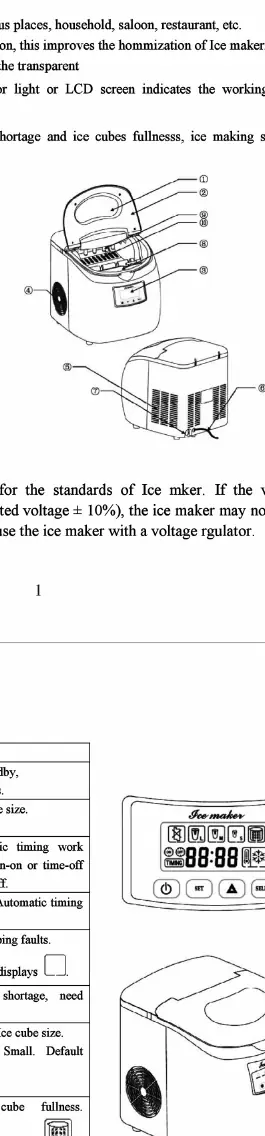
- Start button: Press to begin the ice-making cycle.
- Select button: Press to choose the ice cube size (Large, Medium, Small).
- Timer settings: Use the SET button to adjust the timer. Press the SET button to enter timer mode, then use the arrow buttons to adjust the time.
The display indicates the current status, including water shortage, ice full, and timer settings.
Cleaning and maintenance
Regular cleaning is essential for hygiene:
- Unplug the unit before cleaning.
- Drain the water using the water outlet.
- Wipe the interior and exterior with a soft, damp cloth.
- Do not use organic solvents, boiling water, or strong acids/alkalis.
- If the unit will be unused for a long time, drain all water and dry the interior completely.
Troubleshooting
If you encounter issues, check the following:
- Power light off: Check the power supply and cable connection.
- Ice full indicator on: Remove the ice from the storage box.
- Water shortage indicator on: Add water to the tank.
- Poor ice making: Check if the ambient temperature is too high, the air inlet/outlet is blocked, or the cooling system is damaged.
Technical specifications
- Ice making capacity: 12kg per 24 hours.
- Water tank capacity: 2.8kg.
- Net weight: 11.5kg.
- Display: LED.
- Dimensions: 297 x 360 x 337mm.
Manufacturer information
Della
Practical help
Common problems
Power light is off or not displaying
Check if the power cord is securely plugged into the outlet and verify the power supply.
Ice full indicator is on
The ice storage box is full. Remove the ice to resume operation.
Water shortage indicator is on
The water tank is empty. Add water to the reservoir.
Poor ice making performance
Ensure the ambient temperature is not too high, check that the air inlet/outlet is not blocked, and ensure the cooling system is functioning.
Before use
- Place the unit on a flat, stable surface.
- Ensure at least 20cm of clearance around the unit for ventilation.
- Clean the interior and exterior with a damp cloth.
- Ensure the ambient temperature is above 5°C.
- Let the unit stand for 30 minutes after moving it before plugging it in.
Specs in practice
- Ice making capacity
- The amount of ice the machine can produce in a 24-hour period (12kg).
- Water tank capacity
- The maximum amount of water the tank can hold (2.8kg).
Images and diagrams
- The operation panel features a digital display, a Start button, a Select button for ice size, and a Timer button.
- The internal diagram shows the location of the evaporator and the ice storage box.
Model compatibility
- Requires a stable power supply within rated voltage ± 10%.
- Not suitable for outdoor use.
- Do not use with flammable or corrosive liquids.

Manual page author
David Miller
Documentation analyst
Organizes user manual content into clear summaries, with attention to model details, product context, and everyday usability.