Home Appliances / Cookers & Ranges
User Manual for Gram 16KP 663 Electric Stove
Quick guide for the Gram 16KP 663 electric stove. Includes installation, safety, oven operation, pyrolytic cleaning, and troubleshooting.
Table of contents
Manual images
Click an image to enlargeQuick guide from the manual
This manual provides essential information for the safe and efficient operation of your Gram 16KP 663 electric stove. Before first use, ensure all packaging is removed, the oven is cleaned with warm soapy water, and the unit is heated for 30 minutes at 250°C to burn off manufacturing residues. Always set the current time on the digital clock to enable oven functions.
Safety instructions
- Hot surfaces: The stove and its accessible parts become very hot during use. Keep children under 8 years old away unless supervised.
- Fire safety: Never leave the stove unattended when cooking with oil or fat. Never attempt to extinguish a grease fire with water; use a lid or fire blanket.
- Glass surfaces: Do not use the hob if the glass surface is cracked. Avoid using abrasive cleaners or sharp metal scrapers on the glass.
- General: Do not use the oven or hob for room heating. Ensure the oven door is closed during operation.
Installation
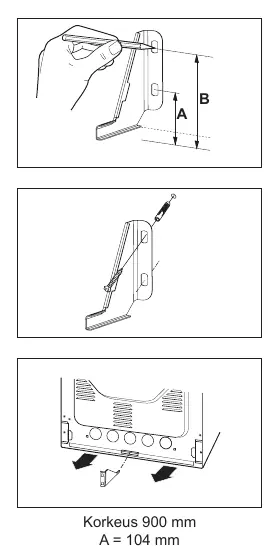
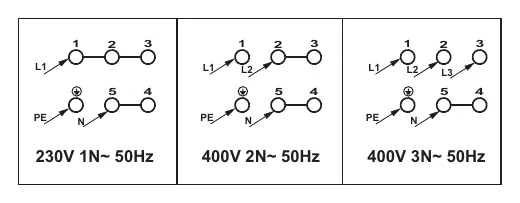
Installation must be performed by a qualified electrician in accordance with local regulations. The stove must be placed on a hard, level floor. Ensure the anti-tip bracket is installed to prevent the unit from tipping. The stove requires a separate circuit and must be connected according to the wiring diagrams provided on the back of the unit.
Using the oven
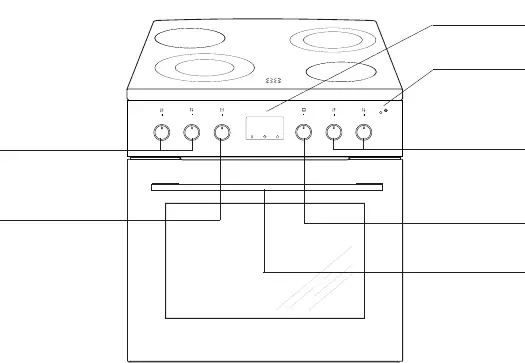
The oven features various heating modes, including top/bottom heat, fan-assisted, and grill functions. Use the function selector knob to choose the mode and the +/- knob to adjust temperature and time. The oven includes a child lock on the door and a meat probe for precise cooking. If the oven is not used for 10 minutes, it enters a deep sleep mode.
Cleaning and maintenance
Pyrolytic cleaning: This function heats the oven to approximately 480°C to burn off residues into ash, which can then be wiped away. Ensure all non-pyrolytic accessories are removed before starting. The door will lock automatically during this process.
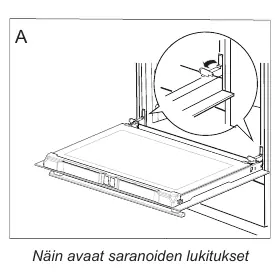
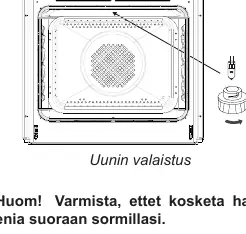
Manual cleaning: The oven door can be removed for easier access. The inner glass pane can also be removed for cleaning. Always disconnect the power before replacing the oven light bulb.
Troubleshooting
If the appliance does not work, check the main fuse in your home. If the oven light fails, check if the bulb is loose or needs replacement. For error codes (E1-E6), refer to the troubleshooting section in the full manual; if the error persists, contact Gram service.
Technical data
The stove operates on 230/400V~ 50 Hz with a maximum power of 9.9 kW. Dimensions are 90 / 60 / 60.5 cm.
Manufacturer information
GRAM
Practical help
Common problems
Appliance does not work
Check the main fuse in your home and replace it if it has blown.
Oven light does not work
Tighten the bulb or replace it with a new one (230V, 25W).
Error codes (E1-E6)
These indicate sensor or system faults. Do not use the oven and contact service.
Before use
- Remove all packaging and protective tape.
- Clean the oven interior and accessories with warm soapy water.
- Ventilate the room by opening a window or turning on ventilation.
- Heat the oven for 30 minutes at 250°C to burn off residues.
- Set the current time on the digital clock.
Images and diagrams
- Control panel: Shows knobs for oven functions, temperature, and hob zones.
- Wiring diagram: Shows connection options for 230V 1N~, 400V 2N~, and 400V 3N~.
Model compatibility
- Use only the provided meat probe.
- Use pots with clean, dry, flat bottoms.
- Do not use pots with plastic handles in the oven.

Manual page author
Emily Carter
User documentation editor
Prepares concise manual descriptions and highlights the most useful setup, operation, and maintenance information for readers.