Home Appliances / Cookers & Ranges
User Manual for Avantco 177IC3500P 3500 Watt Induction Range
Quick guide for the Avantco 177IC3500P 3500 Watt Induction Range. Includes installation requirements, operating instructions, error code troubleshooting, and maintenance tips.
Quick answers from the manual
Quick answer
- The Avantco 177IC3500P is a 3500W induction range. It requires magnetic cookware, operates on 120V, and features adjustable power (1-20), temperature (120-450°F), and a timer (0-180 min). p. 1, 8, 9
Key actions
- Adjusting power or temperature p. 8
- Cleaning the unit p. 11
First start
- Place magnetic cookware on the unit, plug it in, press ON/OFF, then press Heat/Hold to start. p. 8
Problems and fixes
E0
No cookware or non-usable cookware. Use induction-ready cookware.
p. 10
E3
Top plate sensor overheat. Unplug and let cool.
p. 10Error codes
| Code | Meaning | Action | Pages |
|---|---|---|---|
| E0 | No cookware or non-usable cookware | Use correct induction-ready cookware. | p. 10 |
| E1 | Low-voltage | Ensure voltage is higher than 100V. | p. 10 |
| E2 | High-voltage | Ensure voltage is lower than 280V. | p. 10 |
| E3 | Top plate sensor overheat | Turn off, unplug, and allow to cool. | p. 10 |
Maintenance and reset
- Clean after each use with a damp cloth. Do not use abrasive cleaners. p. 11
Technical specifications
| Parameter | Value | Meaning | Pages |
|---|---|---|---|
| Voltage | 120V | Operating voltage | p. 2, 5 |
| Power | 3500W | Power consumption | p. 1 |
Where to find it in the PDF
- Control Panel p. 8
- Error Codes p. 10
Table of contents
Manual images
Click an image to enlargeQuick Guide
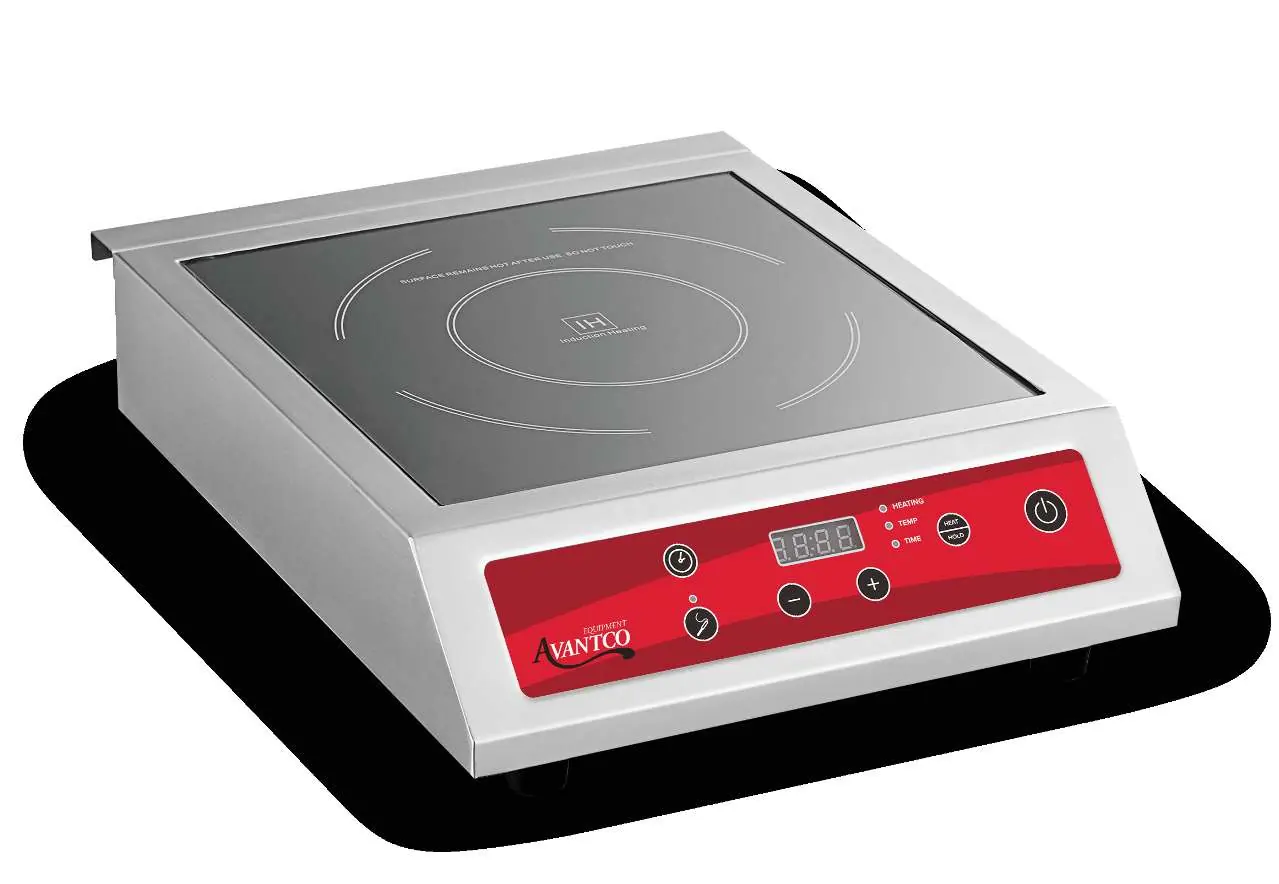
The Avantco 177IC3500P is a 3500W induction range designed for commercial use. It features precise temperature control, a built-in timer, and probe cooking capabilities. Always ensure the unit is placed on a stable, heat-resistant surface and that you are using compatible magnetic cookware.
Installation Requirements
- Clearance: Maintain at least 4 inches of space between the unit and non-combustible surfaces, and 12 inches from combustible surfaces. Ensure at least 3/4 inch clearance below the unit for airflow.
- Environment: Do not install near gas equipment or in high-heat environments (ambient temperature must not exceed 100°F).
- Ventilation: Do not obstruct ventilation openings on the sides, bottom, or rear.
- Electrical: Connect to a grounded power socket matching the voltage on the serial plate. Do not use extension cords.
Operation
Basic Usage:
- Place magnetic cookware centered on the cooking field.
- Plug in the unit; the display will show "---".
- Press the ON/OFF key to enter Standby Mode.
- Press "Heat/Hold" to start the fan and enter power mode (default 1200W).
- Use "+" or "-" keys to adjust power levels (1-20) or temperature (120°F-450°F).
- Use the "Timer" key to set cooking time (0-180 minutes).
Probe Mode: Press "Probe" to enter probe mode. Set the target temperature using "+" and "-" keys, then select power using the "Heat/Hold" button.
Cookware Compatibility
Only use magnetic cookware. Compatible materials include steel, cast iron, enameled iron, and stainless steel with a flat bottom. Recommended diameter is 4¾ to 10¼ inches (9 inches ideal). Do not use glass, ceramic, copper, or aluminum cookware.
Cleaning & Maintenance
- Always switch off, unplug, and let the unit cool before cleaning.
- Wipe the surface with a damp cloth. Do not use abrasive cleaners or metal scouring pads.
- Never immerse the unit or cord in water.
- Do not use petrol products or flammable substances to clean.
- Store in a dry place out of reach of children.
Manufacturer information
Avantco Equipment
Practical help
Common problems
E0 Error Code
No cookware detected or non-magnetic cookware used. Ensure you are using induction-ready cookware.
E1/E2 Error Codes
Voltage issues. E1 indicates low voltage (280V).
E3 Error Code
Top plate sensor overheat. Turn off, unplug, and allow the unit to cool down.
E5 Error Code
IGBT sensor overheat or fan issue. Check if the cooling fan is obstructed or jammed.
Before use
- Ensure the unit is placed on a stable, flat, dry surface.
- Verify the power supply is grounded and matches the unit's requirements.
- Check that ventilation slots are not blocked.
- Confirm cookware is magnetic and flat-bottomed.
- Clean the surface with a slightly moist cloth.
Specs in practice
- Power Levels
- Adjustable from 1 to 20.
- Temperature Range
- 120°F to 450°F.
- Auto-Shutoff
- Unit shuts off automatically after 10 continuous hours of use.
Images and diagrams
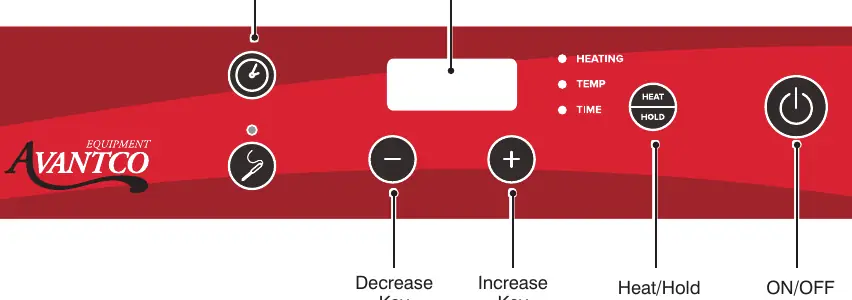
- The control panel includes keys for Timer, Decrease, Increase, Heat/Hold, and ON/OFF.
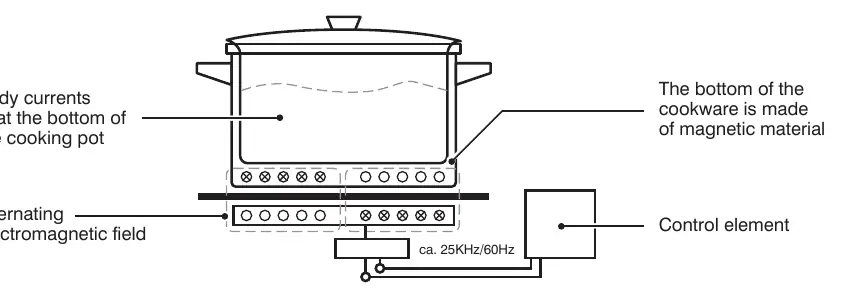
- Induction heating works by creating an alternating electromagnetic field that heats the bottom of the cookware directly.
Model compatibility
- Use only magnetic cookware.
- Compatible diameters: 4¾ inches to 10¼ inches.
- Do not use glass, ceramic, copper, or aluminum pans.

Manual page author
Emily Carter
User documentation editor
Prepares concise manual descriptions and highlights the most useful setup, operation, and maintenance information for readers.