HVAC / Air Conditioners
User Manual for GREE 15K-18K Heat Pump Remote Controller
Quick guide for the GREE 15K-18K heat pump remote controller. Learn how to use buttons, set modes, adjust temperature, manage sleep and quiet functions, and replace batteries.
Table of contents
Manual images
Click an image to enlargeQuick guide from the manual
This document provides instructions for the universal remote controller used with GREE 15K-18K heat pump systems. Key operations include turning the unit on/off, selecting operating modes (Auto, Cool, Dry, Fan, Heat), adjusting fan speed, and utilizing special functions like Turbo, Sleep, and Quiet modes. If the remote is lost or damaged, the indoor unit can be operated manually using the auxiliary button located under the front panel.
Remote controller overview
The remote controller features a sliding cover. When closed, it provides access to basic controls like ON/OFF, MODE, FAN, and temperature adjustment. Sliding the cover open reveals advanced settings including:
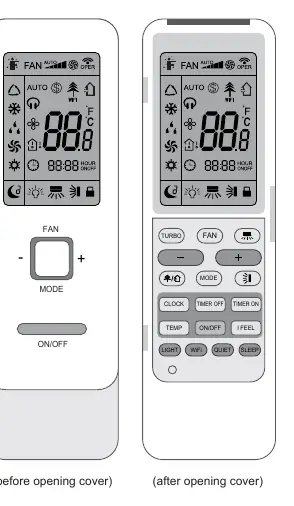
- TURBO: For rapid cooling or heating.
- LIGHT: Controls the indoor unit display light.
- WiFi: Enables/disables WiFi connectivity.
- QUIET: Reduces fan noise.
- SLEEP: Activates sleep curves for comfort.
- TEMP: Toggles display between set temperature, indoor ambient, and outdoor ambient temperature.
- CLOCK/TIMER: For setting the time and scheduled operation.
- I FEEL: Adjusts temperature based on the remote's location.
Basic operation
To operate the air conditioner:
- Press ON/OFF to start or stop the unit.
- Press MODE to cycle through Auto, Cool, Dry, Fan, and Heat modes.
- Press FAN to adjust fan speed (Auto, Low, Medium-low, Medium, Medium-high, High).
- Use + or - buttons to adjust the set temperature.
Special functions
- Turbo function: Runs the unit at super-high fan speed to reach the target temperature quickly.
- Sleep modes: Offers three sleep curves (Sleep 1, 2, 3) to adjust temperature automatically during the night for comfort. Sleep 3 allows for DIY temperature curve settings.
- Quiet function: Adjusts fan speed to lower noise levels based on ambient temperature.
- Auto clean: Cleans the evaporator. Hold MODE and FAN simultaneously for 5 seconds while the unit is off to activate.
- 8°C Heating: Maintains room temperature at 8°C to prevent freezing. Activate by pressing TEMP and CLOCK simultaneously in Heat mode.
- Child lock: Press + and - simultaneously to lock or unlock the keyboard.
Maintenance and troubleshooting
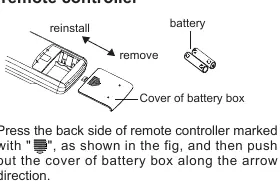
If the remote controller display is fuzzy or blank, replace the two AAA 1.5V batteries. Ensure the positive and negative poles are aligned correctly. During operation, point the remote directly at the indoor unit's receiving window, ensuring no obstacles are in the way and the distance is within 8 meters. Avoid using the remote near fluorescent lamps or wireless telephones to prevent signal interference.
Manufacturer information
Gree Electric Appliances, Inc.
Practical help
Common problems
Remote controller not responding
Check if batteries are inserted correctly or replace them. Ensure no obstacles between remote and indoor unit, and distance is within 8m.
Display is fuzzy or blank
Replace the two AAA 1.5V batteries.
Signal interference
Avoid using the remote near fluorescent lamps or wireless telephones.
Before use
- Ensure two AAA 1.5V batteries are installed correctly.
- Point the remote directly at the indoor unit's receiving window.
- Remove any obstacles between the remote and the unit.
- Ensure the remote is within 8 meters of the unit.
Specs in practice
- Turbo Function
- Runs at super-high fan speed to cool or heat quickly.
Images and diagrams
- The remote controller features a sliding cover; buttons inside include TURBO, FAN, MODE, ON/OFF, LIGHT, WiFi, QUIET, SLEEP, TEMP, I FEEL, CLOCK, TIMER OFF, and TIMER ON.
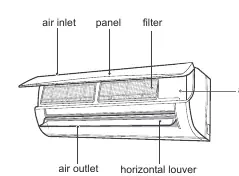
- The indoor unit display shows indicators for Heat mode, Cool mode, Temperature, and Power.
Model compatibility
- Some functions (e.g., 8°C heating, Quiet, Sleep, Auto clean) are only available on specific models.
- If a button is pressed for a function the model doesn't support, the unit will maintain its original status.

Manual page author
Emily Carter
User documentation editor
Prepares concise manual descriptions and highlights the most useful setup, operation, and maintenance information for readers.