Electronics / Remote Controls
Troubleshooting Guide for Skytech 1410-A and 1420-A Series Remote Controls
Quick troubleshooting guide for Skytech 1410-A and 1420-A series remote controls. Learn how to test receiver functionality, pair the transmitter, and resolve fireplace ignition issues.
Table of contents
Manual images
Click an image to enlargeQuick Troubleshooting Guide
This guide provides steps to resolve common issues with Skytech 1410-A and 1420-A series remote controls. If your fireplace burner fails to ignite, follow the testing and pairing procedures outlined below.
Receiver and Transmitter Setup
Before troubleshooting, ensure the following conditions are met:
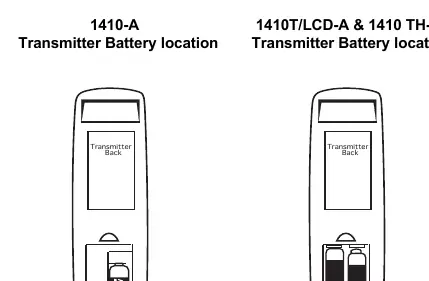
- Batteries: Verify that new or functional batteries are correctly installed in the transmitter.
- Range: Ensure the transmitter is within a 20 to 25-foot range of the receiver.
Testing the Receiver
To determine if the issue is with the remote or the fireplace system, perform a manual test:
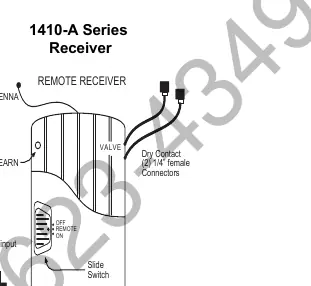
- Locate the slide switch on the receiver.
- Slide the switch to the ON position. The burner should ignite.
- If the burner ignites, move the switch back to the REMOTE position and proceed to the pairing steps.
- If the burner does not ignite, check the following:
- Ensure the main gas supply is turned ON.
- Verify the pilot light is lit.
- Ensure the valve knob is in the ON position.
- Check that the rocker switch on the fireplace is set to REMOTE or OFF.
Pairing and Learning Procedure
If the receiver does not respond to the transmitter (no BEEP), follow these steps to re-pair the devices:
- Push and hold the LEARN button on the face of the receiver for 10 seconds or more. Release the button; you should hear 3 beeps.
- Press and release the LEARN button again; you should hear a single beep.
- Within 5 seconds, push the ON button on the transmitter. You should hear several beeps confirming the pairing is successful.
Technical Support
If the above steps do not resolve the issue, contact Skytech Products Group for further assistance.
Phone: 855.498.8324Email: [email protected]
Practical help
Common problems
Burner does not ignite during test
Check gas supply, pilot light, valve position, and ensure the fireplace rocker switch is in REMOTE or OFF.
No BEEP heard from receiver
Perform the LEARN button pairing procedure to re-sync the transmitter and receiver.
Before use
- Ensure fresh batteries are installed in the transmitter.
- Verify the transmitter is within 20-25 feet of the receiver.
- Check that the main gas supply is turned ON.
- Ensure the pilot light is lit.
- Verify the valve knob is in the ON position.
Specs in practice
- Receiver Switch
- OFF: System disabled; REMOTE: Controlled by transmitter; ON: Manual override (burner ignites).
Images and diagrams
- Receiver Diagram: Shows the location of the antenna, LEARN button, and slide switch.
- Transmitter Battery: Shows the battery compartment location on the back of the transmitter.
Model compatibility
- Compatible with 1410-A and 1420-A series remotes.

Manual page author
Emily Carter
User documentation editor
Prepares concise manual descriptions and highlights the most useful setup, operation, and maintenance information for readers.