Automotive / Car Audio
Owner's Manual for Ground Zero GZCA 13000.M1 Mono Amplifier
Get the most out of your Ground Zero GZCA 13000.M1 high-power mono amplifier with this comprehensive owner's manual. Includes installation guidelines, wiring instructions, technical specifications, and troubleshooting tips.
Table of contents
Manual images
Click an image to enlargeQuick guide from the manual
The Ground Zero GZCA 13000.M1 is a high-power mono class D amplifier designed for demanding SPL applications. Before installation, ensure you disconnect the vehicle battery to prevent electrical errors. Always install a main fuse within 20 cm of the battery connection. The amplifier is 1 Ohm stable and requires proper ventilation to prevent overheating. Never mount the unit on vibrating surfaces like subwoofer enclosures.
Installation notes
Proper installation is critical for performance and safety:
- Battery: Disconnect the vehicle battery before starting. Consult your vehicle manual regarding potential error messages in modern electrical systems.
- Fusing: The main power cable must be protected by a fuse within 20 cm of the battery. The fuse value must match the amplifier's requirements.
- Wiring: Keep signal and speaker cables separated from power-carrying cables to avoid interference. Do not route cables over sharp edges.
- Ventilation: Ensure the heatsink has adequate airflow. Never cover the surface of the amplifier.
- Mounting: Do not mount the amplifier on vibrating parts (e.g., subwoofer boxes) to avoid internal damage.
- Connections: Perform all wiring connections and switch adjustments while the amplifier is turned off. Wait up to 30 minutes after switching off before disconnecting speakers to allow capacitors to discharge.
Controls & Features
The amplifier features a control panel for fine-tuning your audio system:
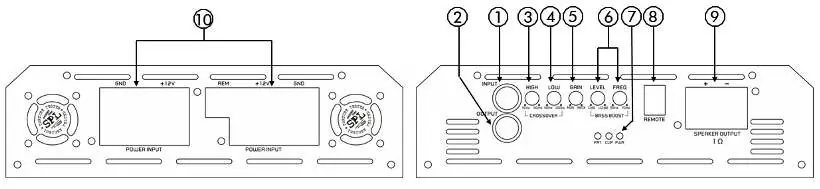
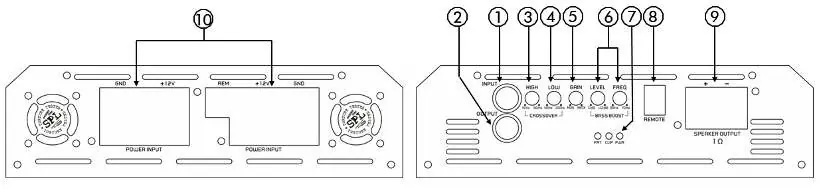
- Line Input/Output (RCA): Use for signal input. Do not use stereo RCA input wires. The lower socket is for connecting another amplifier.
- High Pass Filter: Adjusts the crossover point (15 Hz to 80 Hz).
- Low Pass Filter: Adjusts the crossover point (40 Hz to 200 Hz).
- Sensitivity Control: Adjusts input sensitivity (0.4 – 6 V).
- Bass Boost: Adjusts bass frequency and level (0 to 12 dB @ 30-70 Hz).
- Status Indication: PWR (Operation), PRT (Protection mode), CLIP (Signal clipping).
- Power Terminals: Includes +12V (battery), REM (remote from head unit), and GND (chassis ground).
Technical Specifications
Key performance data for the GZCA 13000.M1:
- Output Power (RMS) @ 1 Ohm: 12560 W (1% THD+N)
- Output Power (RMS) @ 2 Ohm: 6400 W (1% THD+N)
- Output Power (RMS) @ 4 Ohm: 3200 W (1% THD+N)
- Operating Voltage: 9 – 16 V
- Recommended Fuse: 3x 300 A
- Frequency Range: 15 Hz – 200 Hz
- Damping Factor: > 200
Troubleshooting
If you encounter issues, check the following:
- No Sound: Check fuses, remote wire connection, +12V power, and ground connection. If the PRT LED is lit, check for speaker shorts or overheating.
- Device does not turn on: Verify power supply and remote wire connection to the head unit.
- Device turns off at high volume: Check if speaker load impedance matches the amplifier specifications.
- PWR/PRT LED red: The amplifier may be overheating (reduce volume/wait for cooling) or there may be a short circuit in the speaker wires.
Manufacturer information
Ground Zero Audio
Practical help
Common problems
No audible sound
Check protection fuses, remote wire connection, +12V power supply, and ground wire. If PRT LED is lit, check for speaker shorts or overheating.
Device does not turn on
Check power supply connections and ensure the remote wire is receiving power from the head unit.
Device turns off at medium/high volume
Verify that the load impedance of each speaker matches the amplifier's technical specifications.
PWR/PRT LED lights up red
If overheating, reduce volume and wait for cooling. If speaker wires are shorted or damaged, inspect and insulate them.
Before use
- Disconnect the vehicle battery before mounting.
- Install a main fuse within 20 cm of the battery.
- Ensure power wire diameter is sufficient for the required current.
- Separate signal/speaker cables from power cables.
- Ensure adequate ventilation for the heatsink.
- Do not mount on vibrating surfaces.
Specs in practice
- Output Power (RMS) @ 1 Ohm
- 12560 W (1% THD+N)
- Operating Voltage
- 9 – 16 V
- Recommended Fuse
- 3x 300 A
- Input Sensitivity
- 0.4 – 6 V
Images and diagrams
- The control panel includes RCA inputs/outputs, crossover filters (High/Low), gain/sensitivity control, bass boost, and status LEDs.
- Power terminals include +12V, REM, and GND connections.
Model compatibility
- 1 Ohm stable.
- Do not use stereo RCA input wires.
- Requires pre-amplified output (RCA) from the head unit.

Manual page author
Michael Turner
Technical manual editor
Reviews PDF manuals for structure, safety notes, and practical product details so readers can find the right information quickly.