Automotive / Car Audio
Owner's Manual for Ground Zero GZIA 1.1450DX-II Amplifier
Quick guide for the Ground Zero GZIA 1.1450DX-II amplifier. Includes installation instructions, wiring diagrams for RCA and high-level inputs, control settings, and troubleshooting tips.
Table of contents
Manual images
Click an image to enlargeQuick guide from the manual
The Ground Zero GZIA 1.1450DX-II is a high-efficiency Class D mono amplifier. This document provides essential instructions for safe installation, wiring, and operation. Key features include 1 Ohm stability, high-level input with Auto-On, adjustable bass boost, and thermal/short circuit protection. Important: Never use RCA and High-level inputs simultaneously, as this may cause serious damage to the amplifier.
Safety Warnings
- Disconnect the vehicle battery before starting installation.
- Install a main fuse within 20 cm (8 inches) of the battery. The fuse value must equal the sum of the fuses of all connected devices.
- Do not drill into gas tanks, brake lines, or vehicle wiring.
- Avoid routing wires over sharp edges.
- Keep wiring away from antennas and electronic devices to prevent radio interference.
- Ensure sufficient air supply for cooling; do not cover the heatsink.
- Do not mount the amplifier on strongly vibrating surfaces like subwoofer enclosures.
Wiring Instructions
The amplifier supports two input methods. Choose one based on your head unit:
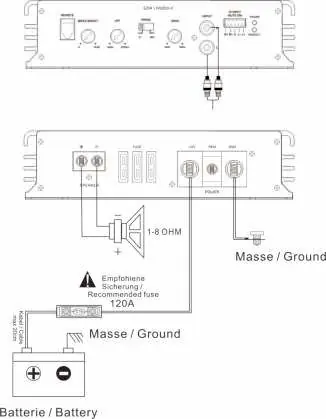
- RCA Input: Connect RCA cables from the head unit to the amplifier. Use high-quality cables.
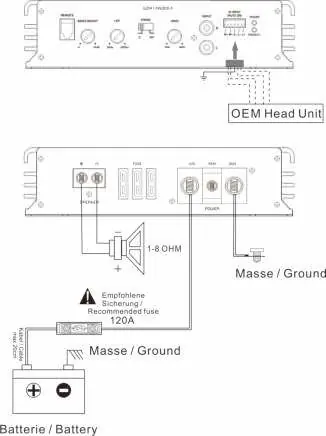
- High-level Input: Connect speaker outputs from the head unit directly to the amplifier. This enables the Auto-On feature; the REM (remote) terminal remains unused.
General Wiring Requirements:
- Power supply wire: min 25.0 mm² / 3 AWG
- Speaker wires: min 2.5 mm² / 13 AWG
- High-level input wires: min 1.00 mm² / 18 AWG
- Remote wire: min 0.75 mm² / 20 AWG
Controls and Features
The amplifier features several controls to fine-tune your audio:
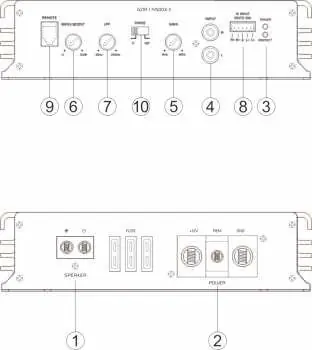
- Gain Control: Adjusts input sensitivity.
- Bass Boost: Adjusts bass level (0 to +12 dB at 45 Hz).
- Low-Pass (LPF) Control: Sets the crossover point (30 Hz to 250 Hz).
- Phase Control: Selects phase (0° or 180°) for the subwoofer.
- Status LEDs: Green (POW) indicates correct operation; Red (PROT) indicates error or protection mode.
Troubleshooting
If you encounter issues, check the following:
- No sound: Check if the POW LED is green. Verify fuse, remote wire, +12V power, and ground connections.
- Device does not turn on: Check power wire connections and remote wire signal.
- No sound on one channel: Check speaker wiring for shorts or open circuits. Reverse RCA inputs to test the signal.
- Device turns off at high volume: Verify speaker load impedance matches specifications.
- PROT LED is red: The temperature protection circuit may be active. Decrease volume and allow the unit to cool. Check for speaker shorts.
Manufacturer information
Ground Zero Audio
Practical help
Common problems
No audible sound
Check if POW LED is green. Verify protection fuse, remote wire connection, +12V power supply, and ground connection.
Device does not turn on
Check power wire connections and ensure the remote wire is powered (if using RCA input mode).
Device turns off at medium/high volume
Check if speaker load impedance matches amplifier specifications.
Status LED turned on red
Temperature protection circuit active (decrease volume/wait for cooling) or speaker wires are shorted/damaged.
Before use
- Disconnect vehicle battery before mounting.
- Install main fuse within 20 cm of the battery.
- Ensure power supply wire is separated from speaker wiring.
- Verify speaker load impedance matches amplifier specs.
- Do not use RCA and High-level inputs simultaneously.
Specs in practice
- RMS Power @ 1 Ohm
- 1250 W (1% THD+N)
- Low pass filter
- 30 Hz – 250 Hz (12 dB/Oct)
- Input sensitivity
- 200 mV – 6 V
Images and diagrams
- RCA input wiring diagram shows connection from head unit to amplifier and battery power.
- High-level input wiring diagram shows direct connection from OEM head unit speaker outputs.
Model compatibility
- 1 Ohm stable mono amplifier.
- High-level input supports Auto-On feature.

Manual page author
Emily Carter
User documentation editor
Prepares concise manual descriptions and highlights the most useful setup, operation, and maintenance information for readers.