General / Other Manuals
Growatt ARK 12.8H Energy Storage System User Guide
Quick guide for the Growatt ARK 12.8H high-voltage battery system, covering installation, electrical connections, system startup, maintenance, and troubleshooting.
Table of contents
Manual images
Jump to the sectionQuick guide from the manual
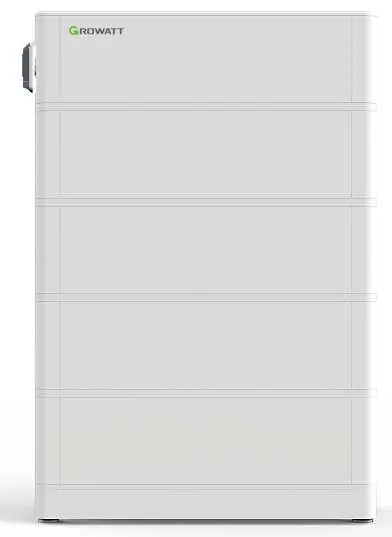
The Growatt ARK 12.8H is a high-voltage battery system consisting of an HVC 60050-A1 power module and multiple ARK 2.5H-A1 battery modules. This document provides essential instructions for safe installation, electrical connection, operation, and maintenance. Always ensure the system is installed by qualified personnel and that all safety warnings are strictly followed.
Product Overview
The system is designed for energy storage, allowing solar power to be stored and used when needed. It features advanced battery management (BMS) for monitoring voltage, current, and temperature. The system supports series connection of 2 to 10 modules to scale capacity.
Safety Precautions
- Do not expose the battery to temperatures above 50°C or heat sources.
- Avoid installation in humid environments, such as bathrooms, or areas with corrosive gases.
- Ensure the battery is kept out of reach of children and animals.
- Do not touch the battery with wet hands or disassemble it without authorization.
- Always use insulated tools and personal protective equipment (ESD gloves, safety shoes, goggles) during installation.
Installation
The system can be wall-mounted or floor-standing. Ensure the wall can support at least 150 kg for wall installations. Maintain a minimum distance of 300 mm from walls and other heat sources. For floor-standing installations, use the battery base and secure the system to the wall to prevent tipping.
Electrical Connection
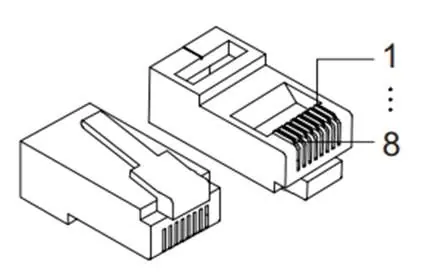
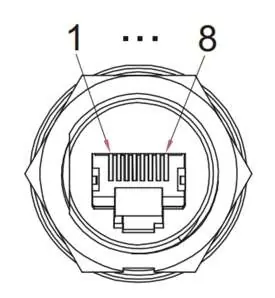
Connect the power cables and communication cables according to the provided diagrams. Ensure the color coding is correct to avoid short circuits. A 6 mm² grounding wire must be connected to the system. Always insert a dummy plug into the communication port of the last battery module to ensure proper system communication.
Operation
To start the system, ensure all cables are securely connected and the DC circuit breaker is in the ON position. Press and hold the POWER button for more than 5 seconds. The LED indicators will show the system status; if the RUN/ALM light turns red, a fault has occurred and must be resolved before restarting.
Maintenance and Troubleshooting
Regular maintenance involves checking connections and ensuring the system is kept clean. If a fault occurs, refer to the LED status indicators. Common issues like communication errors or voltage protection triggers may require professional intervention. If the battery is not used for an extended period, perform a charge/discharge cycle every 3 months to maintain chemical health.
Manufacturer information
Growatt New Energy
Practical help
Common problems
RUN/ALM light blinks red (External CAN communication error)
Check the connection between the PCS and the battery. If the connection is secure but communication fails, professional repair is required.
Over-temperature protection
Stop operation immediately. Wait for the battery temperature to drop; the error will clear automatically.
Under-voltage protection
Stop discharging and initiate charging immediately to prevent over-discharge.
Before use
- Verify the wall or floor can support the weight of the battery stack.
- Ensure all modules in a series are of the same manufacturer, model, and batch.
- Check that the voltage difference between battery modules is ≤ 0.5 V before series connection.
- Wear appropriate PPE: ESD gloves, safety goggles, and safety shoes.
- Ensure the DC circuit breaker is in the OFF position before starting installation.
Specs in practice
- Nominal Voltage
- The standard operating voltage of the battery system (e.g., 256V for the 12.8H model).
- Ingress Protection (IP65)
- The system is protected against dust and low-pressure water jets.
- Operating Temperature
- The system functions between -10°C and 50°C; performance may be limited below 0°C.
Images and diagrams
- The connection diagrams show the correct sequence for power and communication cables between the power module and battery modules.
- The RJ45 pinout diagram defines the communication port connections for the HVC 60050-A1 module.
Model compatibility
- The system requires an HVC 60050-A1 power module and 2 to 10 ARK 2.5H-A1 battery modules.
- The PCS connection cable must be purchased separately.
- Two-row installations require a separately purchased extension cable.

Manual page author
Michael Turner
Technical manual editor
Reviews PDF manuals for structure, safety notes, and practical product details so readers can find the right information quickly.