Hvac / Heat Pumps
Solplanet ASW 05-15KH-T2-T3-DG Series Hybrid Inverter Quick Installation Guide
Quick installation guide for Solplanet ASW 05-15KH-T2-T3-DG series hybrid inverters, covering safety, mounting, electrical connections, and communication setup.
Table of contents
Manual images
Jump to the sectionQuick guide from the manual
This document provides essential installation and safety information for the Solplanet ASW 05-15KH-T2-T3-DG series hybrid inverters. It is intended for qualified personnel and does not replace the full user manual. Always ensure the latest version of the documentation is consulted at www.solplanet.net.
Safety
The inverter is a transformerless device for indoor and outdoor use. It must be connected to PV modules of protection class II and approved lithium-ion batteries. Warning: High voltages from PV arrays and batteries pose a lethal risk. Never touch live components, do not open the product, and always disconnect all energy sources before maintenance. Wait at least 10 minutes after disconnection before touching internal parts to allow for capacitor discharge.
Mounting
Ensure the installation environment is suitable, avoiding direct sunlight, extreme temperatures, and high humidity. The device must be mounted vertically on a stable surface with sufficient clearance for cooling. Use the provided mounting bracket and follow the drilling and fastening steps outlined in the manual.
Electrical Connections
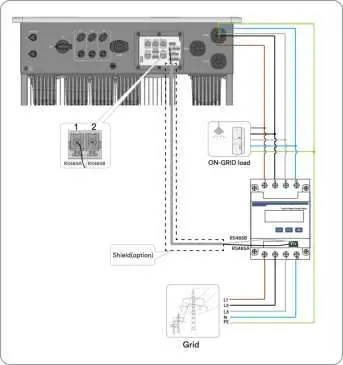
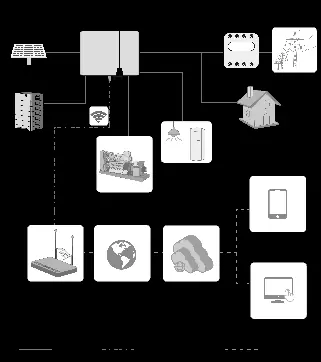
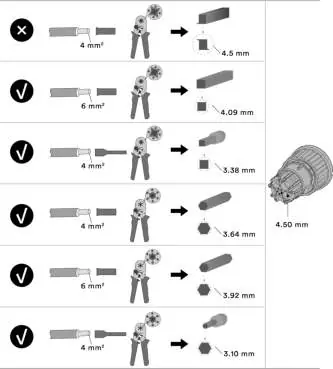
The inverter features specific terminals for AC (Grid, Load, GEN), PV input, and battery connection. Important: AC terminals are color-coded; ensure correct wiring according to the terminal requirements. Use properly insulated tools and ensure all cables are correctly crimped and secured. The system requires additional grounding if specified by local regulations.
Communication Setup
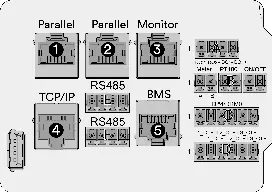
The inverter supports various communication options, including Ai-Dongle, RS485, and E-Meter connections. An E-Meter communication option is mandatory for Self-Consumption mode. Use the Solplanet App for initial setup and maintenance.
Contact
For technical support, contact the Solplanet Service Department via email at [email protected] (EMEA), [email protected] (APAC), or [email protected] (LATAM). Provide the inverter model, serial number, PV module details, fault code, and installation location.
Official resources from the manual
Practical help
Common problems
Electric arc during DC disconnection
Never disconnect DC connectors while the product is under load.
System remains live in backup mode
Even if AC and PV switches are off, the system may be live if the battery is on. Disconnect all energy sources.
Battery fire or explosion risk
Ensure the battery is not fully discharged before commissioning. Contact the manufacturer if the battery is fully discharged.
Before use
- Verify the battery is not fully discharged.
- Ensure all PV modules are protection class II.
- Check that the battery voltage is within the permissible input range.
- Confirm the grid structure is supported (TN-S).
- Ensure all tools are properly insulated.
- Verify the installation site meets temperature and clearance requirements.
Specs in practice
- Protection class II
- Required safety standard for connected PV modules.
- Capacitor discharge time
- Wait at least 10 minutes after power disconnection before touching live parts.
- E-Meter communication
- Mandatory for Self-Consumption mode operation.
Images and diagrams
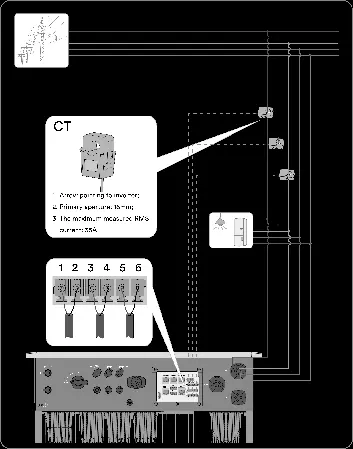
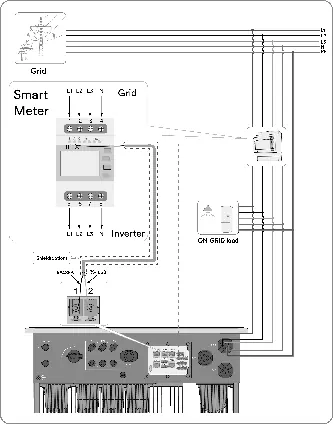
- The manual includes detailed wiring diagrams for Australia and Europe, showing connections for PV, battery, grid, and loads.
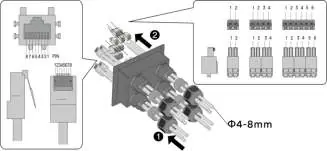
- Communication port pin definitions are provided for TCP/IP, BMS, and Monitor ports.
- Specific diagrams illustrate the correct crimping and assembly of AC, EPS, and DC connectors.
Model compatibility
- Only use lithium-ion batteries approved by Solplanet.
- The product is not equipped with an integrated transformer and lacks galvanic isolation.
- Do not use PV modules requiring functional grounding.

Manual page author
Emily Carter
User documentation editor
Prepares concise manual descriptions and highlights the most useful setup, operation, and maintenance information for readers.