Plumbing / Sinks Faucets
Hansgrohe PuraVida iControl mobile Shower Control System
Quick guide for the Hansgrohe PuraVida iControl mobile shower system. Includes installation, electrical connection, operation, and configuration modes.
Table of contents
Manual images
Click an image to enlargeQuick guide from the manual
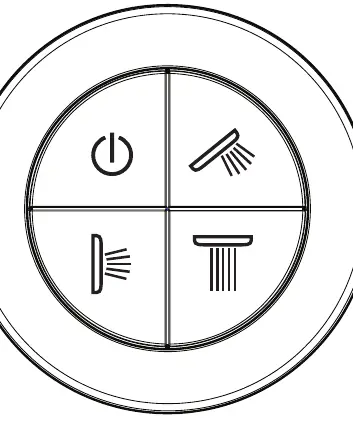
The Hansgrohe PuraVida iControl mobile system allows for electronic control of shower functions. The system is operated via a control panel with four buttons: Everything off, Hand shower, Body shower, and Overhead shower. To enter advanced configuration modes (Service, Expert), a magnet must be used to actuate the REED contact located behind the rosette.
Safety Information
- The shower system is intended for bathing, hygiene, and body cleansing purposes only.
- Children and individuals with physical, mental, or sensory impairments must not use the system without proper supervision.
- Persons under the influence of alcohol or drugs must not use the system.
- Avoid direct contact of shower streams with sensitive body parts (e.g., eyes). Maintain an adequate distance.
- Large pressure differences between hot and cold water supplies must be balanced.
Electrical Connection
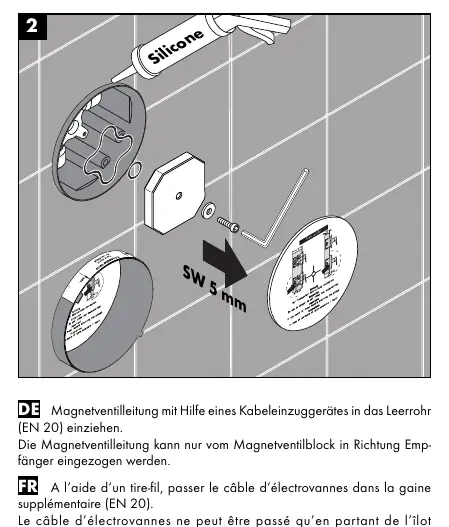
- Installation and testing must be performed by a skilled electrician in accordance with VDE 0100 part 701 and IEC 60364-7-701.
- The system requires a 230V/N/PE/50Hz AC connection.
- The system must be protected by a leakage current protective device (RCD/FI) with a measurement difference current of ≤ 30 mA.
- The product must be disconnectable from the mains via a freely accessible plug or an all-pin switch according to EN 60335-1.
- The transformer must be installed in a dry area (protected zone 3).
Operation
The system is operated via the control panel. Pressing any button will turn on the corresponding shower function if it is not already active. Pressing the 'Everything off' button turns off all active shower functions.
Service and Expert Modes
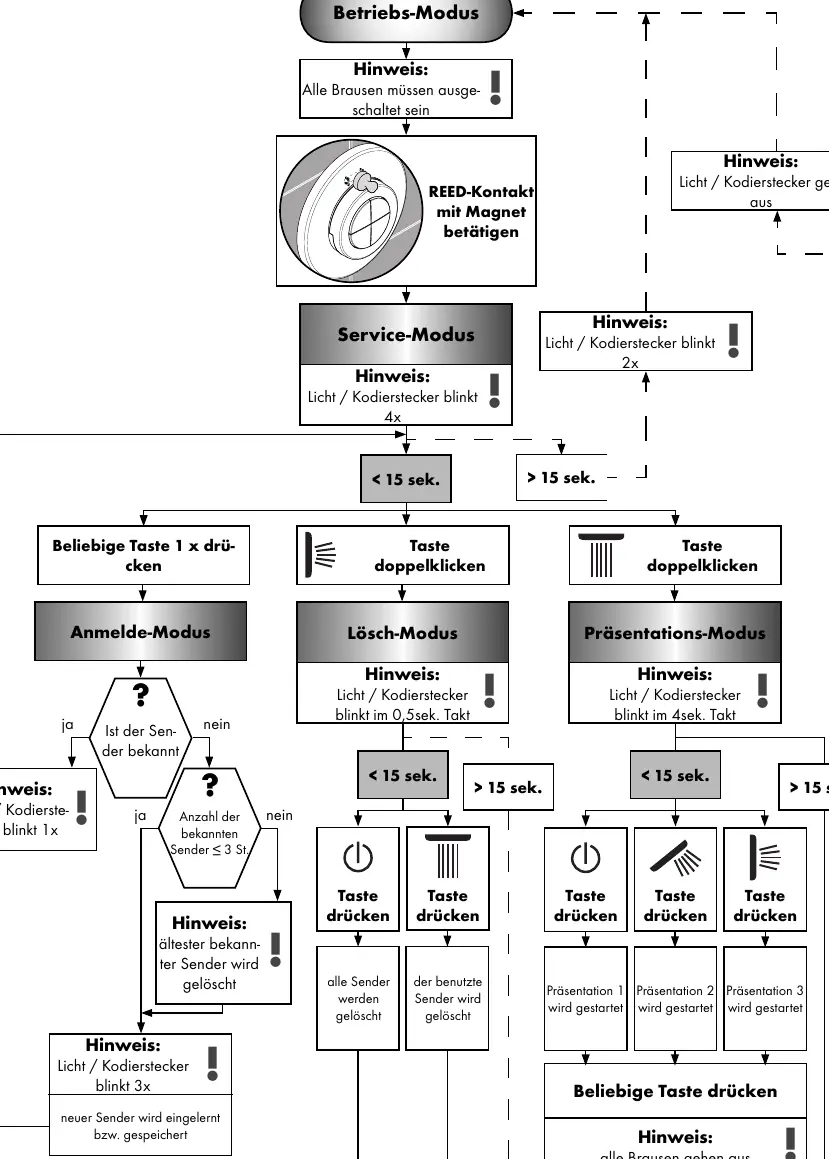
To access advanced settings, the system must be in the 'Operating mode' with all showers turned off. Use a magnet to actuate the REED contact behind the rosette to enter 'Service mode'. From here, you can access:
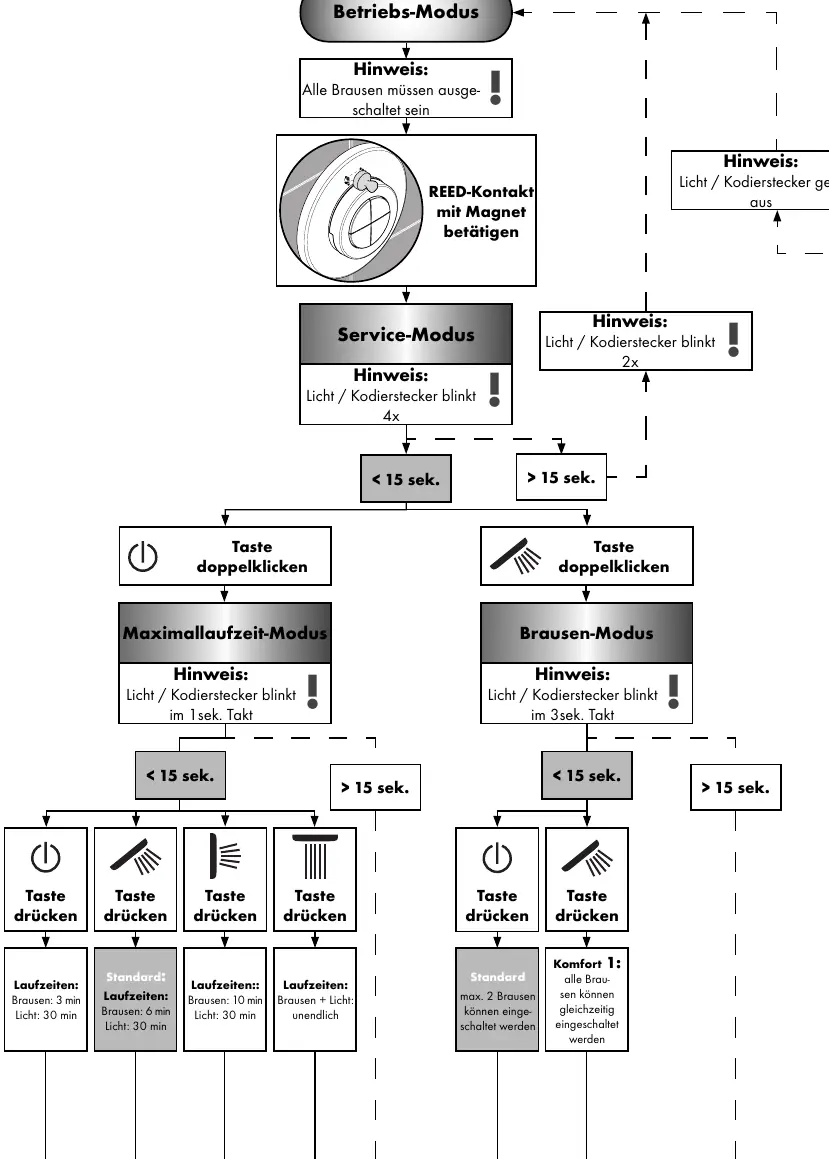
- Maximum Runtime Mode: Configure runtimes for showers and lighting.
- Shower Mode: Configure how many showers can be active simultaneously.
- Login Mode: Pair new transmitters.
- Delete Mode: Remove transmitters.
- Presentation Mode: Start demonstration sequences.
Troubleshooting
- No function: Check power supply, transformer, receiver position, or re-teach transmitter.
- Operating mode cannot be configured: Ensure Reed contact is correctly placed behind the rosette.
- Consumers shut off automatically: Adjust runtime in service mode.
- Fixture leaks: Clean or replace solenoid valve membrane.
- Flow too low: Clean or replace dirt-collecting sieve.
Technical Data
- Radio Frequency: 868.3 MHz
- Range: Approx. 10 meters (depends on damping materials)
- Transformer Power: 50 VA
Manufacturer information
Hansgrohe SE
Practical help
Common problems
No function
Check power supply, transformer, receiver position, or re-teach transmitter.
Operating mode cannot be configured
Ensure Reed contact is correctly placed behind the rosette.
Consumers shut off automatically
Adjust runtime in service mode.
Fixture leaks
Clean or replace solenoid valve membrane.
Flow too low
Clean or replace dirt-collecting sieve.
Before use
- Ensure power supply is 230V/N/PE/50Hz
- Verify RCD/FI protection is installed
- Ensure all components are accessible
- Check that the transformer is in a dry area (zone 3)
Specs in practice
- Radio Frequency
- 868.3 MHz
- Transformer Power
- 50 VA
Images and diagrams
- The system uses a magnet to actuate a REED contact behind the rosette to enter service modes.
- The control panel has four buttons: Everything off, Hand shower, Body shower, Overhead shower.
Model compatibility
- Not intended for use with steam baths.

Manual page author
Michael Turner
Technical manual editor
Reviews PDF manuals for structure, safety notes, and practical product details so readers can find the right information quickly.