Tools / Saws
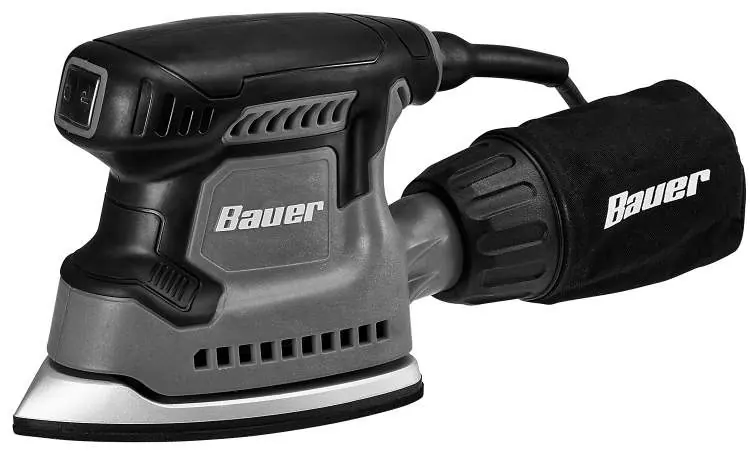
Owner's Manual for Bauer 2019E-B Detail Corner Sander
Quick guide for the Bauer 2019E-B Detail Corner Sander. Includes setup, operation, maintenance, troubleshooting, and safety instructions.
Quick answers from the manual
Quick answer
- The Bauer 2019E-B is a detail corner sander. It requires 120VAC power, uses hook and loop sandpaper, and features a dust collection system. p. 1, 7, 9
Key actions
- Install dust bag p. 9
- Install sandpaper p. 9
First start
- Ensure dust bag is attached, sandpaper is aligned, and run the tool for 30 seconds to check for abnormal noise or vibration. p. 10
Problems and fixes
Tool will not start
Check power, circuit breaker, or thermal reset.
p. 13
Overheating
Reduce pressure, clean vents, or check extension cord.
p. 13Maintenance and reset
- Clean external surfaces, empty dust bag, and blow out motor vents with compressed air. p. 12
Technical specifications
| Parameter | Value | Meaning | Pages |
|---|---|---|---|
| Electrical Rating | 120VAC / 60Hz / 1.2A | Power requirements | p. 7 |
| No Load Speed | 12,500/min | Speed of the sander | p. 7 |
Where to find it in the PDF
- Operation p. 9, 10, 11
- Maintenance p. 12, 13
- Parts List p. 14, 15
Table of contents
Manual images
Click an image to enlargeQuick guide from the manual
This manual provides essential safety, setup, and operating instructions for the Bauer 2019E-B Detail Corner Sander. Always read the full safety information before use. Key operations include installing the dust bag, attaching hook and loop sandpaper, and proper handling techniques to ensure safety and performance.
Safety Information
General Power Tool Safety: Keep the work area clean and well-lit. Do not operate in explosive atmospheres. Keep children and bystanders away. Ensure the power tool plug matches the outlet; never modify the plug. Use personal protective equipment, including eye protection, dust masks, and hearing protection.
Vibration Safety: Prolonged exposure to vibration can cause injury. If you experience tingling, numbness, or white/blue fingers, seek medical advice. Wear suitable gloves and include vibration-free periods in your work schedule.
Setup and Functions
The sander features a power switch, handle, base plate, dust bag, and power cord. Before use, ensure the dust bag is securely attached and the sandpaper is correctly aligned with the holes in the base plate for effective dust collection.
Operation
Workpiece Preparation: Ensure the workpiece is free of foreign objects and secured with clamps or a vise. Wear a NIOSH-approved respirator when sanding treated lumber.
Tool Usage: Grip the tool firmly with both hands. Start the tool before contacting the surface. Allow the tool to reach full speed before gently touching the workpiece. Do not apply heavy pressure; let the tool do the work. Move in a uniform pattern to ensure even sanding.
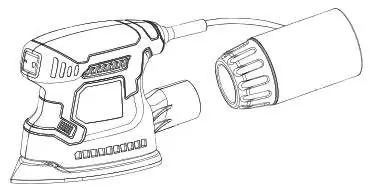
Dust Collection: The sander comes with a dust bag. Alternatively, it can be connected to a vacuum system. Periodically check the dust bag and empty it as needed.
Maintenance
Before Each Use: Inspect for loose hardware, damaged cords, or misalignment. After Use: Wipe external surfaces with a clean cloth and empty the dust bag. Periodically blow dust out of the motor vents using dry compressed air while wearing appropriate safety gear.
Troubleshooting
If the tool fails to start, check the power source, circuit breaker, and thermal reset button. If the tool operates slowly, reduce pressure on the workpiece or check the extension cord gauge. If the tool overheats, allow it to work at its own rate and ensure vents are not blocked.
Manufacturer information
Harbor Freight Tools
Practical help
Common problems
Tool will not start
Check power source, circuit breaker, and thermal reset button.
Tool operates slowly
Reduce pressure on the workpiece; ensure the extension cord is of the correct gauge.
Overheating
Allow the tool to work at its own rate; clean motor vents.
Tool does not sand effectively
Check if the accessory is loose, damaged, or the wrong type.
Before use
- Inspect tool for loose hardware or damage
- Ensure switch is OFF before plugging in
- Check sandpaper condition
- Ensure dust bag is attached
- Secure workpiece with clamps
Specs in practice
- Electrical Rating
- 120VAC / 60Hz / 1.2A
- No Load Speed
- 12,500/min
Images and diagrams
- Exploded view of parts for assembly reference
- Dust bag installation
- Sandpaper attachment
Model compatibility
- Uses hook and loop sandpaper
- Can be connected to a vacuum instead of the dust bag

Manual page author
Michael Turner
Technical manual editor
Reviews PDF manuals for structure, safety notes, and practical product details so readers can find the right information quickly.