Automotive / Garage Equipment
User Manual for Central Machinery 20-Inch High Velocity Floor Fan 57880
Quick guide for the Central Machinery 20-Inch High Velocity Floor Fan (Model 57880). Includes safety rules, assembly instructions, operation, maintenance, and technical specifications.
Quick answers from the manual
Quick answer
- The Central Machinery 20-Inch High Velocity Floor Fan (57880) is a household fan with three speed settings and a tilt-adjustable head. It must be used in dry areas and is not compatible with external speed controllers. p. 3
Key actions
- Assemble the fan by inserting it onto the bracket until the buttons snap into place. p. 3
- Operate the fan using the rear switch: 0 (Off), 1 (Low), 2 (Medium), 3 (High). p. 3
First start
- Ensure the fan is on a stable surface, plug into a 120VAC outlet, and rotate the rear switch to the desired speed. p. 3
Problems and fixes
Abnormal noise or vibration
Stop use immediately and have the problem corrected by a qualified technician.
p. 3Maintenance and reset
- Clean regularly to prevent dust accumulation on the blade using a damp cloth. p. 3
Technical specifications
| Parameter | Value | Meaning | Pages |
|---|---|---|---|
| Electrical Rating | 120VAC / 60Hz / 1.38A | Power requirements | p. 3 |
| Speed | Low 1017 RPM / Medium 1156 RPM / High 1330 RPM | Fan rotation speeds | p. 3 |
Where to find it in the PDF
- Safety Rules p. 2
- Specifications and Operation p. 3
- Warranty p. 4
Table of contents
Manual images
Click an image to enlargeQuick guide from the manual
The Central Machinery 20-Inch High Velocity Floor Fan (Model 57880) is designed for household use. It features three speed settings and a tilt-adjustable head. Before use, ensure the fan is placed on a stable surface and connected to a 120VAC, 60Hz outlet. Always turn off and unplug the fan before cleaning or moving it.
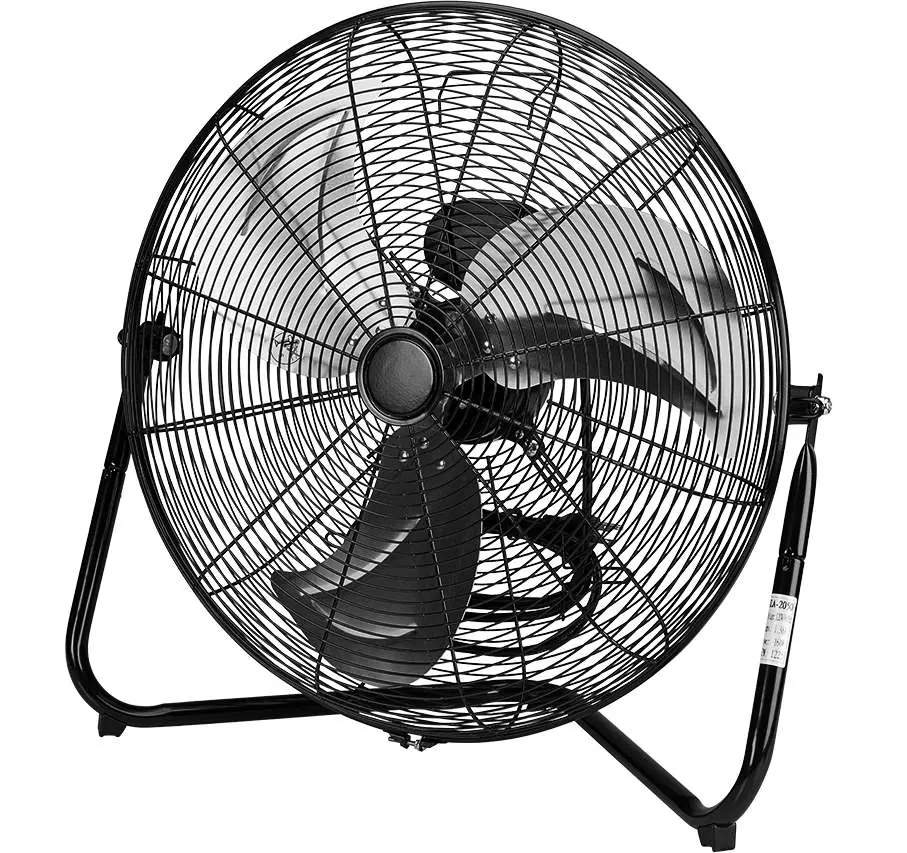
Safety Rules
Important: Read all safety instructions before use to prevent fire, electric shock, or personal injury.
- Pacemaker Warning: People with pacemakers should consult their physician before use, as electromagnetic fields may cause interference.
- Environment: Use only in dry areas. Do not use in bathrooms, laundry areas, near sinks, or in windows where rain may create an electrical hazard.
- Operation: Do not leave the fan running unattended. Never insert fingers or objects through the blade guards.
- Cords: Do not run the power cord under carpeting, furniture, or appliances. Do not cover the cord with rugs.
- Speed Control: Do not use this fan with any solid-state speed control device.
Assembly and Operation
Follow these steps to set up and operate your fan:
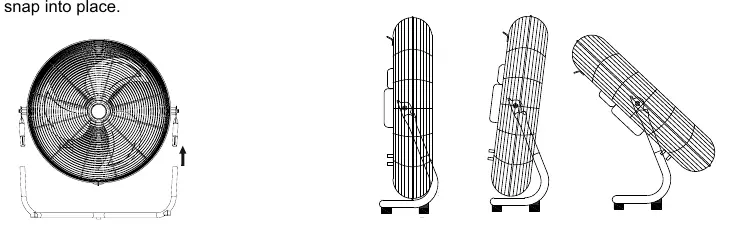
- Assembly: Insert the fan onto the bracket until the buttons snap into place.
- Power: Plug the fan into a 120VAC, 60Hz outlet.
- Speed Control: Rotate the switch on the back of the fan to select the speed: O is Off, 1 is Low, 2 is Medium, and 3 is High.
- Adjustment: The fan head may be tilted as desired.
Maintenance and Inspection
To ensure safe operation and prevent fan failure, perform the following:
- Before Each Use: Inspect for loose hardware, misalignment or binding of moving parts, cracked or broken parts, and damaged electrical wiring.
- Cleaning: Clean regularly to prevent dust accumulation on the blades. Use a damp cloth and dry completely before use.
- Servicing: If the supply cord is damaged, it must be replaced by a qualified service technician. Procedures not explained in this manual must be performed by a qualified technician.
Technical Specifications
- Electrical Rating: 120VAC / 60Hz / 1.38A
- Speeds: Low (1017 RPM), Medium (1156 RPM), High (1330 RPM)
Manufacturer information
Harbor Freight Tools
Practical help
Common problems
Fan does not start
Ensure the fan is plugged into a 120VAC outlet and the rear switch is not in the 'O' (Off) position.
Abnormal noise or vibration
Stop use immediately. Inspect for loose hardware or damaged parts. Have the problem corrected by a qualified technician before further use.
Before use
- Inspect for loose hardware
- Check for cracked or broken parts
- Ensure electrical wiring is undamaged
- Verify the fan is on a stable surface
- Ensure the fan is in a dry location
Specs in practice
- Electrical Rating
- 120VAC / 60Hz / 1.38A power requirement
- Speed Settings
- Low (1017 RPM), Medium (1156 RPM), High (1330 RPM)
Images and diagrams
- The fan head can be tilted to direct airflow.
- The rear switch controls the fan speed: 0 (Off), 1 (Low), 2 (Medium), 3 (High).
Model compatibility
- For household use only.
- Do not use with solid-state speed control devices.

Manual page author
Michael Turner
Technical manual editor
Reviews PDF manuals for structure, safety notes, and practical product details so readers can find the right information quickly.