Tools / Power Tools
User Manual for HiKOKI M 18DYA Cordless Board Trimmer
Get started with your HiKOKI M 18DYA Cordless Board Trimmer. This guide covers battery charging, bit installation, depth adjustment, safety warnings, and maintenance procedures.
Table of contents
Manual images
Click an image to enlargeQuick guide from the manual
The HiKOKI M 18DYA is a cordless board trimmer designed for window-removing and cutting gypsum board. Before operation, ensure the battery is fully charged and the bit is securely installed. Always wear eye and hearing protection. The tool features a restart prevention function and a braking function for safety.
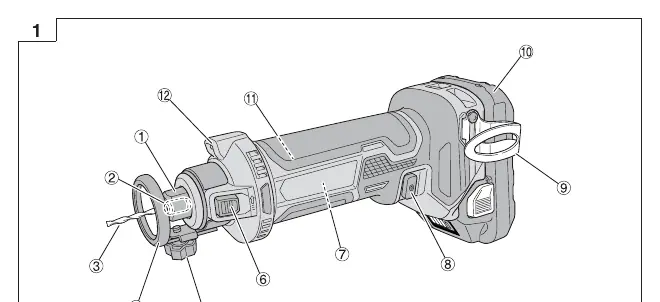
Names of parts
Key components include the collet nut, collet (1/8" or 1/4"), bit, depth guide, knob bolt, lock button, motor, switch, hook, battery, LED light, and latch.
Battery charging
Before using the tool, charge the battery using the specified charger. Connect the charger to a power source, insert the battery, and wait for the pilot lamp to indicate charging status. Do not charge at temperatures below 0°C or above 40°C.
Mounting and operation
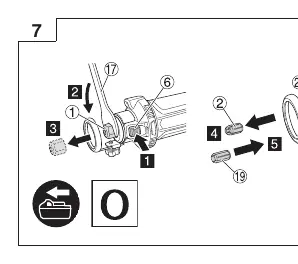
Installing the bit
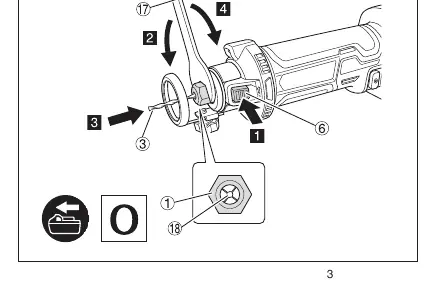
- Ensure the switch is in the OFF position and the battery is removed.
- Use the provided wrench to loosen the collet nut.
- Insert the bit into the collet.
- Tighten the collet nut securely.
Adjusting the depth of cut
The depth guide should be adjusted before each cut. Ensure the tip of the bit protrudes at least 3 mm from the material for a clean finish. Verify there is enough space under the material so the bit does not make contact.
Switch operation
Press the ON side (I) of the switch to activate the tool. Press the OFF side (0) to stop it. The center position is the OFF state.
LED light warning signals
The tool features safeguard functions indicated by the LED light:
- Overload Protection: LED blinks (0.1s on/off). Remove the cause of the overloading.
- Temperature Protection: LED blinks (0.5s on/off). Allow the tool and battery to cool.
Maintenance and inspection
Always turn off the switch and remove the battery before maintenance. Regularly inspect the bit for dullness or damage and replace if necessary. Check all mounting screws for tightness. Keep the motor unit clean and free from oil or water. Store the tool in a place where the temperature is less than 40°C and out of reach of children.
Manufacturer information
HiKOKI
Practical help
Common problems
Tool stops during operation
Battery may be depleted or overload protection triggered. Release the switch, remove the cause of the overload, or charge the battery.
LED light blinks rapidly (0.1s on/off)
Overload protection is active. Remove the cause of the overloading.
LED light blinks slowly (0.5s on/off)
Temperature protection is active. Allow the tool and battery to cool down.
Before use
- Ensure the battery is fully charged.
- Check that the bit is sharp, undamaged, and of the correct shank diameter.
- Verify the collet nut is securely tightened.
- Ensure the depth guide is adjusted correctly for the material.
- Check the work area for buried objects like electrical conduits or pipes.
Specs in practice
- No-Load Speed
- 28000 /min
- Collet chuck capacity
- 1/8 inch or 1/4 inch
Images and diagrams
- Fig 1: Overview of parts including collet, bit, depth guide, and switch.
- Fig 6: Bit installation process using the wrench.
- Fig 8: Adjusting the depth of cut.
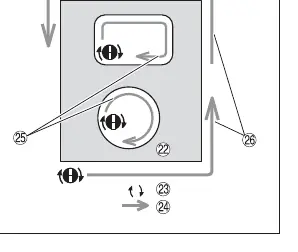
- Fig 11: Cutting operation direction.
Model compatibility
- Use only genuine HiKOKI batteries.
- Compatible with 1/8 inch and 1/4 inch bits.

Manual page author
Michael Turner
Technical manual editor
Reviews PDF manuals for structure, safety notes, and practical product details so readers can find the right information quickly.