Tools / Power Tools
User Manual for HiKOKI WR 18DF Cordless Impact Wrench
Quick guide for the HiKOKI WR 18DF Cordless Impact Wrench, including safety instructions, operation, battery charging, and maintenance.
Table of contents
Manual images
Click an image to enlargeQuick guide from the manual
This manual provides essential information for the safe and efficient operation of the HiKOKI WR 18DF Cordless Impact Wrench. Before using the tool, ensure the work area is clean and well-lit. Always wear eye protection and follow all safety warnings provided in the manual to prevent electric shock, fire, or serious injury.
Safety Warnings
- General Power Tool Safety: Keep work area clean, avoid explosive atmospheres, and keep children away. Ensure power tool plugs match the outlet and avoid body contact with earthed surfaces.
- Cordless Impact Wrench Safety: Hold the tool by insulated gripping surfaces when performing operations where the fastener may contact hidden wiring.
- Battery Safety: Recharge only with the specified charger. Do not short-circuit the battery or expose it to fire or excessive temperatures.
Names of Parts
Refer to the figures in the manual for the following components:
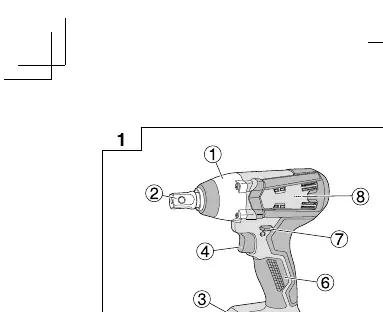
- Hammer case, Anvil, LED light, Trigger switch, Battery, Handle, Push button, Motor, Latch, Pilot lamp, Socket, Switch panel, Battery level indicator switch, Battery level indicator lamp, Hook, Screw, Groove.
Battery Charging
Before using the tool, charge the battery using the UC18YKSL charger:
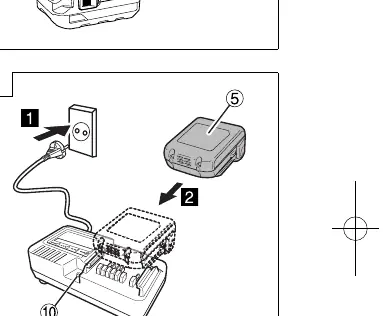
- Connect the charger's power cord to a receptacle. The pilot lamp will blink in red.
- Insert the battery firmly into the charger.
- Charging will commence, and the pilot lamp will light continuously in red.
- When fully charged, the pilot lamp will blink in red.
Operation
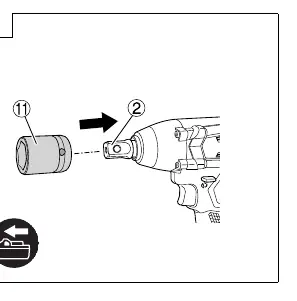
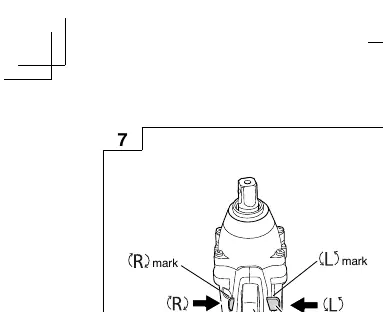
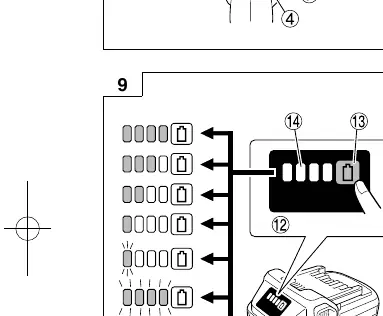
- Removing and inserting the battery: Use the latch to release and insert the battery.
- Mounting the socket: Align the plunger on the anvil with the hole in the hex socket. Push the plunger and mount the socket.
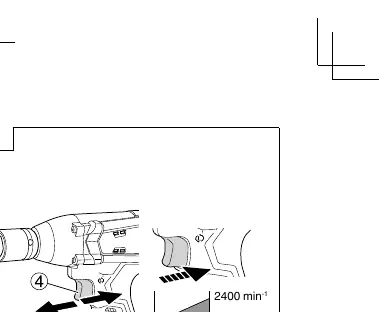
- Reversing rotation: Use the push button to select clockwise or counterclockwise rotation.
- Switch operation: The trigger switch varies the rotation speed steplessly.
Maintenance and Inspection
- Socket Inspection: Periodically check for worn or deformed sockets, as they can cause loss of tightening torque.
- Mounting Screws: Regularly inspect and tighten all mounting screws.
- Motor Maintenance: Ensure the motor winding is not damaged or wet.
- Cleaning: Wipe the tool with a soft, dry cloth or a cloth moistened with soapy water. Do not use solvents that melt plastic.
- Storage: Store in a place where the temperature is less than 40°C and out of reach of children.
Manufacturer information
HiKOKI
Practical help
Common problems
Motor stops during use
Battery is empty (charge it) or tool is overloaded (release switch, remove cause of overload).
Battery overheated
Stop using the tool and let the battery cool down.
Pilot lamp blinks red (0.1s intervals)
Malfunction in the battery or the charger. Contact an authorized service center.
Before use
- Check work area safety
- Ensure battery is fully charged
- Check socket for wear or deformation
- Inspect all mounting screws for tightness
- Check terminals for debris or dust
Specs in practice
- Tightening torque
- Maximum torque capacity for tightening bolts and nuts.
- No-load speed
- Rotation speed of the tool without any load.
Images and diagrams
- Fig 1: Parts identification
- Fig 4: Battery charging procedure
- Fig 6: Socket mounting procedure
- Fig 7: Reversing rotational direction
- Fig 8: Switch operation
Model compatibility
- Use only designated genuine HiKOKI batteries
- Compatible with UC18YKSL charger

Manual page author
Michael Turner
Technical manual editor
Reviews PDF manuals for structure, safety notes, and practical product details so readers can find the right information quickly.