Tools / Power Tools
User Manual for HiKOKI CV 18DA Cordless Multi-Tool
Quick guide for the HiKOKI CV 18DA Cordless Multi-Tool. Includes instructions for battery charging, tool mounting, operation, maintenance, and safety warnings.
Table of contents
Manual images
Click an image to enlargeQuick guide from the manual
This manual provides essential information for the safe and efficient operation of the HiKOKI CV 18DA Cordless Multi-Tool. Always read the safety warnings before use. Ensure the battery is fully charged before first use and that the tool is switched off before inserting or removing the battery.
Description of the tool
The CV 18DA is a cordless multi-tool. Key components include:
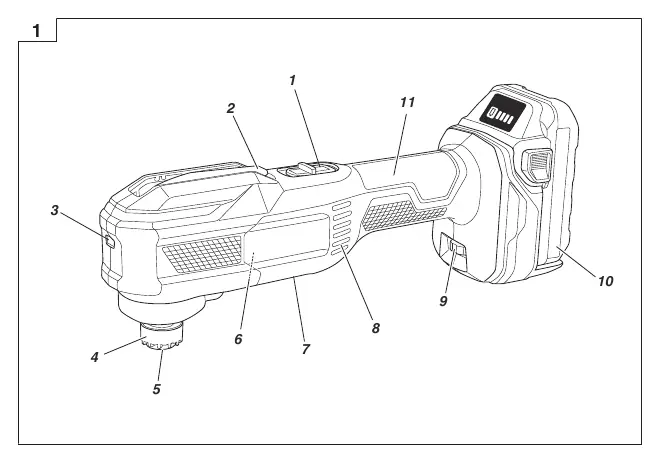
- Switch: Used to turn the tool on and off.
- Lever: Used for mounting application tools.
- LED light: Illuminates the work area.
- Dial: Adjusts the vibration frequency (1-6).
- Battery: Power source for the tool.
Mounting and Operation
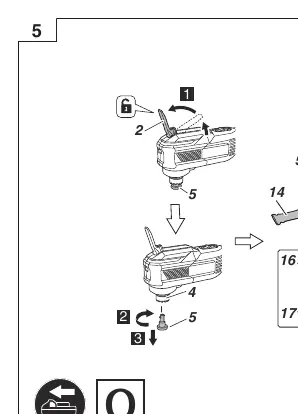
Mounting the application tool
To mount an application tool, push the lever down to open the attachment ring, insert the tool, and release the lever. Caution: The lever is spring-loaded; be careful not to pinch your fingers.
Mounting the dust collection adapter
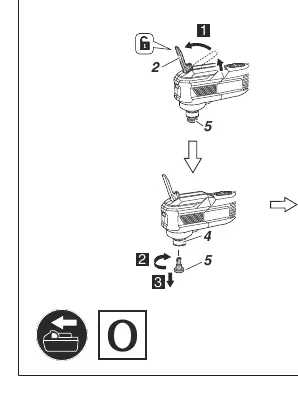
The dust collection adapter is designed for use with the MSU93D accessory. Attach it to the tool as shown in the manual.
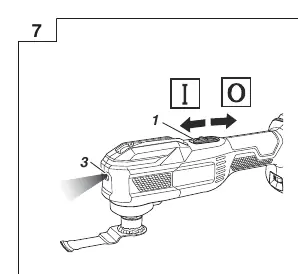
Switch operation
Use the switch to turn the tool on and off. When the switch is on, the LED light will blink simultaneously.
Adjusting operating speed
You can adjust the vibration frequency between 6000 and 20000 min-1 by turning the dial from 1 to 6. Adjust this according to the material and task.
Maintenance and Inspection
Regular maintenance ensures the tool's longevity and safety:
- Inspect the application tool: Replace dull or damaged tools immediately to prevent motor overload.
- Inspect mounting screws: Regularly check that all screws are tight.
- Motor maintenance: Keep the motor winding clean and free from oil or water.
- Terminal inspection: Ensure no dust or swarf has accumulated on the tool or battery terminals.
- Cleaning: Wipe the exterior with a soft, dry cloth or a cloth moistened with soapy water. Do not use solvents.
Safety Warnings
General Power Tool Safety: Keep the work area clean and well-lit. Do not operate in explosive atmospheres. Keep children and bystanders away. Use appropriate personal protective equipment (eye protection, dust mask).
Battery Safety: Recharge only with the specified charger. Do not short-circuit the battery. Do not expose to fire or excessive temperatures. If the battery leaks, avoid contact and seek medical help if necessary.
Additional Safety: Hold the tool by insulated gripping surfaces when cutting near hidden wiring. Do not use in wet conditions. Do not touch the application tool immediately after use as it will be hot.
Manufacturer information
HiKOKI
Practical help
Common problems
Motor stops during use
The battery may be empty (charge it) or the tool may be overloaded (release the switch and clear the cause of the overload).
Battery will not charge
Ensure the battery is fully inserted, check for foreign matter on the terminals, or check if the battery/charger is damaged.
Excessive vibration
Check if the application tool is loose or unevenly attached and re-attach it if necessary.
Before use
- Ensure the work area is clean and well-lit.
- Check for hidden obstructions (wiring, pipes) in the cutting area.
- Ensure the battery is fully charged.
- Verify the application tool is securely attached.
- Wear eye and hearing protection.
Specs in practice
- Vibration frequency
- 6000 to 20000 min-1, adjustable via dial (1-6).
Images and diagrams
- Fig 1: Parts identification.
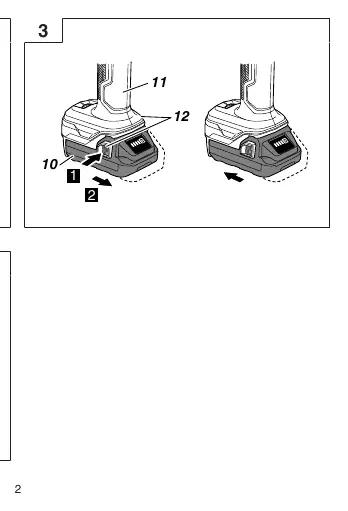
- Fig 3: Battery removal and insertion.
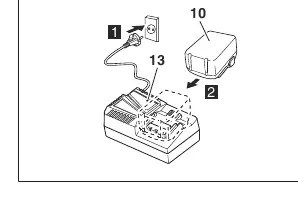
- Fig 4: Charging procedure.
- Fig 5: Mounting the application tool.
- Fig 6: Mounting the dust collection adapter.
Model compatibility
- Dust collection adapter (21) is for use with MSU93D only.

Manual page author
Michael Turner
Technical manual editor
Reviews PDF manuals for structure, safety notes, and practical product details so readers can find the right information quickly.