Tools / Drills
User Manual for HiKOKI DS 10DAL Cordless Driver Drill
Quick guide for the HiKOKI DS 10DAL cordless driver drill. Includes safety instructions, charging procedures, operation, maintenance, and technical specifications.
Table of contents
Quick Guide
The HiKOKI DS 10DAL is a cordless driver drill designed for driving and removing machine screws, wood screws, and tapping screws, as well as drilling into various metals and woods. Before using the tool, ensure the battery is fully charged using the UC10SL2 charger.
Charging
Connect the charger's power cord to a receptacle. Insert the battery firmly into the charger until it touches the bottom. The pilot lamp will indicate the charging status:
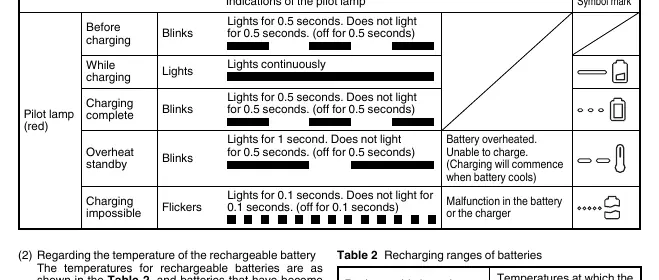
- Before charging: Blinks (0.5s on, 0.5s off).
- While charging: Lights continuously.
- Charging complete: Blinks (0.5s on, 0.5s off).
- Overheat standby: Blinks (1s on, 0.5s off).
- Charging impossible: Flickers (0.1s on, 0.1s off).
Operation
The tool features adjustable torque and two speed settings. Ensure the switch is in the off position before changing speeds with the shift knob. When mounting a bit, tighten the keyless chuck sleeve adequately to prevent the bit from slipping.
Safety Warnings
Read all safety warnings and instructions. Failure to follow them may result in electric shock, fire, or serious injury. Always wear eye protection and keep the work area clean and well-lit. Hold the tool by insulated gripping surfaces when performing operations where the cutting accessory may contact hidden wiring.
Specifications
- No-load speed: 0–350 / 0–1300 min-1
- Drilling capacity (Wood): 29 mm
- Drilling capacity (Metal): 10 mm (Steel), 12 mm (Aluminum)
- Driving capacity: 6 mm (Machine screw), 5.8 mm (Wood screw)
- Compatible batteries: BCL1015S, BCL1015, BCL1030
Maintenance and Inspection
Regularly inspect the tool for dullness and replace or sharpen as needed. Check all mounting screws to ensure they are properly tightened. Clean the exterior with a soft, dry cloth or a cloth moistened with soapy water. Do not use chloric solvents, gasoline, or paint thinner. Store the tool in a place where the temperature is less than 40°C and out of reach of children.
Manufacturer information
HiKOKI
Practical help
Common problems
Motor stops during operation
The tool may be overloaded or the battery may be empty. Release the switch, eliminate the cause of the overload, and recharge the battery if necessary.
Battery will not charge
The battery may be overheated. Let it cool down before attempting to charge again. If the pilot lamp flickers, check for foreign objects in the charger connector.
Motor rotation locked
If the motor is locked, immediately turn the power off to prevent damage to the motor or battery.
Before use
- Ensure the work area is clean and well-lit.
- Check the area to be drilled for hidden electrical wiring, water, or gas pipes.
- Ensure the battery is fully charged.
- Check that the bit is securely mounted in the keyless chuck.
- Verify the torque setting is appropriate for the task.
Specs in practice
- No-load speed
- The rotational speed of the drill without any load, adjustable between low (0-350 min-1) and high (0-1300 min-1).
- Charging voltage
- The voltage required for the UC10SL2 charger, which is 10.8 V.
- Drilling capacity
- The maximum diameter the drill can effectively bore into specific materials (29 mm for wood, 10 mm for steel).
Images and diagrams
- The manual includes diagrams for battery removal/insertion, charging, torque adjustment, drill position selection, speed change, LED light usage, bit mounting, rotation direction reversal, switch operation, and hook installation.
Model compatibility
- Compatible with HiKOKI BCL1015S, BCL1015, and BCL1030 lithium-ion batteries.
- Designed for use with the UC10SL2 charger.

Manual page author
Michael Turner
Technical manual editor
Reviews PDF manuals for structure, safety notes, and practical product details so readers can find the right information quickly.