Tools / Drills
Instruction Manual for HiKOKI FD 10SA and FD 10VA Drill
Comprehensive user guide for the HiKOKI FD 10SA and FD 10VA power drills. Includes setup, drilling techniques, speed control, maintenance, and safety instructions.
Table of contents
Manual images
Click an image to enlargeQuick Guide from the Manual
This manual provides essential operating and safety instructions for the HiKOKI FD 10SA and FD 10VA drills. Before using the tool, ensure the power source matches the nameplate specifications and that the power switch is in the OFF position. Always wear eye protection and keep the work area clean and well-lit.
Safety Precautions
- Electrical Safety: Do not expose the tool to rain or wet conditions. Use an RCD-protected supply if working in damp locations.
- Personal Safety: Always wear eye protection. Do not wear loose clothing or jewelry that could get caught in moving parts.
- Operation: Hold the drill firmly with both hands. Do not touch the drill bit during or immediately after operation as it becomes very hot.
- Drilling: Before drilling into walls, floors, or ceilings, confirm there are no hidden electric cables or conduits.
Specifications
- Voltage: 220V~
- Power Input: 285W
- No-load Speed: 2300/min (FD 10SA); 0-2300/min (FD 10VA)
- Capacity (Steel): 10mm
- Capacity (Wood): 18mm
- Weight: 1.1kg
Operation
Switch and Speed Control
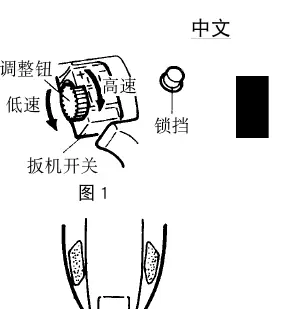
The trigger switch controls the operation. For continuous running, pull the trigger and push the stopper. To release, pull the trigger again. For the FD 10VA model, speed is adjustable via the trigger and the adjusting knob. Turn the knob clockwise for higher speed and anticlockwise for lower speed.
Direction of Rotation
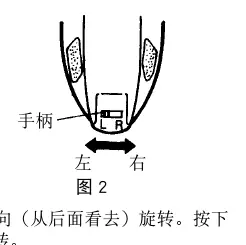
Use the reversing switch lever to change the direction of rotation. Push the R-side for clockwise rotation and the L-side for counter-clockwise rotation. Caution: Never change the direction while the motor is running; turn the switch OFF first.
Drilling Techniques
- Metal: Use an iron-working drill bit. Use a center punch to mark the position to prevent the bit from slipping.
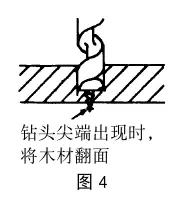
- Wood: Use a wood-working drill bit. When drilling through holes, remove the drill as soon as the tip protrudes, then finish from the opposite side for a clean hole.
- Driving Screws (FD 10VA only): Use a driver bit matching the screw head. Pilot holes are recommended to prevent wood splitting.
Maintenance and Inspection
Always switch the power OFF and disconnect the plug before maintenance.
- Drill Bits: Replace or resharpen worn bits immediately to prevent motor malfunction and ensure efficiency.
- Mounting Screws: Regularly inspect and tighten all mounting screws.
- Service: If the power cord is damaged, it must be replaced by an authorized HiKOKI Service Center.
Manufacturer information
HiKOKI
Practical help
Common problems
Drill bit slips during operation
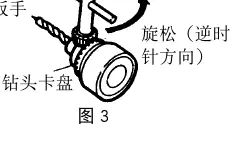
Ensure the drill bit is fully inserted and the chuck is tightened equally at all three holes using the chuck wrench.
Motor overheating or reduced efficiency
Check if the drill bit is worn or dull. Replace or resharpen the bit. Do not apply excessive force.
Tool starts unexpectedly
Ensure the power switch is in the OFF position before connecting the plug to the power source.
Before use
- Verify the power source matches the nameplate specifications.
- Ensure the power switch is in the OFF position.
- Check that the drill chuck is securely tightened.
- Inspect the drill bit for wear or damage.
- Ensure the work area is clear and well-lit.
Specs in practice
- Voltage: 220V~
- Standard operating voltage for the tool.
- Power Input: 285W
- The power consumption of the motor.
- Capacity (Steel): 10mm
- Maximum diameter of hole that can be drilled in steel.
- Capacity (Wood): 18mm
- Maximum diameter of hole that can be drilled in wood.
Images and diagrams
- Fig 1: Adjusting knob and trigger switch for speed control.
- Fig 2: Reversing switch lever for clockwise/counter-clockwise rotation.
- Fig 3: Using the chuck wrench to tighten or loosen the drill bit.
- Fig 4 & 5: Proper drilling techniques for clean holes in lumber.
Model compatibility
- The FD 10VA model supports wood screw driving; the FD 10SA does not.

Manual page author
Emily Carter
User documentation editor
Prepares concise manual descriptions and highlights the most useful setup, operation, and maintenance information for readers.