Tools / Power Tools
User Manual for HiKOKI G 10SF3 Disc Grinder
Quick guide for the HiKOKI G 10SF3 Disc Grinder. Includes assembly instructions, safety warnings, maintenance tips, and technical specifications.
Table of contents
Manual images
Click an image to enlargeQuick guide from the manual
This manual provides essential instructions for the safe operation and maintenance of the HiKOKI G 10SF3 Disc Grinder. Key procedures include proper wheel mounting, maintaining the correct grinding angle, and routine maintenance of carbon brushes. Always ensure the power switch is OFF before connecting to a power source and perform a trial run before starting daily work.
Safety Warnings
General Safety: Keep the work area clean and well-lit. Do not operate in explosive atmospheres. Keep children and bystanders away.
Electrical Safety: Ensure the plug matches the outlet. Do not modify the plug. Avoid body contact with earthed surfaces. Do not expose the tool to rain or wet conditions.
Kickback Prevention: Maintain a firm grip and use the auxiliary handle. Never place your hand near the rotating accessory. Avoid working on corners or sharp edges where the accessory might snag.
Specifications
- Voltage: 220V
- Power Input: 560W
- Rated Speed: 12000/min
- Wheel Size: 100mm (External dia.), 4mm/6mm (Thickness), 16mm (Internal dia.)
- Weight: 1.4 kg
Assembling the Depressed Center Wheel
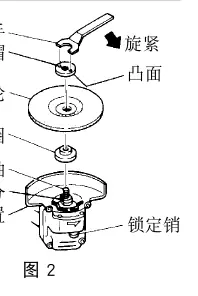
- Turn the equipment upside down so the spindle faces up.
- Mount the wheel washer onto the spindle.
- Mount the protuberance of the depressed center wheel onto the wheel washer.
- Mount the convex side of the wheel nut onto the wheel and screw it onto the spindle.
- Push the lock pin to prevent spindle rotation and tighten the wheel nut with the provided wrench.
Operation
Grinding Angle: Hold the machine at an angle of 15°–30° so the external edge of the wheel contacts the material at an optimum angle.
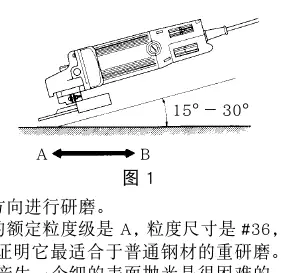
Pressure: Do not apply excessive pressure. The weight of the machine is usually sufficient for effective grinding. Excessive pressure causes overloading and reduces machine life.
Maintenance and Inspection

- Carbon Brushes: These are consumable parts. Replace them when worn to or near the 'wear limit' (5mm).
- Mounting Screws: Regularly inspect and tighten all mounting screws.
- Motor: Ensure the motor winding does not become damaged or wet with oil or water.
- Supply Cord: If damaged, it must be replaced by a HiKOKI Authorized Service Center.
Manufacturer information
HiKOKI
Practical help
Common problems
Excessive noise when grinding thin steel plates
Place a rubber mat beneath the material to be ground.
Motor overheating or damage
Ensure cutting depth is kept within 2-5 mm and do not apply excessive pressure.
Grinder vibrates or loses control
Check if the accessory is damaged, if the arbour size matches, or if the wheel is mounted correctly.
Before use
- Ensure the power switch is in the OFF position before plugging in.
- Verify the wheel guard is securely mounted.
- Check that the depressed center wheel is free of cracks or splits.
- Perform a trial run (3 minutes for a new wheel, 1 minute for daily start).
- Ensure the lock pin is disengaged before switching on.
Images and diagrams
- Fig 1: Shows the correct grinding angle (15-30 degrees) and direction of movement.
- Fig 2: Illustrates the assembly sequence for the depressed center wheel.
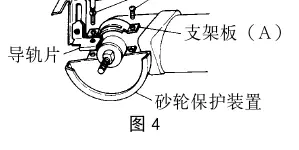
- Fig 4: Shows the installation of the guide base assembly for cutting.
- Fig 8: Indicates the wear limit for carbon brushes.
Model compatibility
- Use only depressed center wheels with a 'Safe Speed' of at least 13700/min.
- Do not use accessories that require liquid coolants.
- Do not use worn-down wheels from larger power tools.

Manual page author
Emily Carter
User documentation editor
Prepares concise manual descriptions and highlights the most useful setup, operation, and maintenance information for readers.