Home Appliances / Washing Machines
HiKOKI N 14DSL / N 18DSL Cordless Stapler User Manual
Quick guide for the HiKOKI N 14DSL and N 18DSL cordless staplers, covering battery installation, staple loading, operation modes, and maintenance.
Table of contents
Manual images
Jump to the sectionQuick guide from the manual
This document provides essential instructions for the HiKOKI N 14DSL and N 18DSL cordless staplers. The tool is designed for driving staples into wood and similar materials. Always wear eye protection when operating the tool. Ensure the trigger is locked and the battery is removed before performing any maintenance or clearing jams.
Battery Removal/Installation
Hold the handle tightly and push the battery latch to remove the battery. To install, insert the battery while observing the correct polarity until it clicks into place.
Loading the Staples

- Lock the trigger and remove the battery.
- Press the stop lever and slide the magazine backward.
- Place the staples in the magazine with the prongs facing upward.
- Slide the magazine back into position until the stop lever locks.
Operation Modes
The tool features two modes:
- Single-shot: Place the push lever against the target area first, then pull the trigger.
- Continual-shot: Pull the trigger first, then place the push lever against the target area to fire repeatedly.
The tool includes an anti-blank firing mechanism that stops operation when eight or fewer staples remain.
Maintenance and Inspection
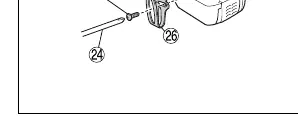
- Removing Jams: Remove the battery, open the magazine, and clear any debris or jammed staples from the blade guide using a flathead screwdriver.
- Cleaning: Wipe the exterior with a soft, dry cloth or a cloth moistened with soapy water. Do not use gasoline or paint thinner.
- Storage: Store in a place where the temperature is below 40°C and out of reach of children.
Manufacturer information
HiKOKI
Practical help
Common problems
Stapler won't fire
Check if the battery is charged, correctly attached, or if the trigger was released halfway in single-shot mode.
Staples not fully driven in
Ensure the material is not too hard, the stapler is pressed firmly against the surface, and the driver blade is not worn.
Blank firing
Clean debris from the micro switch inside the magazine or clear jammed staples near the discharge outlet.
Before use
- Ensure the work area is clean and well-lit.
- Check that no screws are loose.
- Verify there are no damaged or missing parts.
- Ensure the trigger lock mechanism is functioning.
- Check that the push lever slides smoothly.
Specs in practice
- Amount of loadable staples
- 150 staples.
Images and diagrams
- Fig 1: Battery storage and ventilation holes.
- Fig 2: Battery removal and installation.
- Fig 4: Trigger lock mechanism positions.
- Fig 6: Loading staples into the magazine.
- Fig 9: Adjusting staple depth.
Model compatibility
- Only use staples manufactured by HiKOKI.
- Use only designated genuine HiKOKI battery packs.

Manual page author
Emily Carter
User documentation editor
Prepares concise manual descriptions and highlights the most useful setup, operation, and maintenance information for readers.