Electronics / Networking
User Guide for TP-Link TL-SL1218MP, TL-SL1218P, and TL-SL1226P PoE+ Switches
Quick guide for TP-Link TL-SL1218MP, TL-SL1218P, and TL-SL1226P PoE+ switches. Learn about PoE power budgets, Extend Mode, Priority Mode, and hardware specifications.
Table of contents
Manual images
Click an image to enlargeQuick guide from the manual
The TP-Link PoE+ switches are designed for plug-and-play operation, requiring no configuration for basic setup. Simply connect your network devices to the RJ45 ports to begin data and power transmission. For advanced features like Extend Mode, Priority Mode, or Isolation Mode, ensure your network requirements align with the specific port limitations described in this guide.
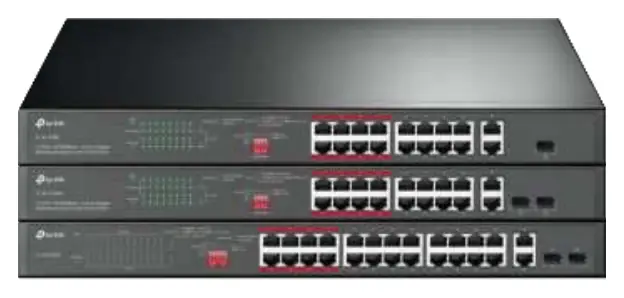
Product Overview
These switches provide a simple way to expand your wired network while simultaneously transferring power over the same Ethernet cable. They support the PoE+ standard (802.3af/at), making them suitable for powering high-powered devices such as wireless access points, IP cameras, and IP phones.
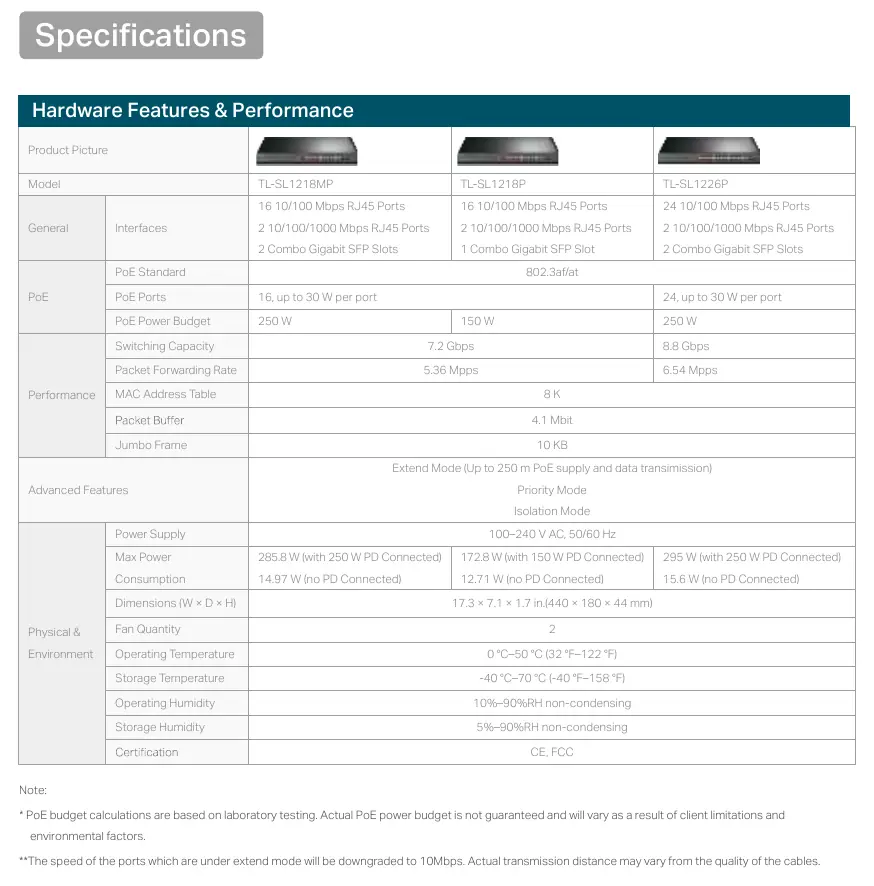
Key Features and Modes
- Extend Mode: Allows for data and power transmission up to 250 meters. Note that when this mode is enabled, the port speed is downgraded to 10 Mbps.
- Priority Mode: Ensures high priority for ports 1–8, which is ideal for quality-sensitive applications like video monitoring.
- Isolation Mode: Allows for one-click client traffic separation, which helps prevent snooping and tampering, improving LAN security and performance.
- Auto MDI/MDIX: Eliminates the need for crossover cables.
- Auto-negotiation: Intelligently adjusts for compatibility and optimal performance.
Hardware Specifications
The switches operate on a power supply of 100–240 V AC, 50/60 Hz. The PoE power budget varies by model:
- TL-SL1218P: 150 W total PoE power budget.
- TL-SL1218MP and TL-SL1226P: 250 W total PoE power budget.
Each PoE port supports up to 30 W of power. The operating temperature range is 0 °C to 50 °C (32 °F to 122 °F), and the operating humidity is 10% to 90% RH non-condensing.
Important Operational Notes
PoE budget calculations are based on laboratory testing. Actual PoE power budget is not guaranteed and will vary as a result of client limitations and environmental factors. Always ensure that the total power consumption of connected devices does not exceed the switch's total PoE power budget.
Practical help
Common problems
Connected device is not receiving power or data in Extend Mode.
Verify that the cable quality is sufficient for long-distance transmission. Note that Extend Mode limits port speed to 10 Mbps.
PoE devices are not powering on.
Check if the total power consumption of all connected PoE devices exceeds the switch's total PoE power budget (150W for TL-SL1218P, 250W for others).
Before use
- Ensure the power supply is within the 100-240V AC range.
- Verify that your PoE devices are compatible with the 802.3af/at standard.
- Check that the total power draw of all connected devices is within the switch's PoE budget.
- Use high-quality Ethernet cables, especially if utilizing the 250m Extend Mode.
Specs in practice
- Priority Mode
- Prioritizes traffic on ports 1-8 to ensure stable performance for sensitive applications like video surveillance.

Manual page author
Emily Carter
User documentation editor
Prepares concise manual descriptions and highlights the most useful setup, operation, and maintenance information for readers.