Tools / Power Tools
Operating Instructions for Hilti NCR 060 II-A22 and NCR 060C-A22 Cordless Crimping Tool
Quick guide for the Hilti NCR 060 II-A22 and NCR 060C-A22 cordless crimping tool. Includes setup, operation, safety, maintenance, and troubleshooting steps.
Table of contents
Manual images
Click an image to enlargeQuick guide from the manual
This document provides essential operating instructions for the Hilti NCR 060 II-A22 and NCR 060C-A22 cordless crimping tools. Before use, ensure you have read all safety warnings. The tool is designed for crimping copper or aluminum connectors. Always use Hilti B 22 series batteries and approved chargers.
Product overview
The tool features a crimping head, a piston reset slider for emergencies, a servicing/fault indicator (red LED), a battery release button, a control switch, and a white LED for work area illumination. The NCR 060C-A22 model features a two-layer PVC coating on the crimping head (red inner layer, black outer layer) for safety.
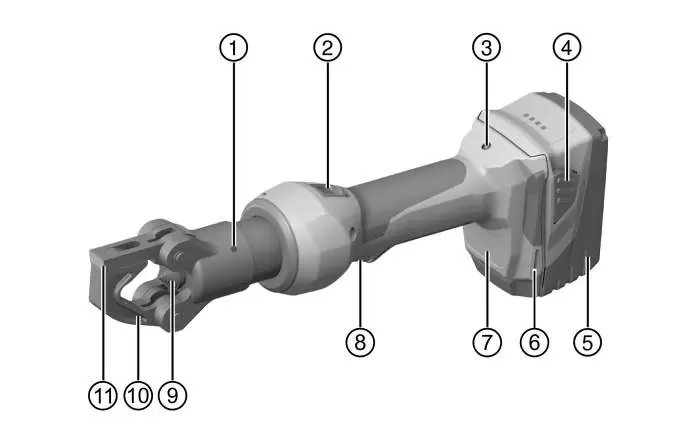
Operation
Preparation: Ensure the tool is switched off before inserting the battery. Charging: Use only approved Hilti chargers. Inserting/Removing Battery: Push the battery until it engages with an audible click. Press the release buttons to remove. Fall Arrest: Use only the recommended Hilti tool tether and retaining strap when working at heights. Crimping Procedure: Open the lever and pivoting bar, insert the connector, close the tool, insert the battery, and press the control switch until the piston retracts. Ensure the tool is correctly aligned before starting.
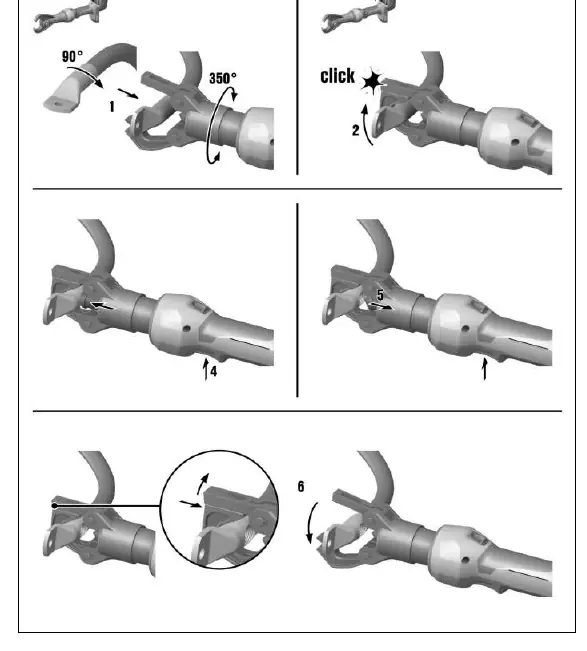
Care and maintenance
Always remove the battery before performing maintenance. Clean the housing with a slightly damp cloth; do not use silicone-based cleaning agents. Keep air vents clean using a dry, soft brush. Regularly inspect all parts for damage. If the tool or battery is damaged, contact Hilti Service.
Troubleshooting
If the tool fails to operate, check the battery charge status and temperature. If the red LED lights continuously, a technical problem exists; contact Hilti Service. If the red LED flashes, the battery charge may be too low or the crimping pressure was not achieved.
Technical data
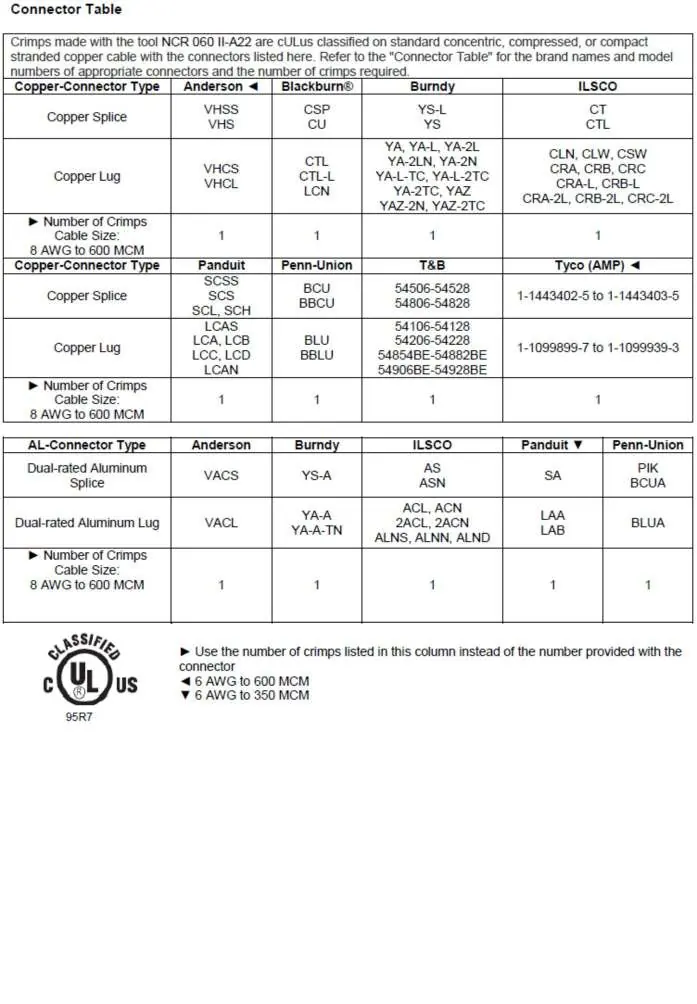
- Rated voltage: 21.6 V
- Max. crimping force: 30 kN to 60 kN
- Crimping time: approx. 5 seconds
- Ambient temperature for operation: -17 °C to 60 °C
Manufacturer information
Hilti Corporation
Practical help
Common problems
Battery LED does not light up
Check if the battery is inserted correctly, check if the battery is discharged, or allow the battery to reach room temperature.
Red LED lights continuously
Technical problem. Contact Hilti Service.
Red LED flashes
Battery charge is too low or crimping pressure was not achieved. Check crimping operation.
Tool overheated
Allow the product to cool down.
Before use
- Inspect the tool for visible damage
- Ensure the battery is fully charged
- Verify crimping jaws are correctly positioned
- Check work area for live cables or pipes
- Wear appropriate personal protective equipment
- Ensure the locking pin is securely engaged
Specs in practice
- Rated voltage
- 21.6 V
- Max. crimping force
- 30 kN to 60 kN
- Crimping time
- approx. 5 seconds
Images and diagrams
- Overview of tool components (Page 2)
- Step-by-step crimping procedure (Page 3)
- Connector selection table (Page 75-77)
Model compatibility
- Use only Hilti B 22 series Li-ion batteries
- Use only Hilti-approved battery chargers

Manual page author
David Miller
Documentation analyst
Organizes user manual content into clear summaries, with attention to model details, product context, and everyday usability.