Tools / Measuring Tools
Operating Instructions for Hilti VC 140-2-22 Cordless Vacuum Cleaner
A comprehensive guide for the Hilti VC 140-2-22 cordless wet/dry vacuum cleaner. Includes setup, operation, filter maintenance, troubleshooting, and technical specifications.
Quick answers from the manual
Quick answer
- The Hilti VC 140-2-22 is a cordless wet/dry vacuum cleaner. It is operated via a control switch and supports automatic filter cleaning. It uses Hilti Nuron B 22 batteries. p. 6, 9, 14
Key actions
- Bump-cleaning the filter p. 14
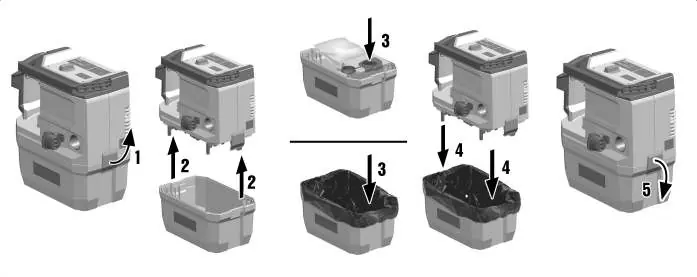
- Changing the dust bag p. 14
First start
- Charge the battery fully, insert it into the product until it clicks, and ensure the filter is installed. p. 13
Problems and fixes
Reduced suction performance
Empty container, clean hose/nozzle, bump-clean or change filter.
p. 18Maintenance and reset
- Replace filter at least every six months or more frequently with intensive use. p. 16
Technical specifications
| Parameter | Value | Meaning | Pages |
|---|---|---|---|
| Weight | 13 lb (6 kg) | Weight of the vacuum cleaner. | p. 12 |
| Container capacity | 2 gal (8 l) | Total container volume. | p. 12 |
Where to find it in the PDF
- Product Overview p. 9
- Technical Data p. 12, 13
Table of contents
Manual images
Click an image to enlargeQuick guide from the manual
The Hilti VC 140-2-22 is a professional-grade cordless wet/dry vacuum cleaner designed for commercial use. Before initial operation, ensure the battery is fully charged and the filter is correctly installed. Always operate the vacuum with the filter element in place. For optimal performance, use Hilti Nuron B 22 series batteries.
Product overview
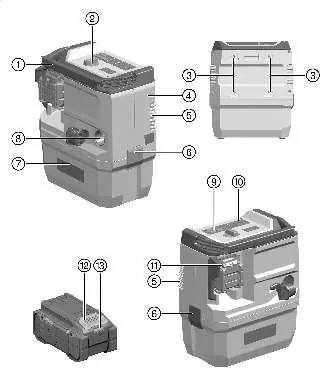
The vacuum consists of a suction head, waste material container, control switch, and intake fitting. Optional features include a backpack holder and Bluetooth module. The display and control panel allow for monitoring and operation.
Intended use
This product is designed for commercial applications, including construction sites, hotels, and hospitals. It is suitable for wet and dry cleaning. It is approved for the Hilti SafeSet application. Do not use for hazardous dusts exceeding the rated dust class, flammable liquids, or explosive materials.
Operation
Switching on and off
Turn the control switch to the ON position to start and OFF to stop. Use the ECO button to activate reduced suction power for longer battery runtime.
Filter cleaning
The vacuum features automatic filter cleaning, which activates upon startup. To perform manual bump-cleaning: close off the end of the hose, wait for maximum vacuum to build up, and press the filter cleaning button.
Vacuuming
For dry dust, ensure the correct dust bag is fitted. For liquids, check the container level monitoring system and ensure the filter is dry before use. Always empty the container after vacuuming liquids.
Maintenance
Filter replacement
To change the filter: set the switch to OFF, open the latches, remove the suction head, turn the filter latches 180°, remove the filter frame, and install a new filter. Ensure no debris falls into the turbine aperture.
Cleaning
Clean the exterior with a slightly damp cloth. Do not use silicone-based cleaning agents. Regularly clean the air vents with a soft brush. Check the container level monitoring sensors for dirt and clean if necessary.
Troubleshooting
If suction performance is reduced, check if the container is full, the hose is blocked, or the filter is clogged. If the battery does not engage, clean the retaining lug. If the vacuum switches off automatically, the container may be full.
Manufacturer information
Hilti Corporation
Practical help
Common problems
Reduced suction performance
Empty the waste material container, clean the suction hose/nozzle, or bump-clean/replace the filter.
Battery does not engage with a click
Clean the retaining lug on the battery and push it into the product until it engages.
Dust is blown out of the appliance
Ensure the filter element is correctly installed or replace it if damaged.
Vacuum switches off automatically
The waste material container is full; empty it.
Before use
- Ensure the battery is fully charged
- Verify the filter element is installed and dry
- Check that the container is empty
- Ensure the suction hose is securely connected
- Check for any damage to the hose or nozzle
Specs in practice
- Max. volume flow
- 142 CFM (67 l/s) - the maximum rate of air movement.
- Container capacity
- 2 gal (8 l) - total volume of the waste container.
Images and diagrams
- Overview of vacuum components and controls
- Steps for dust bag installation and removal
- Filter replacement procedure
Model compatibility
- Compatible with Hilti Nuron B 22 series batteries
- Use only approved Hilti chargers
- Approved for Hilti SafeSet application

Manual page author
Emily Carter
User documentation editor
Prepares concise manual descriptions and highlights the most useful setup, operation, and maintenance information for readers.