Tools / Power Tools
Operating Instructions for Hilti TE 2000-AVR Demolition Hammer
Quick guide for the Hilti TE 2000-AVR demolition hammer. Includes setup, operation, maintenance, and troubleshooting steps.
Quick answers from the manual
Quick answer
- The Hilti TE 2000-AVR is a hand-held electric demolition hammer designed for chiseling concrete, masonry, and asphalt. p. 11, 20
Key actions
- Fitting the accessory tool p. 13, 21
First start
- Connecting the supply cord p. 13, 21
Problems and fixes
Tool doesn't start
Switch off and on again, check power supply, check cable/plug, or load generator.
p. 15, 23Maintenance and reset
- Service indicator lights red p. 11, 20
Technical specifications
| Parameter | Value | Meaning | Pages |
|---|---|---|---|
| Weight | 14.5 kg | Weight in accordance with EPTA procedure 01 | p. 12, 20 |
Where to find it in the PDF
- Overview p. 2, 11
Table of contents
Manual images
Click an image to enlargeDescription
The Hilti TE 2000-AVR is a hand-held electric demolition hammer designed for professional use in chiseling concrete, masonry, and asphalt. It can also be used for excavating and compacting. The tool features an Active Vibration Reduction (AVR) system to reduce user fatigue.
Operation
Connecting the supply cord: Ensure the tool is clean, dry, and disconnected from power. Insert the supply cord connector into the tool until it clicks into place, then plug into the power outlet.
Fitting the accessory tool: Unplug the tool. Lightly grease the accessory tool shank using original Hilti grease. Insert the tool into the chuck and turn while applying light pressure until it clicks into place. Pull on the tool to verify it is locked.
Removing the accessory tool: Unplug the tool. Pull the tool lock back to the stop and remove the accessory tool. Wear protective gloves as the tool may be hot or sharp.
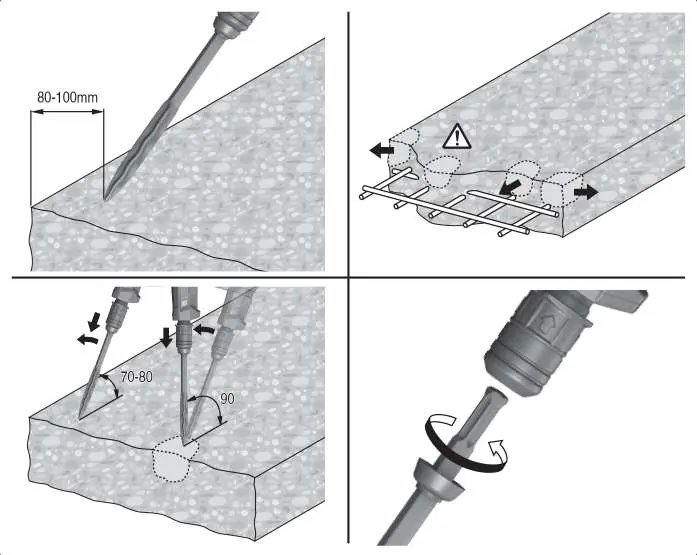
Chiseling: Plug in the tool, position the chisel, and press the on/off switch. For low-temperature operation, allow the tool to run under no load until it reaches minimum operating temperature.
Transport
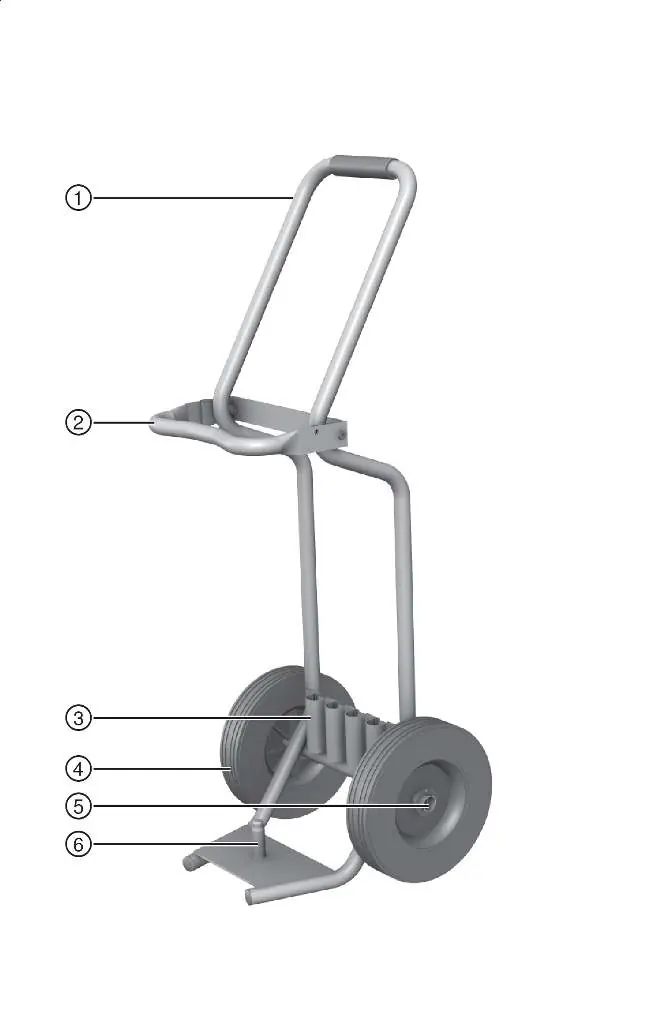
The optional transport trolley ensures safe movement of the tool. Ensure the trolley is stable, secure the tool on the locating pin with the retaining bar, and lock chisels into the provided holders.
Care and Maintenance
Always unplug the tool before maintenance. Remove stubborn dirt, clean air vents with a dry brush, and wipe the casing with a slightly damp cloth. Do not use silicone-based cleaning agents. Repairs to electrical components must be performed by a qualified electrical specialist.
Troubleshooting
If the tool does not start, check the power supply, ensure the cable is correctly connected, or wait for the electronics to initialize (approx. 4 seconds). If the service indicator flashes red, it may indicate overheating or overvoltage; switch off and allow to cool. If it lights red continuously, it indicates a service interval has been reached.
Manufacturer information
Hilti Corporation
Practical help
Common problems
Tool does not start
Check power supply, wait 4 seconds for electronics initialization, or check if the generator is in sleep mode.
No hammering action
Allow the tool to warm up to the minimum operating temperature.
Indicator flashes red
Temporary fault (overheating or overvoltage). Switch off, let cool, or connect to a different power source.
Indicator lights red continuously
Service interval reached. Contact Hilti Service.
Before use
- Check power supply voltage and frequency
- Ensure earth conductor and RCD are present
- Inspect power cable for damage
- Grease accessory tool shank
- Wear appropriate PPE (ear, eye, dust protection)
Specs in practice
- Impact speed
- 30 Hz
Images and diagrams
- Overview of tool components (grip, switch, service indicator, chuck)
- Overview of transport trolley components
- Connecting the power cable
- Fitting and removing the accessory tool
- Chiseling techniques (angle, distance from edge)
Model compatibility
- Use only original Hilti grease
- Use only genuine Hilti spare parts and consumables

Manual page author
Michael Turner
Technical manual editor
Reviews PDF manuals for structure, safety notes, and practical product details so readers can find the right information quickly.