Lighting / Fixtures
Installation Manual for Hinkley 10382GW Foundry Classic 1 Light
Step-by-step installation guide for the Hinkley 10382GW Foundry Classic 1 Light fixture. Includes instructions for stem assembly, mounting, shade installation, and electrical wiring.
Table of contents
Quick Guide from the Manual
This document provides installation instructions for the Hinkley Foundry series hanging light. Before beginning, ensure the power supply is turned off at the circuit breaker. Determine the desired fixture length and check if additional stems are required. The fixture is supplied with two 12-inch stems and one 6-inch stem.
Important Safety Warning: Do not use the swivel mechanism in high wind areas.
Assembly Instructions
To assemble the fixture stems:
- Find a clear area to work and unpack the fixture and glass.
- Feed the wires (W) from the socket fitter (1) through the stems (2).
- Slip the free end of the wire through the small hole at the end of the stem.
- Continue adding stems until the required length is achieved.
- Thread the swivel into the top of the last stem and the socket fitter into the bottom stem.
To mount the fixture:
- Slip the end of the swivel stem (S) into the neck (N) of the mounting bracket (6) until flush.
- Tighten the three hex head screws (7) into the neck through the stem holes.
- Secure the swivel (9) to the swivel stem (S).
- Pass the wires through the center hole of the mounting bracket (6).
- Secure the mounting bracket (6) to the junction box (J).
- Slide the canopy (5), washer (8), and logo plate (4) over the swivel and stem.
- Slide the decorative collar (3) over the swivel and stem, then tighten with the provided Allen key to lock the canopy in place.
Shade Installation
- Remove the knurled shade ring (9) from the socket cover (SC).
- Slide the decorative ring (8) onto the edge of the fitter (1), ensuring the recess in the ring faces the edge of the fitter.
- Place the shade (10) over the socket.
- While holding the shade in position, thread the shade ring (9) back onto the socket cover and tighten to secure the parts.
Wiring and Grounding
Follow these steps for electrical connections:
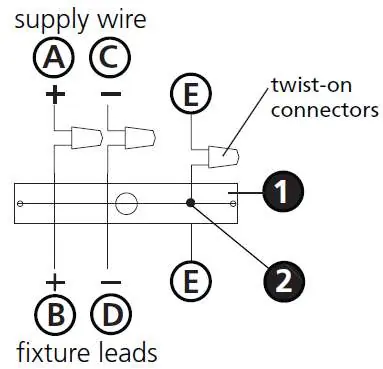
- Positive Wire: Connect the positive supply wire (typically black or the smooth, unmarked side of the cord) to the positive fixture lead (B) using a twist-on connector.
- Negative Wire: Connect the negative supply wire (typically white or the ribbed, marked side of the cord) to the negative fixture lead (D).
- Grounding: Fasten the fixture ground wire (E) (typically copper or green plastic coated) to the mounting strap (M) using the ground screw (S). For chain-hung or post-mount fixtures, connect the fixture ground wire directly to the building system ground wire using a twist-on connector.
- Outdoor Installation: Cover the open ends of connectors with silicone sealant to form a watertight seal. If installing on a wall, use caulk to seal gaps between the mounting plate and the wall.
Manufacturer information
Hinkley Lighting
Practical help
Common problems
Fixture movement in high wind
Do not use the swivel mechanism in high wind areas.
Water ingress in outdoor installation
Cover open ends of connectors with silicone sealant and caulk gaps between the backplate and the wall.
Before use
- Turn off power supply at the circuit breaker.
- Ensure you have all parts (stems, swivel, canopy, shade).
- Determine the required fixture length and if additional stems are needed.
- Verify the mounting surface is suitable for the fixture weight.
Specs in practice
- Included Stems
- Supplied with 2-12 inch and 1-6 inch stems.
- Positive Wire
- Typically black or the smooth, unmarked side of the two-conductor cord.
- Negative Wire
- Typically white or the ribbed, marked side of the two-conductor cord.
Images and diagrams
- Drawing 1 (Assembly): Illustrates feeding wires through stems and attaching the swivel.
- Drawing 2 (Assembly): Illustrates mounting the bracket to the junction box and securing the canopy.
- Drawing 1 (Shade): Illustrates the order of the decorative ring, shade, and shade ring.
Model compatibility
- Suitable for indoor and outdoor use (with proper sealing).
- Not for use in high wind areas if using the swivel.

Manual page author
David Miller
Documentation analyst
Organizes user manual content into clear summaries, with attention to model details, product context, and everyday usability.