Toys / RC Components
User Manual for Hobbywing Seaking V4 Brushless Electronic Speed Controller
Quick guide for the Hobbywing Seaking V4 series ESC (120A, 90A, 60A, 30A). Includes instructions for throttle calibration, wiring connections, programming methods, LED status indicators, and troubleshooting steps.
Table of contents
Manual images
Click an image to enlargeQuick Start Guide
The Hobbywing Seaking V4 ESC requires calibration before its first use or when a new radio/receiver is installed. Ensure your transmitter throttle channel is set to default (100% EPA/DR) and the throttle trim is set to 0. Follow the ESC calibration process to define the throttle range (Full Throttle, Neutral, and Bottom positions) to ensure the motor operates correctly.
Safety and Warnings
- Ensure all wires and connectors are securely soldered and insulated.
- Do not attempt to drive two brushless motors with a single ESC.
- Always disconnect the battery after use to prevent deep discharge, which can damage the ESC.
- The system is IP67 waterproof; however, blow dry plugs after use to prevent rusting.
- Hold the boat in the air during setup to ensure the propeller can spin freely without causing injury.
Connections and Wiring
Motor Connection: There is no specific wire sequencing. If the motor rotates in the wrong direction, swap any two motor wires or adjust the "Motor Rotation" parameter.
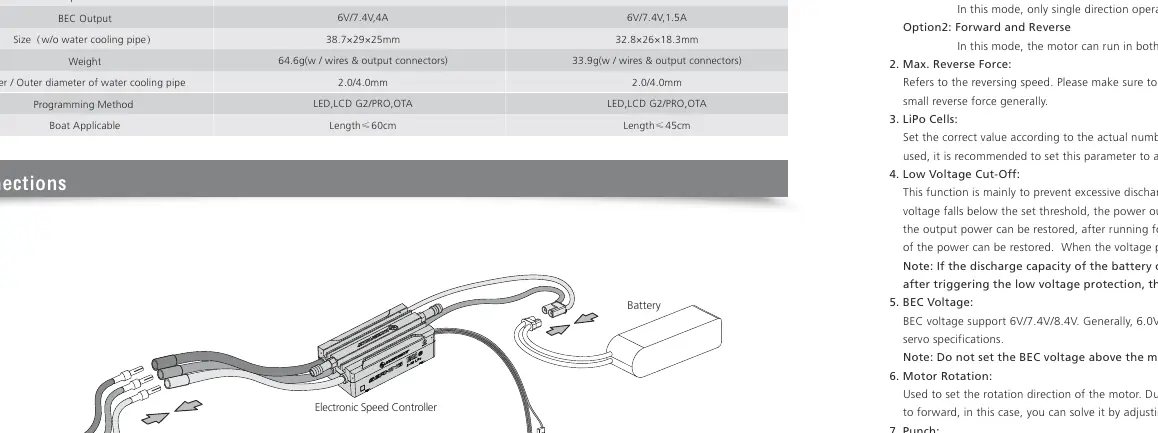
Receiver Connection: Insert the throttle cable into the throttle channel of the receiver. The red wire provides BEC voltage; do not supply external power to the receiver unless the red wire is disconnected and insulated.
Battery Connection: Connect the ESC (+) to the battery (+) and (-) to (-). Reverse polarity will damage the ESC and void the warranty.
Water Cooling: Connect the water-cooling pipes to the ESC according to the boat's internal layout. Use clamps or ties to secure the tubes.
ESC Calibration Process
- Turn on the transmitter and set throttle to neutral.
- Pull the throttle trigger to full position and connect the battery.
- Wait for the "Beep-Beep" tone (full throttle confirmed).
- Release the trigger to neutral and wait for the "Beep" tone (neutral confirmed).
- If using a board-type transmitter, follow the specific stick movements for full/half/bottom range as detailed in the manual.
Programming Methods
The ESC parameters can be adjusted using three methods:
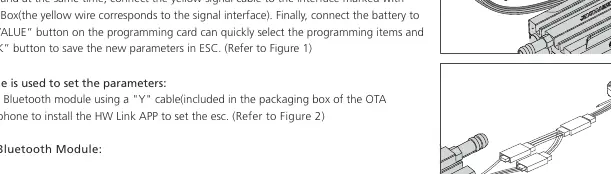
- LED Program Card: Connect the throttle cable to the card, then connect the battery. Use the "ITEM" and "VALUE" buttons to adjust settings.
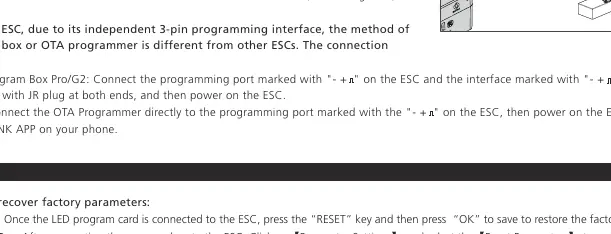
- LCD Program Box Pro/G2: Connect via the programming port and use the menu to select and save parameters.
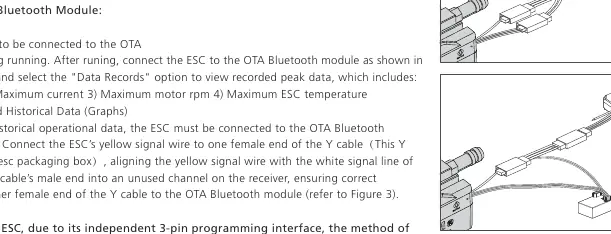
- OTA Bluetooth Module: Connect the ESC to the module and use the HW Link App on your smartphone to adjust settings and view data logs.
LED Status Indicators
- Red light off: Zero throttle position.
- Red light on: Advancing.
- Red + Blue light on: Full throttle (100%).
- Flashing Red (Single): Low voltage protection.
- Flashing Blue (Single): Overheat protection (output reduced to 50%).
- Flashing Blue (Three): Current protection.
- Flashing Blue (Five): Capacitor overheat protection.
Troubleshooting
If the motor does not start, check the battery voltage and ensure the throttle signal is detected. If the motor rotates in the wrong direction, swap two motor wires or change the "Motor Rotation" setting. If the ESC enters protection mode (flashing lights), allow the unit to cool down or check the battery level.
Manufacturer information
Hobbywing
Practical help
Common problems
Motor does not start, red light flashes with warning tone
Check battery voltage, ensure throttle signal is detected, and recalibrate throttle travel.
Boat moves in reverse when forward throttle is applied
Swap any two motor wires or change the 'Motor Rotation' parameter in the settings.
Motor stutters or stops suddenly
Check for interference, low-voltage protection, or overheat protection. Allow the ESC to cool down if overheated.
Throttle travel setting cannot be completed
Ensure the throttle cable is correctly connected to the receiver and the transmitter is on.
Before use
- Ensure all connectors are soldered and insulated.
- Calibrate the ESC throttle range before first use.
- Check that the battery voltage is within the supported range (2-6S for 120A, 2-4S for 90A, 2-3S for 60A/30A).
- Secure water-cooling tubes with clamps or ties.
- Ensure the propeller can spin freely during setup.
Specs in practice
- Freewheeling
- When enabled, provides better throttle linearity, energy recovery, and lower heat.
Images and diagrams
- Figure 1: Connection method for LED Program Box.
- Figure 2: Connection method for OTA Bluetooth module.
- Figure 3: Data reading connection using Y-cable.
- Connections: Wiring diagram showing ESC, Motor, Battery, and Receiver layout.
Model compatibility
- SEAKING 30A/60A V4 do not have an 8.4V BEC option.
- SEAKING 30A V4 does not have a 'Disabled' Freewheeling option.
- Ensure the BEC voltage does not exceed the maximum operating voltage of your servo.

Manual page author
David Miller
Documentation analyst
Organizes user manual content into clear summaries, with attention to model details, product context, and everyday usability.