Toys / RC Components
User Manual for Scorpion Tribunus 14-300A ESC
Quick guide for the Scorpion Tribunus 14-300A ESC. Includes installation, wiring, PC/Android programming, VBar integration, and safety instructions.
Table of contents
Manual images
Click an image to enlargeQuick Guide
The Scorpion Tribunus 14-300A ESC is a high-performance electronic speed controller. Before use, ensure you have performed the initial throttle range calibration. Always remove the propeller or pinion gear when working on the aircraft with the battery connected to prevent accidental motor startup.
Features
- Wide input voltage range: 14V-61V (4S-14S LiPo/HvLi).
- High current: Up to 300A continuous.
- Built-in BEC: 5.1V-8.3V, 10A continuous, 20A peak.
- Integrated phase sensor (RPM sensor) for external governors.
- Supports Airplane and Helicopter modes.
- Data logging and PC/Android programming support.
Installation
Connecting the ESC:
- Battery: Solder a quality battery connector to the red (positive) and black (negative) power wires. Ensure correct polarity.
- Motor: Use bullet connectors to connect the ESC to the motor. Ensure proper insulation (e.g., heat shrink) on all connections.
- Receiver/Governor: Connect the Master lead (brown, red, yellow) to the receiver throttle channel. Connect the Slave lead to an external governor or RPM sensor.
Mounting: Mount the ESC with the heatsink facing outward. Use a Scorpion Fastening Strap or double-sided tape. If using zip ties, secure them around the metal heatsink, not over the components.
Programming
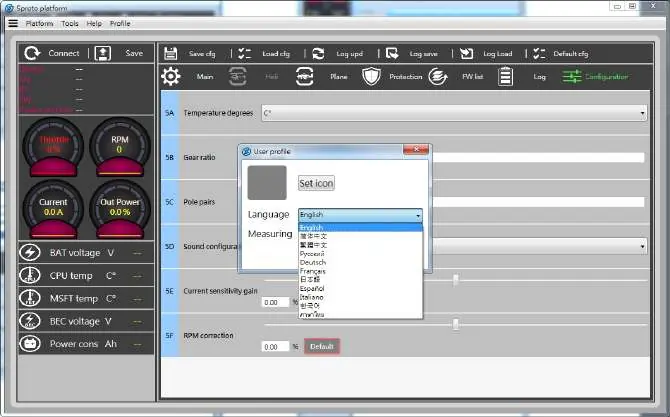
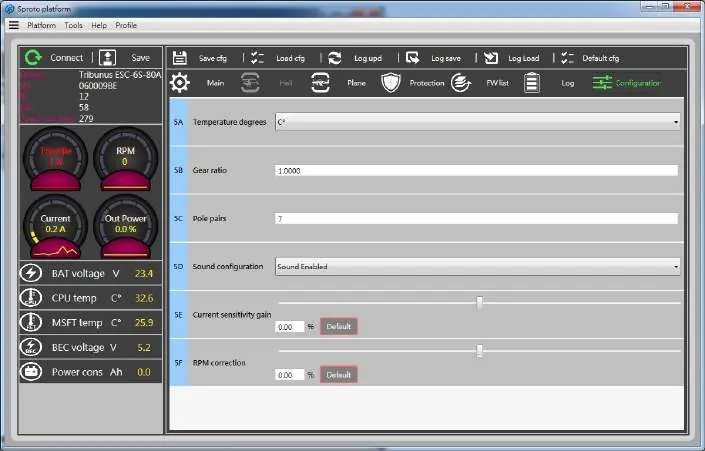
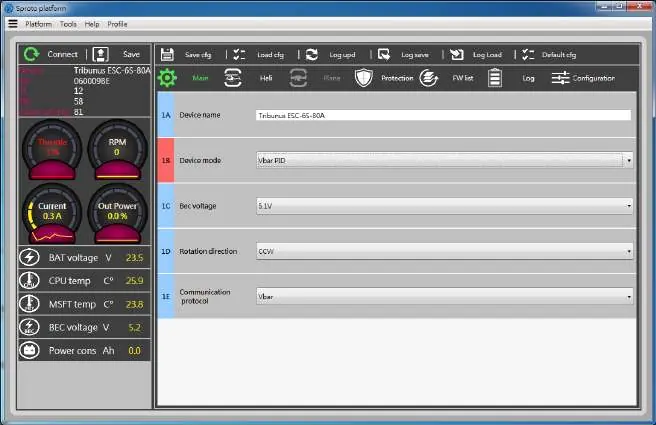
The ESC is programmed using the Scorpion PC or Android software. You will need the Scorpion VLink II cable (optional) and a Diode adaptor cable (included). For Android, an OTG cable is also required. Download the software from the Scorpion website to update firmware and configure settings like BEC voltage, rotation direction, and protection limits.
Modes and Settings
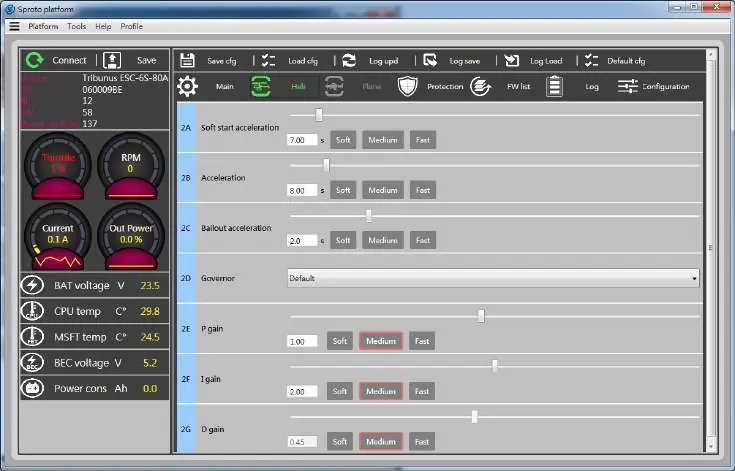
- Helicopter Mode: Configure soft start acceleration, bailout acceleration, and governor gains in the software.
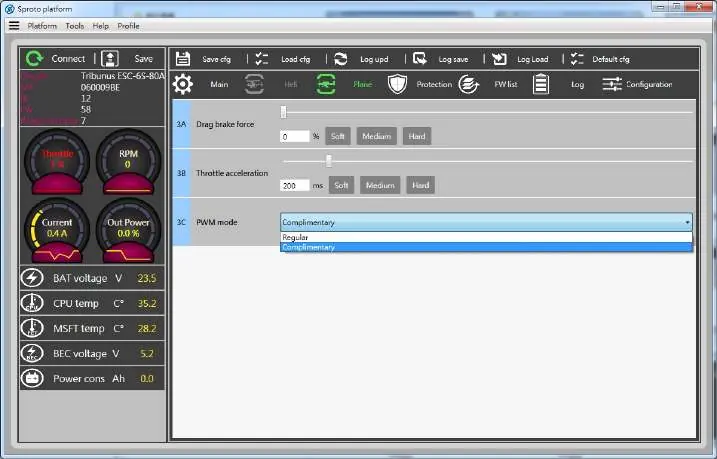
- Airplane Mode: Configure drag brake, throttle acceleration, and PWM mode (Regular or Complimentary).
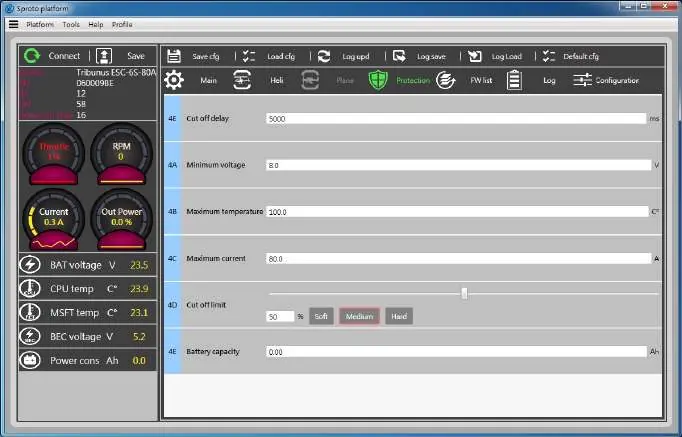
- Protection: Set cutoff delay, minimum voltage, maximum temperature, and maximum current limits to protect your equipment.
VBar Integration
The Tribunus ESC is compatible with Mikado VBar Control. Connect the telemetry cable from the ESC PC port to the VBar NEO telemetry port. Install the "Scorpion ESC Support" app on your VBar radio to enable telemetry features and ESC setup directly from the transmitter.
Anti-Spark DIY Kit
If you experience sparks when connecting the battery, use the included Anti-Spark DIY kit. This involves soldering a PTC resettable fuse to the positive wire and insulating it with the provided plastic tube and heat shrink.
Troubleshooting
The ESC indicates status via Morse code beeps from the motor and LED flashes. Common error codes include:
- N: No throttle signal.
- Z: Throttle not in zero position.
- V: Voltage error.
- I: Current error.
- P: Power error.
- T: Temperature error.
Practical help
Common problems
ESC beeps Morse code upon power-up
Identify the error code (N=No throttle, Z=Not zero, V=Voltage, I=Current, P=Power, T=Temperature) and resolve the corresponding issue.
Sparking when connecting battery
Install the provided Anti-Spark DIY kit on the positive battery wire.
ESC not recognized by PC/Android app
Ensure you are using the VLink II cable and that the ESC is powered by at least a 4S battery.
Before use
- Remove propeller or pinion gear before initial setup.
- Ensure battery polarity is correct (Red to Red, Black to Black).
- Perform throttle range calibration.
- Update to the latest firmware via the PC/Android software.
- Check that all RC components are rated for the set BEC voltage.
Images and diagrams
- Wiring diagram shows connections for battery, motor, receiver (Master), and external governor (Slave).
- Anti-Spark kit installation steps detail the modification of the positive wire using the PTC fuse.
Model compatibility
- Compatible with Mikado VBar Control and VBar NEO.
- Android connectivity requires an OTG cable.
- Firmware updates require the Scorpion VLink II cable.

Manual page author
David Miller
Documentation analyst
Organizes user manual content into clear summaries, with attention to model details, product context, and everyday usability.