Lighting / Smart Lighting
User Manual for Holman 12x Bulb Wi-Fi Festoon Kit
Quick guide for the Holman 12x Bulb Wi-Fi Festoon Kit (WXRL001). Learn how to install, pair with the Holman Home app, control lighting modes, and troubleshoot common issues.
Table of contents
Manual images
Click an image to enlargeQuick Guide from the Manual
This guide provides essential instructions for the Holman 12x Bulb Wi-Fi Festoon Kit (Model WXRL001). Key setup requirements include ensuring the red O-Ring is in place for electrical protection, using the keyhole hang points for installation, and pairing the device via the Holman Home app using Bluetooth mesh.
Overview and Package Content
The kit includes:
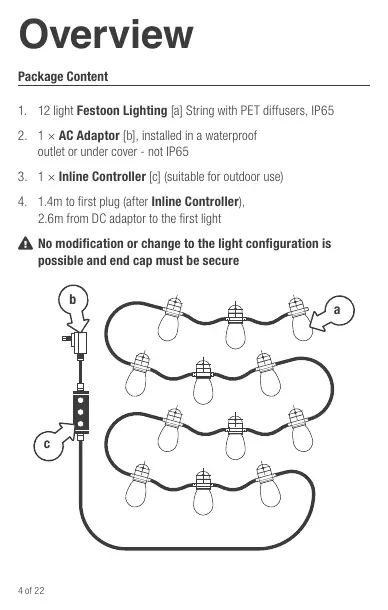
- 12 light Festoon Lighting string with PET diffusers (IP65 rated).
- AC Adaptor (must be installed in a waterproof outlet or under cover).
- Inline Controller (suitable for outdoor use).
Important: No modification or expansion of the light configuration is possible. The end cap must be secure at all times.
Installation and Setup
Follow these steps for safe installation:
- Preparation: Before connecting to power, ensure the red O-Ring is in place and the screw cover is secure.
- Mounting: Use the 'keyhole' hang point built into the top of each bulb to secure the lights to your structure. Do not tie the main black cable between lights.
- Support: If hanging from a beam, secure every 6th light (minimum 2 hang points). If using a guide wire, secure each light to the wire.
- Orientation: Bulbs must hang down to prevent water ingress. Do not install with bulbs facing up.
- Location: Avoid areas where bulbs may knock against walls or items. Do not install in enclosed spaces like ceilings, eaves, or cabinets.
App Pairing and Connection
The system uses Bluetooth mesh for connectivity:
- Download the Holman Home app from the App Store or Google Play.
- Register an account and ensure your country details are correct.
- Enable 'Discovering Nearby Device' or Bluetooth permissions on your phone.
- Plug in the lights. They will flash red to indicate they are in pairing mode.
- In the app, tap 'Add Device' and select the lights under 'Discovering Devices'.
- Follow the prompts to connect to your Wi-Fi.
- Once added, the app will default to 30 lights; you must manually adjust this setting to 12 lights to match your kit.
Using the Inline Controller
The controller allows manual operation without the app:
- Top button: Manual power on/off.
- Middle button: Wi-Fi pairing (press and hold to enter pairing mode).
- Bottom button: Manual mode selector (cycles through scenes and colors).
If the lights are not connected to Wi-Fi, allow a few minutes for them to exit pairing mode (turn solid red) before using the controller for testing.
App Functions
The Holman Home app provides advanced control:
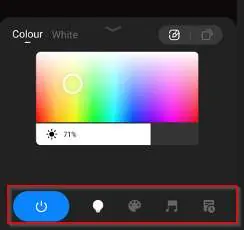
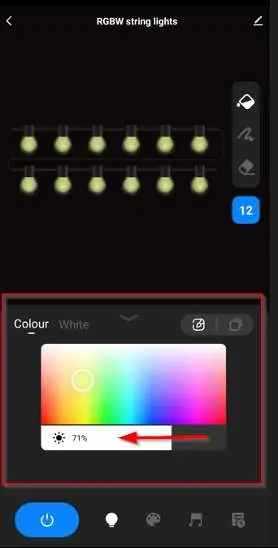
- Bulb Control: Adjust brightness, switch between RGB/White modes, and use the 'Tipping Bucket' (all lights one color), 'Squiggle' (individual light control), or 'Eraser' (remove bulb from display).
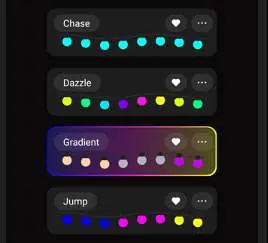
- Pallete (Scene): Select preset lighting scenes.
- Music: Lights change color to the beat of music (requires microphone permission).
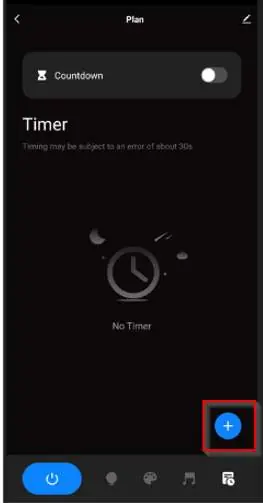
- Timer: Set daily schedules using 24-hour time. You can set different times for weekdays and weekends.
Troubleshooting
- Lights only flash red: They are in pairing mode. Wait a few minutes for them to exit pairing mode (solid red) to use the controller.
- Won't enter pairing mode: Press and hold the Wi-Fi button on the controller for 5 seconds. If that fails, power cycle the unit at the power point 3 times (on/off/on/off/on/off/on).
- Removing device: In the app, tap the pencil icon in the Festoon light menu and select 'Remove Device'. You can choose 'Disconnect' or 'Disconnect and wipe' (to restore factory defaults).
Specifications
- Input: 230-240V AC
- Output: 12V DC
- Light Output: 0.5W per light (6W total)
- Waterproof Rating: IP65
- Dimensions: 45mm diameter, 130mm height
Practical help
Common problems
Lights only flash red when plugged in
The lights are in pairing mode. Wait a few minutes for them to turn solid red, then use the controller.
Lights will not enter pairing mode
Press and hold the Wi-Fi button on the controller for 5 seconds. If unsuccessful, power cycle the unit at the wall 3 times.
Conflicting timer schedules
Check your timer settings in the app; you may need to delete or adjust overlapping schedules.
Before use
- Ensure the red O-Ring is in place for electrical protection.
- Verify the screw cover is secure.
- Ensure the power point is within 2.6m of the first light.
- Download the Holman Home app.
- Enable Bluetooth/Nearby Device permissions on your mobile device.
Specs in practice
- Input: 230-240V AC
- Standard household mains power.
- Output: 12V DC
- Low voltage power supply for the light string.
- 0.5W per light
- Energy-efficient LED power consumption.
Images and diagrams
- Inline Controller: Top button is Power, Middle is Wi-Fi Pairing, Bottom is Mode Selector.
- Keyhole hang points: Located on top of each bulb for secure mounting.
Model compatibility
- Not intended for installation in ceilings, eaves, cabinets, or enclosed spaces.
- No modification or expansion of the light set is possible.
- Requires 2.4GHz Wi-Fi network for app features.

Manual page author
David Miller
Documentation analyst
Organizes user manual content into clear summaries, with attention to model details, product context, and everyday usability.