Toys / RC Models & Drones
User Manual for Holy Stone HS440G RC Quadcopter
Comprehensive user guide for the Holy Stone HS440G RC Quadcopter. Learn about flight functions, app interface, stabilization, troubleshooting, and technical specifications.
Table of contents
Manual images
Click an image to enlargeQuick guide from the manual
This manual provides instructions for operating the Holy Stone HS440G drone. Key operational requirements include ensuring a strong GPS signal (7+ satellites) for RTH functions, calibrating the compass before the first flight, and maintaining a clear line of sight. Always operate in open areas away from obstacles, crowds, and high-voltage power lines.
Drone Functions
The drone features three types of Return to Home (RTH) functions:
- Smart RTH: Triggered by pressing the RTH button on the transmitter when the GPS signal is strong.
- Failsafe RTH: Automatically activated if the connection between the transmitter and drone is lost for more than 6 seconds.
- Low Voltage RTH: Automatically triggered when the drone battery is low. The drone will return and hover at 49ft above the Home Point.
Stabilization Functions
The drone utilizes two primary stabilization systems:
- Optical Flow Positioning: Uses a camera module to acquire position information. Optimal usage height is 1.6-9.8 ft. Avoid flying over transparent, reflective, or monochrome surfaces.
- Altitude-Hold Function: Maintains the drone's altitude after releasing the left joystick.
App Interface
The app provides real-time flight data and control options. Key features include:
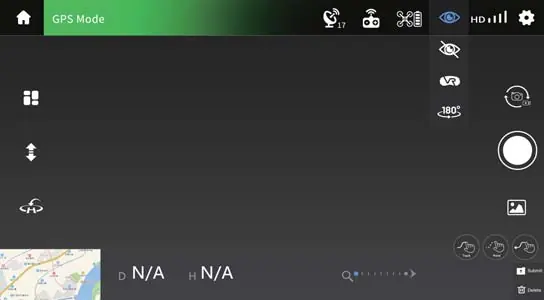
- System Status: Displays flight status and warnings.
- Flight Settings: Access to modify height, distance, and return altitude.
- Map View: Switch between camera view and map view.
- Flight Modes: Access to Circle Flight, Follow Me, and Headless Mode.
Flight Modes
- Beginner Mode: Limits flight distance (0-98 ft) and height (0-98 ft).
- Circle Flight: The drone records its current position and circles around it clockwise.
- Follow Me: The drone tracks the GPS signal of your mobile phone. Ensure the flight range is within 16-98 ft.
- Headless Mode: The drone's orientation is fixed to the direction it faced during takeoff, making it easier for beginners to control.
- Tap Fly: Allows you to draw a path on the map for the drone to follow.
Camera and Video
To capture media, use the app interface to switch between photo and video modes. Photos and videos are saved to the app album and the TF card (if inserted). Ensure the TF card is Class 10 or above with a capacity up to 64 GB.
Status Indicators
The drone uses LED lights to communicate status:
- Fast flashing yellow: Unsuccessful pairing.
- Front arm light steady red, rear arm light steady yellow: Searching for GPS/Exited GPS mode.
- Front arm light steady red, rear arm light steady green: GPS signal successful.
- Front and rear arm lights alternately flashing yellow: Compass calibration.
Specifications
Key technical parameters for the HS440G:
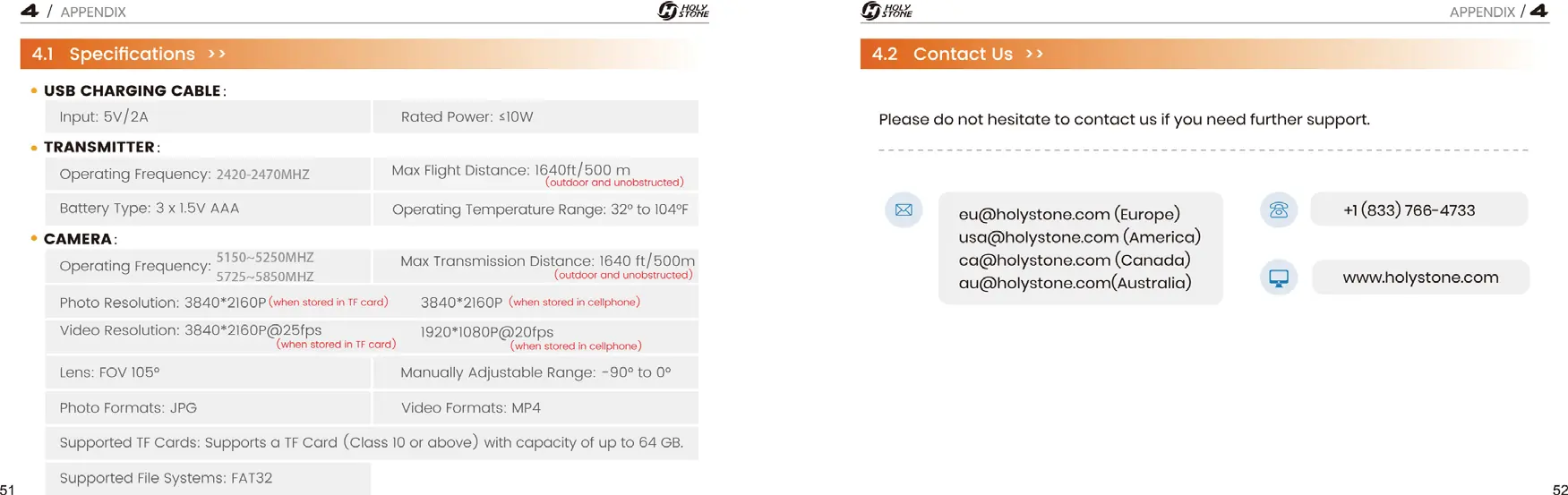
- Max Flight Time: 23 minutes (in a windless environment).
- Max Flight Height: 394 ft.
- Max Transmission Distance: 1640 ft (500 m).
- Battery: 7.6 V, 1700 mAh.
- Camera Resolution: 3840*2160P (TF card), 1920*1080P (cellphone).
Troubleshooting
If you encounter issues, check the following:
- Drone not connecting/No live feed: Ensure only one device is connected to the Wi-Fi. Restart the drone/cellphone.
- Instable flight: Fly in open spaces, recalibrate the compass, or replace propellers.
- No map in app: Pre-load the map by connecting to the internet before flight.
- Drone cannot take off: Ensure the drone and transmitter are paired, battery is full, and compass is calibrated.
Practical help
Common problems
Drone is connected to transmitter's Wi-Fi, but no live-feed.
Ensure only one device is connected to the Wi-Fi. Try restarting the drone and cellphone, or re-pairing them.
Instable flight or abnormal posture.
Operate in open spaces free from obstructions. Recalibrate the compass. Ensure you are away from buildings, power lines, and signal towers. Replace damaged propellers.
Drone cannot take off.
Ensure the drone and transmitter are successfully paired. Ensure the battery is fully charged. Perform compass calibration.
Before use
- Ensure the battery is fully charged.
- Ensure the drone and transmitter are successfully paired.
- Perform compass calibration before the first flight.
- Check that the TF card is inserted (if recording).
- Ensure the GPS signal is strong (7+ satellites) for outdoor flight.
- Check that the flight environment is free from obstacles.
Specs in practice
- Max Flight Time
- 23 minutes in a windless environment.
- Max Transmission Distance
- 1640 ft / 500 m (outdoor and unobstructed).
- Operating Temperature
- 32° to 104°F.
- TF Card Requirements
- Class 10 or above, up to 64 GB capacity.
Images and diagrams
- The RTH diagram illustrates how the drone maintains altitude relative to the Return Altitude (RA) setting when returning to the Home Point.
- The App Interface diagram labels all icons for flight control, settings, and media capture.
Model compatibility
- The drone requires a mobile device with the Holy Stone app installed.
- TF card must be formatted as FAT32.

Manual page author
David Miller
Documentation analyst
Organizes user manual content into clear summaries, with attention to model details, product context, and everyday usability.