Plumbing / Showers & Tubs
User Manual for 12FT Skelly with Servo
Quick guide for the 12FT Skelly with Servo. Includes assembly steps, control box operation, remote control usage, and care instructions.
Table of contents
Manual images
Click an image to enlargeQuick guide from the manual
The 12FT Skelly with Servo is a large seasonal decoration that requires assembly by at least 2 adults (3 are recommended). The unit features a control box for lighting and animation settings, as well as a remote control for operation from up to 20 ft away. Ensure all cables are connected correctly and the adapter is plugged into a live outlet for proper function.
Assembly Instructions
Assembly should be performed on a level surface. Follow these steps carefully:
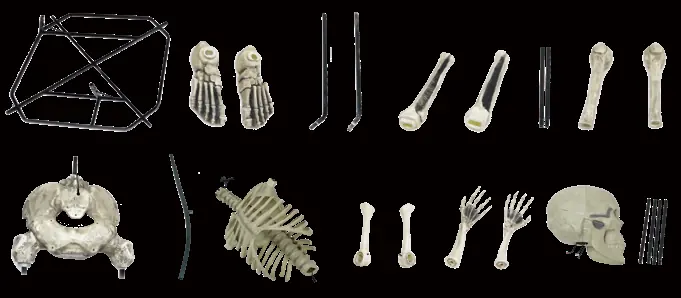

- Base and Legs: Assemble the base and attach the lower support poles. Slide the shins over the lower support poles and fit them onto the feet.
- Legs and Pelvis: Slide the femurs onto the upper support poles and fit them onto the shins. Assemble the pelvis to the upper support poles and femurs. If alignment is difficult, adjust the upper legs.
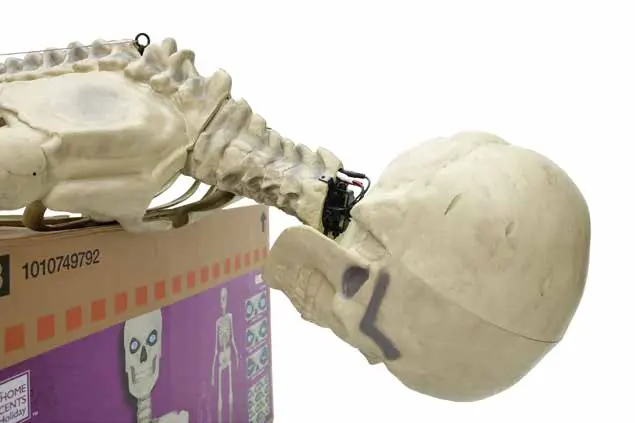
- Spine and Rib Cage: Lean the skeleton against the box for stability. Attach the spinal support to the pelvis. Connect the rib cage with the servo head bracket to the spine.
- Wiring: Connect all cables by aligning the arrow indicators. Press the cables together firmly and rotate the cable cap clockwise until locked. Hide excess wire in the cavity at the bottom of the rib cage.
- Head: Ensure the head is fully seated before tightening. Loosen screws on the servo head bracket, fold the housing over the top, and tighten screws.
- Final Setup: Secure the tether cable before standing the skeleton up. Use weights (like sandbags) on the base and guy wires for additional stability.
Operation Instructions
The control box is located underneath the Pelvis (K). It has two buttons: the middle button controls ON/OFF and Sensor/Timer, and the corner button selects from 8 eye options.
- LIGHTS ONLY: Press the middle button once. Lights stay on indefinitely.
- TIMER - SENSOR: Press the middle button twice. Eyes stay on for 6 hours, then deactivate for 18 hours. The IR sensor triggers an 18-second animation cycle when motion is detected (range: 13 ft / 4 meters).
- OFF - STEP PAD: Press the middle button three times to deactivate. The item will only activate if a step pad is pressed.
The remote control allows you to turn the skeleton on/off and toggle through the 8 eye display modes from up to 20 ft away. It requires 2 x 1.5V AAA batteries.
Care and Storage
When not in use, store the product in its original packing. Keep away from heat and moisture. Remove batteries from the remote control before storage.
Safety Warnings
- This item is for decoration only, not a toy.
- Keep small parts away from children.
- Use only the adapter supplied by the manufacturer.
- Do not climb on, pull, push, or tilt the product.
- Lay the product down before a storm or strong winds.
- Do not mix alkaline, standard, or rechargeable batteries.
Manufacturer information
The Home Depot
Practical help
Common problems
Eyes do not light up
Ensure all cables are connected to their corresponding cable as shown in the instruction sheet (steps 5.1 and 7.2).
Item does not activate when turned on
Ensure the power adapter is plugged into a live outlet.
Remote control is not working
Ensure you are within a 20 ft range. If the issue persists, replace the batteries with fresh 1.5V AAA batteries.
Before use
- At least 2 adults for assembly (3 recommended).
- Small Phillips screwdriver (not included).
- M6 hex wrench (included).
- Check that all cable arrow indicators are aligned.
- Secure the Tether Cable before standing the skeleton up.
- Ensure the adapter cap is rotated clockwise until locked.
Specs in practice
- Sensor Range
- 13 ft / 4 meters (80 degrees)
- Remote Range
- Up to 20 ft
Images and diagrams
- Assembly steps illustrate the connection of the base, legs, pelvis, spine, rib cage, and head.
- Wiring diagrams highlight aligning arrow indicators and rotating cable caps clockwise to secure connections.
Model compatibility
- Compatible with external timers.
- Compatible with 12 Foot Skeleton Lighting Kit (SKU 1009043296), sold separately.

Manual page author
David Miller
Documentation analyst
Organizes user manual content into clear summaries, with attention to model details, product context, and everyday usability.