Automotive / Motorcycle Accessories
ECU Connection Guide for Honda CBR 1000RR-R HRC 2022-2023
Quick guide for connecting AiM devices to the Honda CBR 1000RR-R HRC (2022-2023) ECU. Includes wiring pinouts, connector details, and Race Studio configuration settings.
Table of contents
Manual images
Click an image to enlargeQuick guide from the manual
This document provides instructions for connecting AiM devices to the Honda CBR 1000RR-R HRC (2022-2023) ECU data stream. The process involves identifying the correct HRC harness connector, wiring the AiM device, and configuring the Race Studio 3 software.
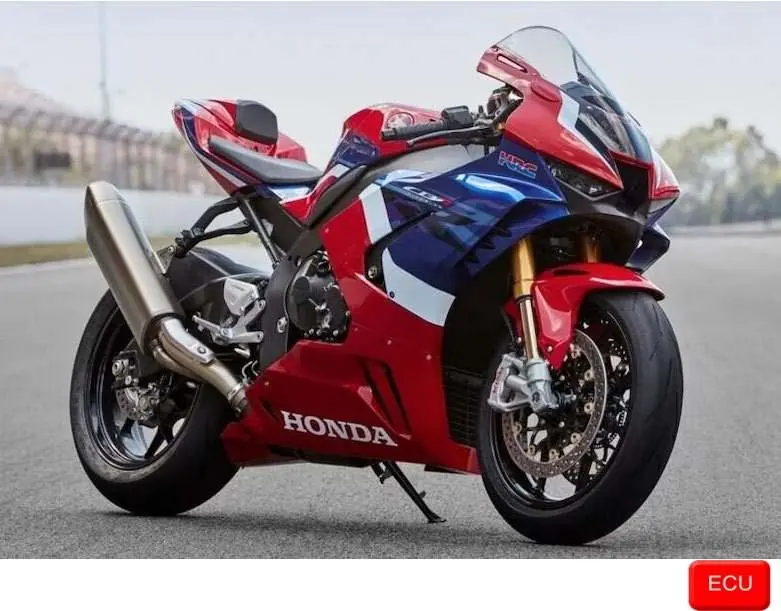
Wiring connection
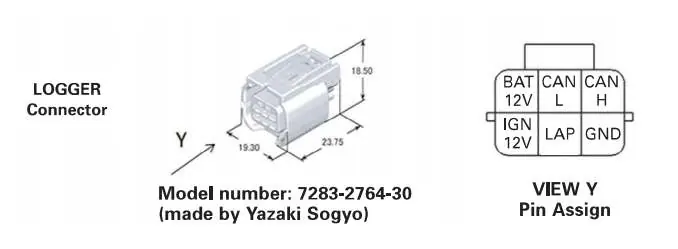
The bike features a specific protocol based on CAN, accessible through a Yazaki Sogyo female connector labeled LOGGER. This connector is part of the HRC harness and is reserved for data logging.
Important: Do not confuse this connector with the red diagnostic connector found on standard bikes.
Refer to the following pinout mapping for the Yazaki connector:
- Brown (Yazaki) to White (AiM cable): CAN High / CAN+
- Yellow (Yazaki) to Blue (AiM cable): CAN Low / CAN-
- Black/white (Yazaki) to Red (AiM cable): Ignition 12V / Ignition
- Green (Yazaki) to Black (AiM cable): Ground / GND
Race Studio configuration
Before connecting the AiM device to the ECU, you must configure the software settings:
- Open AiM RaceStudio 3 software.
- Set ECU Manufacturer to HONDA.
- Set ECU Model to CBR HRC 2022 ECU.
Available data channels
Once configured, the AiM device can receive various data channels from the ECU, including:
- Engine RPM and Gear Position
- Vehicle Speed (Estimated, Front, and Rear)
- Coolant and Intake Air Temperature
- Throttle Position and Grip Position
- Bank Angle and Pitch Angle
- Traction Control and Slip targets
- Battery Voltage and Fuel Consumption
Technical note: Not all data channels outlined in the ECU template are validated for every model or variant. Some channels are model and year specific and may not be applicable to your specific setup.
Manufacturer information
Honda Motor Co., Ltd.
Practical help
Common problems
Connector confusion
Ensure you are using the 'LOGGER' connector on the HRC harness, not the standard red diagnostic connector.
Data not appearing
Verify that the ECU Model in RaceStudio 3 is set to 'CBR HRC 2022 ECU'.
Before use
- Verify your bike model is CBR 1000RR-R HRC (2022-2023).
- Locate the 'LOGGER' connector on the HRC harness.
- Have AiM RaceStudio 3 software installed.
- Prepare the wiring harness according to the pinout table.
Specs in practice
- Yazaki 7283-2764-30
- The specific female connector model required for the HRC harness data logging port.
Images and diagrams
- The wiring diagram shows the pin assignment for the Yazaki connector (View Y).
- The table maps the bike's wire colors to the AiM device cable colors.
Model compatibility
- Compatible with Honda CBR 1000RR-R HRC (2022-2023) only.
- Not all data channels are guaranteed to be validated for every variant.

Manual page author
Emily Carter
User documentation editor
Prepares concise manual descriptions and highlights the most useful setup, operation, and maintenance information for readers.