Electronics / RFID Barcode Scanners
User Guide for Honeywell Xenon Ultra 196X Series Barcode Scanner
Quick start and configuration guide for the Honeywell Xenon Ultra 196X series barcode scanners. Learn about setup, connection, cordless operation, and advanced programming.
Table of contents
Manual images
Click an image to enlargeQuick Guide
The Honeywell Xenon Ultra 196X series includes both corded (1960) and cordless (1962) area imaging scanners. This guide provides essential information for installation, configuration, and maintenance. Before first use, ensure the battery is charged for at least 4 hours.

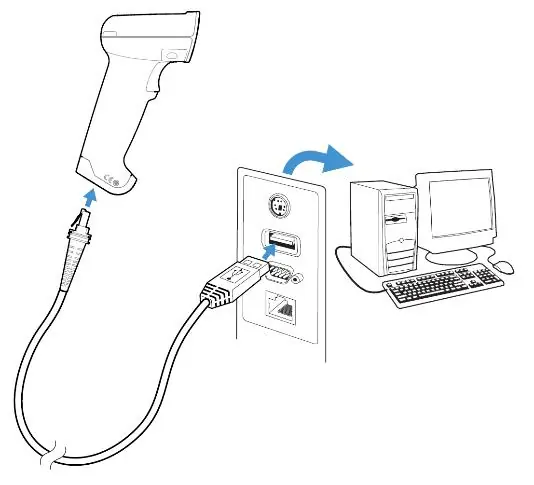
Connecting the Scanner
The scanner supports various interfaces including USB, Keyboard Wedge, and RS232. Ensure the host system is powered off before connecting cables. For USB connections, the scanner defaults to USB PC Keyboard mode. For RS232, ensure the baud rate and data format match the host settings.
Cordless System Operation
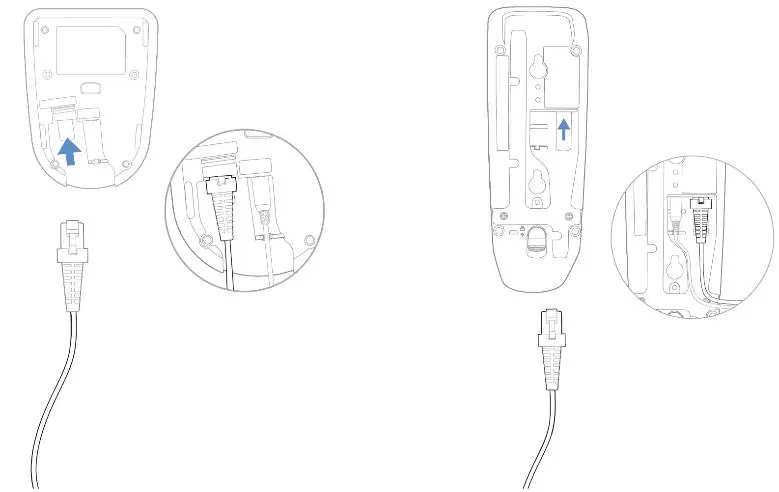
Cordless models (1962) use a charging base or access point. To link a scanner to a base, connect the base to power and the host, then place the scanner in the base. The system supports multi-scanner operation and various link modes. The "Find My" button on the base helps locate the scanner by triggering an audible alert.
Programming
The scanner is programmed by scanning specific barcodes found in this manual. You can configure interface settings, input/output parameters (beeps, LEDs, triggers), and data editing rules (prefixes/suffixes). Custom defaults can be saved and restored as needed.
Maintenance
Keep the scanner window clean to ensure optimal reading performance. Use a soft cloth with water or a mild detergent solution. Do not use abrasive cleaners or solvents. If the battery or cable needs replacement, follow the specific instructions provided in the maintenance section, ensuring the device is powered off first.

Troubleshooting
If the scanner is not functioning correctly, perform a self-test by power cycling the device. Check cable connections, ensure the scanner is properly linked to the base, and verify that the barcode symbology is enabled. Refer to the troubleshooting section for specific LED and beep code indicators.
Manufacturer information
Honeywell International Inc.
Practical help
Common problems
Scanner not linking to base
Ensure the base is properly connected to power and the host. Place the scanner in the base to re-establish the link.
Scanner not reading barcodes
Check the scanner window for dirt, scratches, or obstructions. Ensure the barcode symbology is enabled in the settings.
Data not appearing on host
Verify the interface cable is secure and the correct interface mode is programmed. Check host settings.
Before use
- Inspect the package for shipping damage.
- Verify all ordered items are present.
- Charge the battery for at least 4 hours before first use.
- Ensure the correct interface cable is used for your host system.
Specs in practice
- 115,200 baud
- Default communication speed for RS232 interface.
Images and diagrams
- Scanner Port Layout: Identifies the cable release and interface connection points.
- Base Connection: Illustrates power and communication cable routing for the base.
Model compatibility
- Xenon Ultra 1960: Corded model.
- Xenon Ultra 1962: Cordless model.

Manual page author
Michael Turner
Technical manual editor
Reviews PDF manuals for structure, safety notes, and practical product details so readers can find the right information quickly.