Electronics / RFID Barcode Scanners
User Guide for Elatec TWN4 AppBlaster
Comprehensive user guide for the Elatec TWN4 AppBlaster software. Learn how to configure projects, program firmware, manage transponder types, and set up OSDP or source code projects for your TWN4 RFID reader.
Table of contents
Manual images
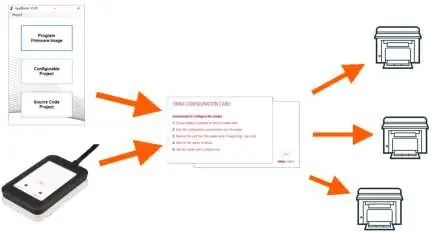
Click an image to enlargeQuick guide from the manual
The TWN4 AppBlaster is a developer tool designed to configure and program Elatec TWN4 RFID readers. It supports three primary workflows: direct firmware programming, interactive configuration of projects, and custom source code development. Before starting, ensure your system meets the minimum requirements: Windows 7 or later, .NET Framework 4.7.2, 2 GHz processor, 4 GB RAM, and 100 MB of free disk space.
Installation
The software is distributed as a zip file within the TWN4 developer pack. To install, simply create an empty directory on your hard disk and unzip the entire content of the package into it. The executable AppBlaster.exe is located in the top directory.
Starting AppBlaster
Upon launching the program, you are presented with a start dialog offering three main options:
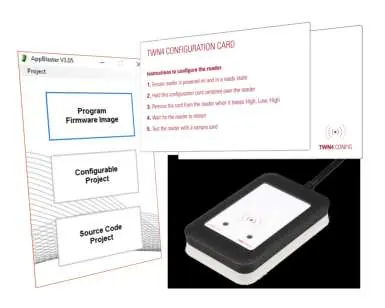
- Program Firmware Image: For flashing compiled firmware files (.bix or .gbl).
- Configurable Project: For interactive setup of reader behavior and transponder handling.
- Source Code Project: For advanced users writing custom C applications.
Configurable Project Workflow
To create a configurable project, follow these steps in the project dialog:
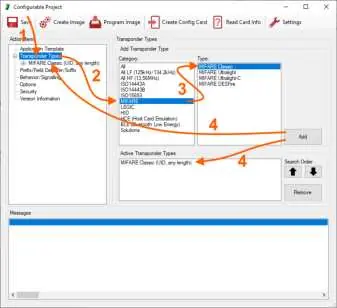
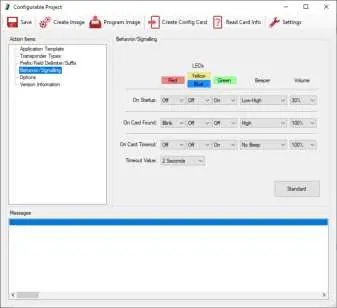
- Select Application Template: Choose the appropriate template (e.g., USB CDC or Keyboard) based on your hardware.
- Add Transponder Types: Select the required transponder technologies from the category list and add them to the active list.
- Specify Data Source: Define where data is stored on the transponder (e.g., UID, sector, block).
- Output Format: Configure how the data is formatted (e.g., Hexadecimal, ASCII).
- Prefix, Delimiter, Suffix: Optionally define special characters for the output data.
- Signalling/Behaviour: Adjust LED and beeper responses for events like startup, card found, or timeout.
- Security: Configure device security settings if required.
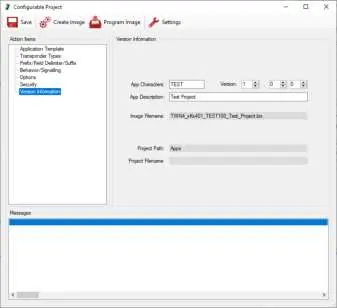
- Version Information: Set the app characters and version number for identification.
- Create and Program: Click Create Image to build the firmware, then Program Image to flash it to the device.
- Save Project: It is recommended to save your project file to allow for future modifications.
OSDP Projects
Creating an OSDP (Open Supervised Device Protocol) app differs from standard projects. Signalling and output formatting are largely controlled by the host. You must select the appropriate OSDP reader model and configure standard or custom properties (such as address, baud rate, and RS-485 settings) in the OSDP tab. Note that OSDP applications are only supported by devices in the TWN4 Palon family.
Source Code Projects
For advanced requirements, such as custom host communication or specific I/O handling, use the Source Code Project option. You will need to specify the USB type, select the source code module file, and define any necessary compiler options (e.g., DEBUG). The AppBlaster acts as a GUI for the underlying tool chain.
Settings
Access the Settings menu to configure command execution (e.g., showing command lines or deleting temporary files) and to select the communication port (USB or COM port for RS-232 connections).
Official resources from the manual
Manufacturer information
ELATEC GmbH
Practical help
Common problems
Firmware not programming
Ensure you are using the correct file extension: .bix for standard firmware or .gbl for BLE module firmware.
Cannot find TWN4 on USB
Ensure the device is connected and the correct port is selected in the Settings menu.
OSDP configuration not working
Verify that your reader model is part of the TWN4 Palon family, as OSDP is only supported on these devices.
Before use
- Ensure Windows 7 or later is installed
- Install Microsoft .NET Framework 4.7.2
- Verify 2 GHz processor and 4 GB RAM
- Ensure 100 MB free hard disk space
- Unzip the developer pack into an empty directory
Specs in practice
- MultiBIX-template
- A template compatible with multiple types of TWN4 hardware.
- App Characters
- 1-4 letters or digits used to identify the project in the firmware naming scheme.
Images and diagrams
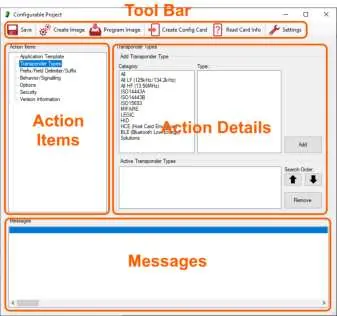
- The AppBlaster interface is divided into a Tool Bar, Action Items, Action Details, and a Messages area.
- The workflow for a configurable project involves selecting a template, adding transponder types, and defining output formats.
Model compatibility
- OSDP applications are only supported by devices in the TWN4 Palon family.

Manual page author
Michael Turner
Technical manual editor
Reviews PDF manuals for structure, safety notes, and practical product details so readers can find the right information quickly.