Electronics / Monitors
User Manual for Fanatec CSL Pedals
Quick guide for Fanatec CSL Pedals: setup, pedal adjustment, hard-mounting, connections, firmware updates, and maintenance instructions.
Table of contents
Quick guide from the manual
This guide provides essential information for setting up and maintaining your Fanatec CSL Pedals. Always follow the chapter sequence for effective assembly. Ensure you have the latest drivers installed for optimal performance.
Safety Warnings
- Photosensitive Seizures: Stop playing immediately if you experience symptoms like light-headedness, altered vision, or convulsions.
- Musculoskeletal Disorders: If you experience persistent pain or discomfort in hands, arms, or shoulders, stop playing and consult a health professional.
- General Safety: Do not expose the device to rain or humidity. Operating temperature is 15°C - 35°C. Do not open the casing; this voids the warranty.
Compatibility
The CSL Pedals are compatible with all CSL, CSL Elite, ClubSport, and Podium series wheel bases. For standalone PC use, the ClubSport USB Adapter is required.
Package Contents
Ensure your package includes:
- 1x CSL Pedals (with pre-installed 1.5 mm edge protectors)
- 2x Hard Mount Spacers
- 2x Edge Protector 2.5 mm (with adhesive)
- 8x M4x12 mm Countersunk Mounting Bolts
- 1x RJ12 Cable
- 1x T20 Torx Key
Assembly
Plan Your Setup
Decide on your pedal positions and whether you will hard-mount the unit. Always use the included RJ12 cable to connect to your wheel base to avoid damage.
Pedal Adjustment
You can adjust the pedal lever units and pedal plates:
- Pedal Lever Units: Lift the heel rest, align the holes of the pedal lever units with the holes of the heel rest at your desired position.
- Pedal Plates: Use the T20 Torx key to loosen bolts and adjust height in 15 mm increments.
Hard-Mount
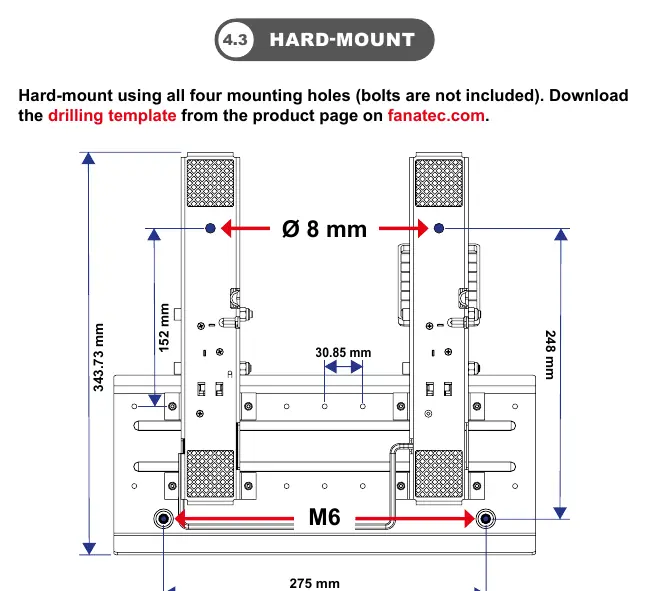
Use all four mounting holes for a secure setup. Download the drilling template from fanatec.com. Use M6 bolts (not included) for mounting.
Connections
Connect the CSL Pedals to the appropriate wheel base port or PC USB port using the ClubSport USB Adapter. Attention: Do not connect non-Fanatec devices to the RJ12 ports on the gas pedal unit, as this may cause permanent damage.
Firmware and Drivers
Always update your Fanatec devices to the latest firmware. Download the latest PC driver from fanatec.com/driver. A Windows PC is required for firmware updates.
Cleaning and Maintenance
- Cleaning: Use only a dry or slightly damp microfibre cloth. Do not use cleaning solutions.
- Maintenance: If you hear grinding, apply lithium grease to the parts highlighted in blue in the manual. Do not apply lubricant to parts highlighted in red.
Troubleshooting
If the PC driver or wheel base does not recognize the pedals:
- Ensure you have updated the wheel base and ClubSport USB Adapter firmware.
- Verify you are using the included RJ12 cable.
- Check that all cables are plugged into the correct ports.
Official resources from the manual
Manufacturer information
Fanatec
Practical help
Common problems
PC driver or wheel base does not recognize the CSL Pedals.
Update the wheel base and ClubSport USB Adapter firmware to the latest version via the PC driver. Ensure the included RJ12 cable is used and connected to the correct ports.
Before use
- Verify all package contents (pedals, spacers, bolts, cable, Torx key).
- Decide on pedal lever and plate positions.
- Download the latest PC driver from fanatec.com/driver.
- Ensure the operating environment is between 15°C and 35°C.
- If hard-mounting, download the drilling template from fanatec.com.
Specs in practice
- M6 mounting holes
- Used for hard-mounting the pedal set to a rig.
Images and diagrams
- Package contents diagram identifies all included hardware and tools.
- Pedal adjustment diagram shows how to align lever units and adjust plate height.
- Hard-mount diagram provides dimensions for the mounting hole pattern.
- Maintenance diagram indicates where to apply lithium grease (blue) and where to avoid (red).
Model compatibility
- Compatible with all CSL, CSL Elite, ClubSport, and Podium series wheel bases.
- Standalone PC use requires the ClubSport USB Adapter.

Manual page author
Emily Carter
User documentation editor
Prepares concise manual descriptions and highlights the most useful setup, operation, and maintenance information for readers.