Tools / Drills
User Manual for HOTO 12V Brushless Drill
Quick guide for the HOTO 12V Brushless Drill (model QWLDZ001). Learn how to install drill bits, use the trigger, adjust torque/speed modes, and troubleshoot common errors.
Table of contents
Manual images
Click an image to enlargeQuick guide from the manual
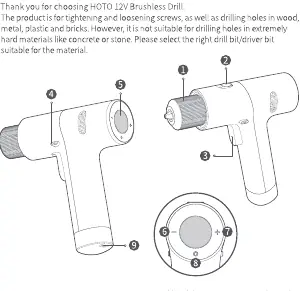
The HOTO 12V Brushless Drill is designed for tightening/loosening screws and drilling holes in wood, metal, plastic, and bricks. It is not suitable for extremely hard materials like concrete or stone. Always ensure the correct drill bit is selected for the material.
Product Overview
The drill features a chuck, function switch, trigger, forward/lock/reverse button, display, torque/speed adjustment buttons, mode button, and a Type-C charging port.
How to Use
Installing Drill/Driver Bits
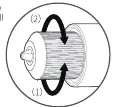
- Turn the chuck in the direction shown in arrow (1) until it is loose enough to insert the bit.
- Insert the bit and turn the chuck in the direction shown in arrow (2) until the bit is secured.
- Ensure the bit is secure before triggering the drill.
Rotation and Locking
Use the forward/lock/reverse button to change rotation or lock the trigger:
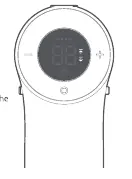
- Forward: Push the button to the far left. The icon will light up on the display.
- Reverse: Push the button to the far right. The icon will light up on the display.
- Lock: Push the button to the middle. No icons will be shown on the display.
Function Switch
- Screwing: Push the switch to the screw position. The drill operates at a low speed.
- Drilling: Push the switch to the drill position. The drill operates at a high speed.
Modes and Settings
Mode Button
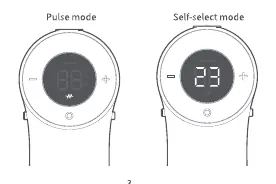
Press the mode button to switch between Pulse mode and Manual torque/speed mode.
- Pulse mode: The drill operates intermittently at a lower speed, suitable for beginners to practice and avoid stripping screws.
- Manual torque/speed mode: Allows selection of 30 levels. Use the torque/speed increase/decrease buttons to adjust.
Torque/Speed Levels
For screwing, it is recommended to start from lower levels (not exceeding level 5 for soft materials) to prevent damage. For drilling, level 30 provides the highest torque and speed, suitable for hard materials like steel or ceramic tile.
Display and Battery
The display turns off automatically after 10s (if in middle/lock position) or 60s (if in operation) of inactivity. The battery indicator has 4 lights, each representing 25% of total energy. The drill will not work while charging.
Troubleshooting
If the drill stops rotating, check the display for error codes:
- E3: Drive board overheating. Let the system cool down.
- E3 (with battery issue): Battery overheating or undervoltage. Let the system cool down and charge the battery.
- E1: Lithium battery depleted. Charge the battery.
Specifications
- Model: QWLDZ001
- Rated Voltage: 12V
- Max Torque: 30 N·m
- Drilling Speed: 0-1400/min
- Screwing Speed: 0-370/min
- Battery Capacity: 2000 mAh
Manufacturer information
Shanghai HOTO Technology Co., Ltd.
Practical help
Common problems
Drill stops rotating with E3 displayed
Drive board overheating. Let the system cool down.
Drill stops rotating with E3 displayed (and battery issue)
Battery overheating or undervoltage. Let the system cool down and charge the battery.
Drill stops rotating with E1 displayed
Lithium battery depleted. Charge the battery.
Unable to insert drill bit
The drill bit is the wrong size. Use a bit <= 10mm in diameter.
Drill doesn't start after pressing trigger
The trigger is locked. Push the forward/lock/reverse button to the left or right.
Before use
- Ensure the battery is fully charged.
- Select the appropriate drill or driver bit for the material.
- Check that the forward/lock/reverse button is set to the desired rotation direction.
- Set the function switch to either 'screwing' or 'drilling' mode.
- Ensure the bit is securely tightened in the chuck.
Specs in practice
- Rated Voltage
- 12V - The operating voltage of the drill.
- Drilling Speed
- 0-1400/min - High-speed mode for drilling holes.
- Screwing Speed
- 0-370/min - Low-speed mode for tightening/loosening screws.
Images and diagrams
- 2: Function Switch
- 4: Forward/Lock/Reverse Button
- 6: Torque/Speed Decrease Button
- 7: Torque/Speed Increase Button
- 8: Mode Button
Model compatibility
- Not suitable for drilling holes in extremely hard materials like concrete or stone.
- Metal drill bits (black) are for metal only.
- Wood drill bits (silver) are for plastic and wood only.

Manual page author
David Miller
Documentation analyst
Organizes user manual content into clear summaries, with attention to model details, product context, and everyday usability.