Tools / Drills
User Manual for Bosch GSR 18V-90 FC Professional Cordless Drill/Driver
Comprehensive user guide for the Bosch GSR 18V-90 FC Professional cordless drill/driver. Includes setup, operation, safety instructions, maintenance, and technical specifications.
Quick answers from the manual
Quick answer
- The Bosch GSR 18V-90 FC is a professional cordless drill/driver designed for screwdriving and drilling in wood, metal, and plastic. It features interchangeable adapters, Bluetooth connectivity, and safety functions like KickBack Control and Precision Clutch. p. 10, 13, 14
Key actions
- Insert battery p. 12
- Change adapter p. 13
- Set rotational direction p. 13
First start
- Charge the battery fully before first use. p. 12
Problems and fixes
Status indicator flashing red
Rapid shut-off (KickBack Control) is triggered. Switch the tool off and on again.
p. 14
Status indicator illuminated red
Tool overheated or battery empty. Allow to cool or replace/charge battery.
p. 14Maintenance and reset
- Keep ventilation slots clean. p. 15
Technical specifications
| Parameter | Value | Meaning | Pages |
|---|---|---|---|
| Rated voltage | 18 V | Operating voltage | p. 11 |
| Max. torque (hard) | 64 Nm | Maximum torque for hard applications | p. 11 |
| Max. drilling diameter (wood) | 68 mm | Maximum hole diameter in wood | p. 11 |
Where to find it in the PDF
- Safety Instructions p. 8, 9
- Product Description p. 10
- Technical Data p. 11
- Operation p. 13, 14
Table of contents
Manual images
Click an image to enlargeQuick guide from the manual
The Bosch GSR 18V-90 FC Professional is a versatile cordless drill/driver designed for driving screws and drilling into wood, metal, and plastic. It features interchangeable chuck adapters, Bluetooth connectivity, and advanced safety features like KickBack Control and Precision Clutch.
Product Description
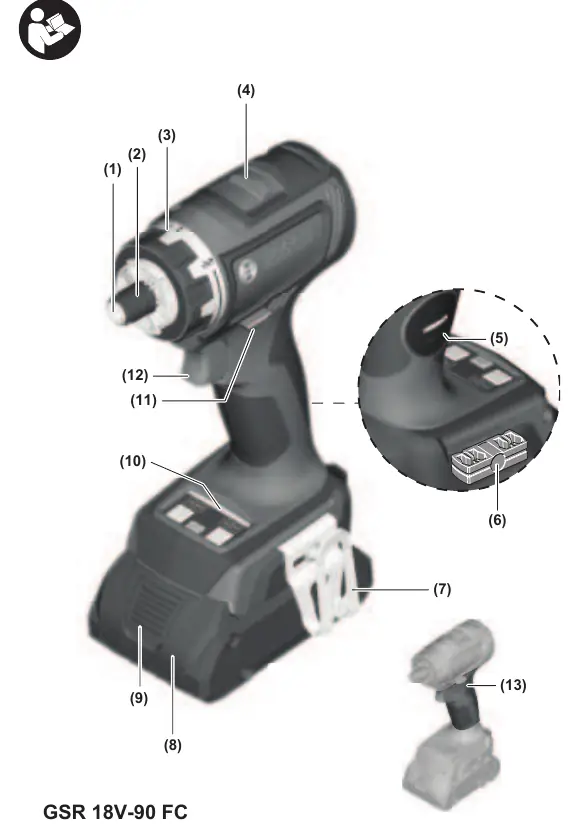
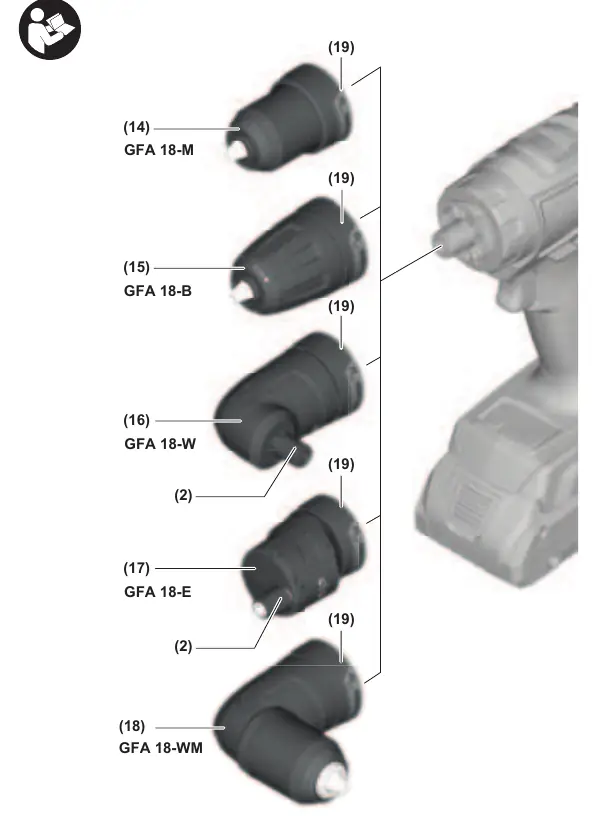
The tool consists of a main drill/driver unit with a holder for various adapters (GFA 18-M, GFA 18-B, GFA 18-W, GFA 18-E, GFA 18-WM). It includes a user interface for controlling the Precision Clutch and KickBack Control, as well as monitoring tool status.
Assembly
- Battery: Insert the charged battery into the battery holder until it clicks into place. To remove, press the release button and pull the battery out.
- Bluetooth Module: The tool can be equipped with the Bluetooth Low Energy Module GCY 42 (accessory). Refer to the module's specific instructions for installation.
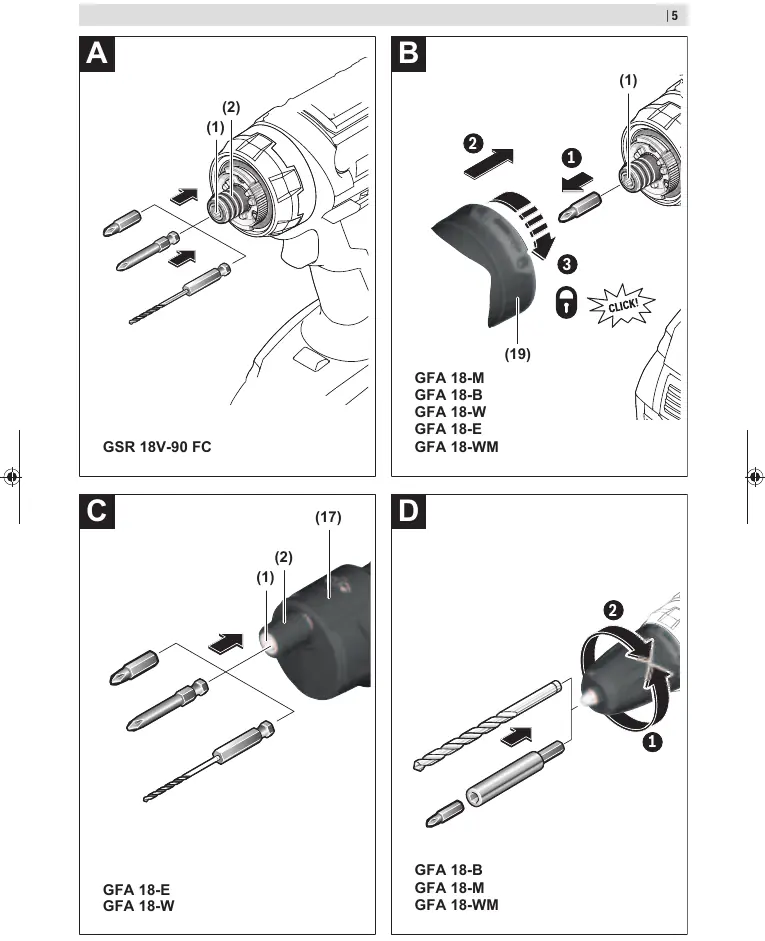
- Changing Tools/Adapters: Push the locking sleeve back to insert or remove bits. To fit an adapter, remove the bit, insert the adapter into the holder, and turn the locking ring until it clicks.
Operation
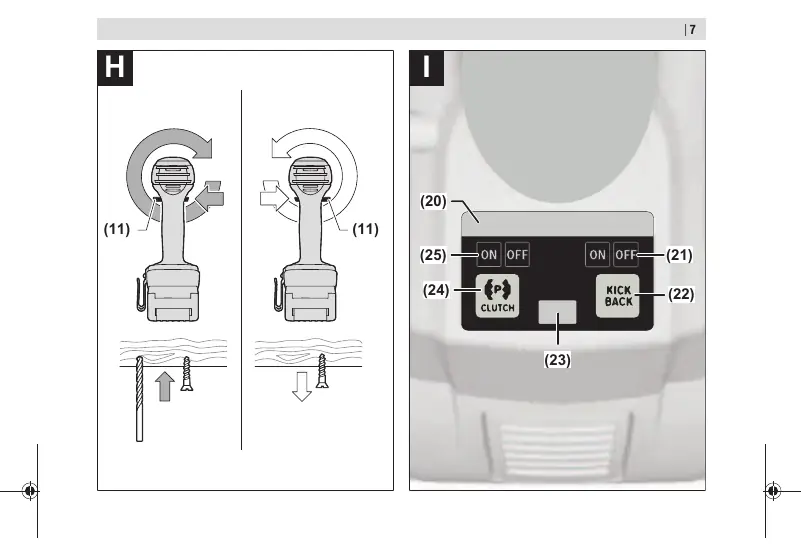
- Direction Switch: Use the rotational direction switch to change the direction of rotation. Only operate when the tool is at a standstill.
- Torque Preselection: Use the torque presetting ring to select the required torque in 20 stages.
- Gear Selection: Use the gear selector switch to choose between two speed ranges. Only operate when the tool is at a standstill.
- KickBack Control: Provides rapid shut-off if the tool suddenly rotates around the drilling axis.
- Precision Clutch: Stops overlocking when the set torque is reached, reducing wear and noise.
Maintenance and Cleaning
Always remove the battery before performing any work on the tool (maintenance, changing tools, etc.) and for transport/storage. Keep the tool and ventilation slots clean for safe and efficient operation.
Troubleshooting
The tool features a status indicator LED. Green indicates normal operation. Yellow indicates critical temperature, low battery, or KickBack Control is off. Solid red indicates overheating or an empty battery. Flashing red indicates the rapid shut-off (KickBack Control) has been triggered.
Manufacturer information
Bosch
Practical help
Common problems
Tool stops unexpectedly
Check if the tool is overloaded or overheated. Allow it to cool down or run at no load. Check battery charge level.
KickBack Control triggered (flashing red LED)
Release the on/off switch and press it again to restart the tool.
Battery not charging
Ensure the charger is compatible and the battery is correctly inserted. If no LEDs light up, the battery may be defective.
Before use
- Ensure the battery is fully charged.
- Select the appropriate adapter for your task.
- Ensure the adapter is securely locked in place.
- Set the correct rotational direction.
- Select the appropriate gear for the drilling or screwdriving task.
- Check that the bit is securely held in the chuck or adapter.
Specs in practice
- Max. torque (hard)
- 64 Nm - Maximum torque for hard screwdriving applications.
- Max. torque (soft)
- 36 Nm - Maximum torque for soft screwdriving applications.
- No-load speed (1st gear)
- 0-630 min-1 - Lower speed for large drilling diameters or screwdriving.
- No-load speed (2nd gear)
- 0-2100 min-1 - Higher speed for small drilling diameters.
Images and diagrams
- Page 3: Overview of tool components including holder, torque ring, gear selector, and user interface.
- Page 4: Identification of available chuck adapters (GFA 18-M, GFA 18-B, GFA 18-W, GFA 18-E, GFA 18-WM).
- Page 5: Instructions for mounting bits and adapters.
- Page 7: User interface layout showing status indicators, KickBack Control, and Precision Clutch buttons.
Model compatibility
- Compatible with GBA 18V and ProCORE18V batteries.
- Compatible with GAL 18, GAX 18, and GAL 36 chargers.
- Supports Bluetooth Low Energy Module GCY 42.

Manual page author
David Miller
Documentation analyst
Organizes user manual content into clear summaries, with attention to model details, product context, and everyday usability.