Computers / Laptops
HP 15.6-inch Laptop PC Maintenance and Service Guide
Comprehensive maintenance and service guide for the HP 15.6-inch Laptop PC. Includes detailed disassembly instructions, spare parts catalog, BIOS setup, system recovery, and hardware diagnostics.
Table of contents
Manual images
Click an image to enlargeQuick guide from the manual
This manual provides essential information for maintaining and servicing the HP 15.6-inch Laptop PC. It includes detailed procedures for component removal and replacement, system recovery, and hardware diagnostics. Always follow safety precautions, such as discharging static electricity and disconnecting power, before performing any service.
Product description
This section details the product components, including processor options (Intel Core i7, i5, i3, and N-series), graphics controllers, display types, memory configurations (DDR4-3200), and storage options (M.2 SSD and UFS).
Getting to know your computer
Identifies the location and function of ports, lights, and components on the right and left sides of the computer, as well as the keyboard area, display, and bottom components.
Illustrated parts catalog
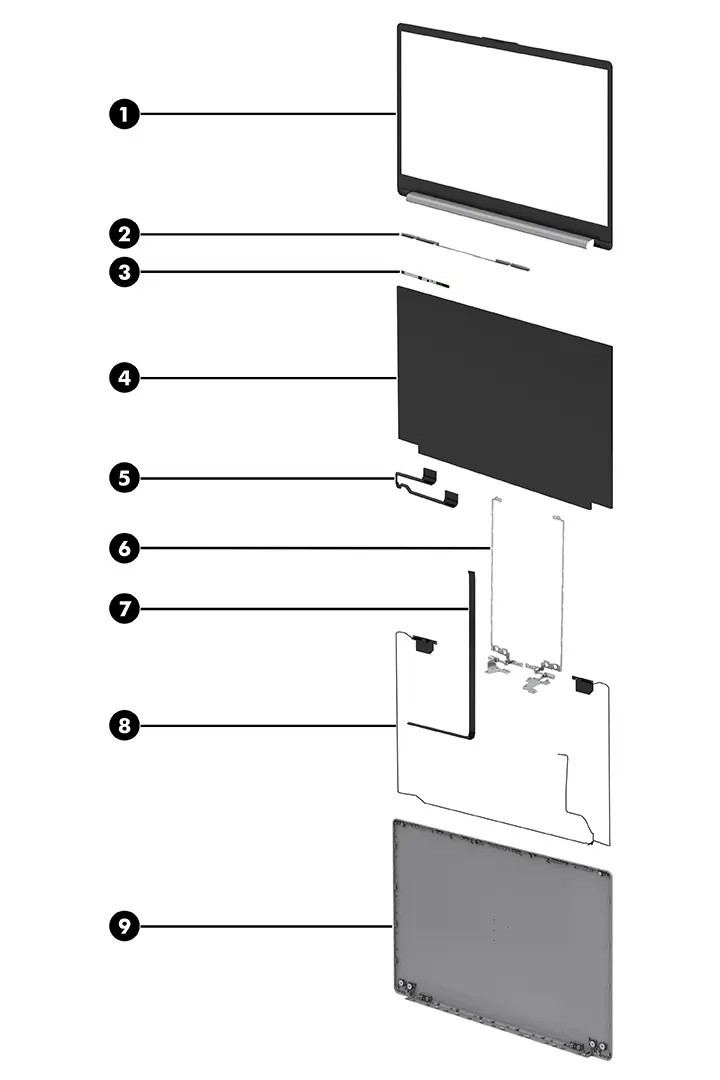
Provides a comprehensive list of spare parts available for the computer, including major components like the display assembly, top cover with keyboard, system board, and miscellaneous parts like AC adapters and screw kits.
Removal and replacement procedures
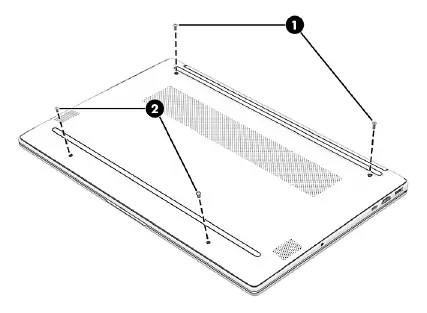
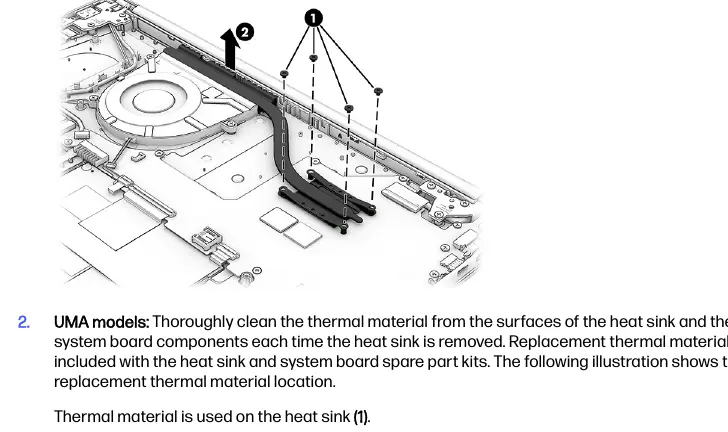
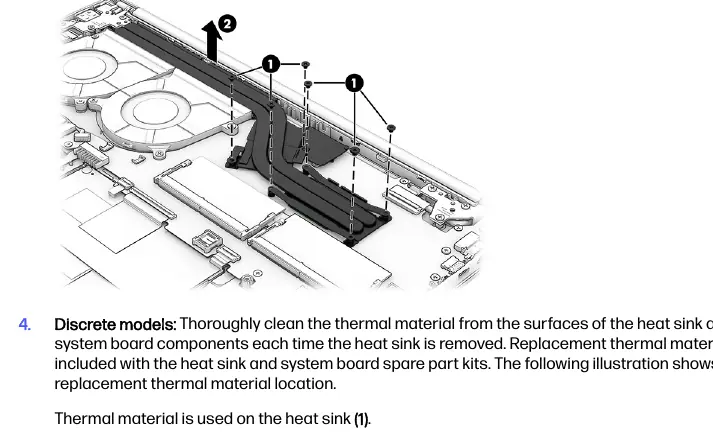
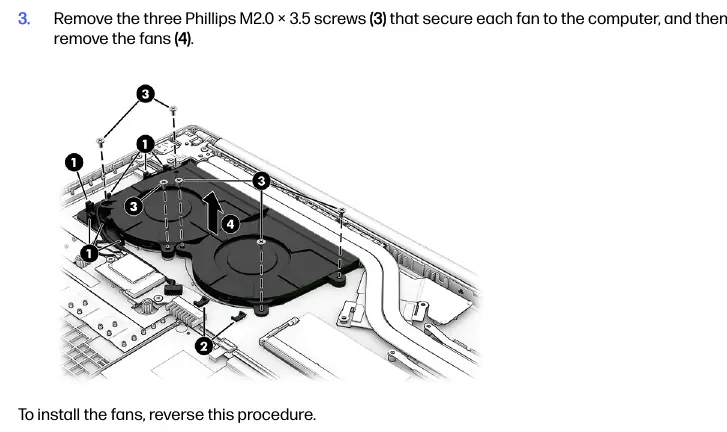
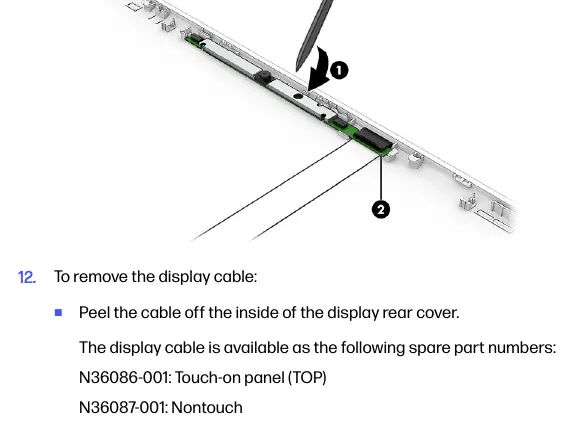
Detailed, step-by-step instructions for authorized service providers to remove and replace internal components. Includes preparation steps, tools required, and specific procedures for the bottom cover, battery, solid-state drive, memory modules, WLAN module, speakers, heat sink, fans, fingerprint reader, USB board, power connector cable, system board, and display assembly.
Using Setup Utility (BIOS)
Explains how to access and use the Setup Utility (BIOS) to manage system settings, update the BIOS, and view system logs.
Backing up, restoring, and recovering
Covers methods for backing up information, creating recovery media, and restoring the system using Windows tools, HP Cloud Recovery, and HP Sure Recover.
Using HP PC Hardware Diagnostics
Instructions for using HP PC Hardware Diagnostics Windows and UEFI to test hardware functionality and troubleshoot failures using failure ID codes.
Specifications
Provides technical specifications for the computer, including dimensions, weight, power requirements, operating temperature, and display and solid-state drive specifications.
Power cord set requirements
Outlines the requirements for power cord sets used in different countries and regions, including connector types and safety standards.
Manufacturer information
HP Inc.
Practical help
Common problems
Computer overheating
Ensure air vents are not obstructed; use the computer only on a hard, flat surface.
Fingerprint reader not working
Verify support in Sign-in options; ensure all sides of the finger are registered during setup.
BIOS update failure
Ensure the computer is connected to reliable external power using the AC adapter before starting the update.
Before use
- Shut down the computer completely.
- Disconnect the power cord and all external devices.
- Use a magnetic Phillips P1 screwdriver.
- Use a nonconductive, nonmarking pry tool.
- Discharge static electricity before handling internal components.
Specs in practice
- Primary Storage
- M.2 solid-state drive (SSD) available in various capacities (128 GB to 1 TB).
Images and diagrams
- Exploded views of the display assembly and major components are provided to assist in disassembly.
- Screw location diagrams are included for each component removal procedure.
Model compatibility
- Display spare parts are available only as subcomponents.
- Some features (like fingerprint reader or low blue light mode) are select-product-only.

Manual page author
Emily Carter
User documentation editor
Prepares concise manual descriptions and highlights the most useful setup, operation, and maintenance information for readers.