General / Other Manuals
Firmware Installation Guide for HP 15C Collectors Edition
Step-by-step instructions for updating the firmware on your HP 15C Collectors Edition calculator using the programming cable and SAM-BA software.
Table of contents
Manual images
Click an image to enlargeQuick guide from the manual
This document provides instructions for updating the firmware on the HP 15C Collectors Edition calculator. You will need the SAM-BA 2.18 software installed on your computer and the programming cable connected to your calculator. The critical steps involve selecting the correct board (sam4l-ek), setting the memory address to 0x04000, and verifying the installation via checksum.
Software setup
Before beginning the firmware update, ensure the following:
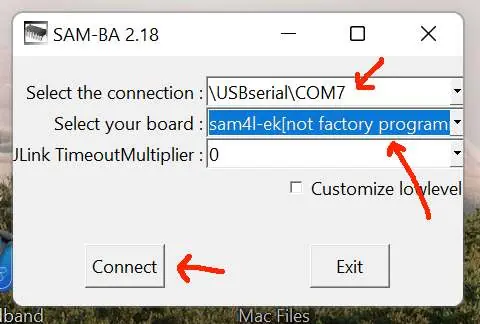
- SAM-BA 2.18 software is installed on your Windows computer.
- The calculator is properly connected to the computer and recognized in the Device Manager.
- If the device is not recognized, refer to the separate How to Use the Programming Cable guide.
To start the process:
- Launch the SAM-BA 2.18 software.
- Select the serial port corresponding to your calculator as seen in the Device Manager.
- Select the board: sam4l-ek (not factory programmed).
- Click Connect.
Installing firmware
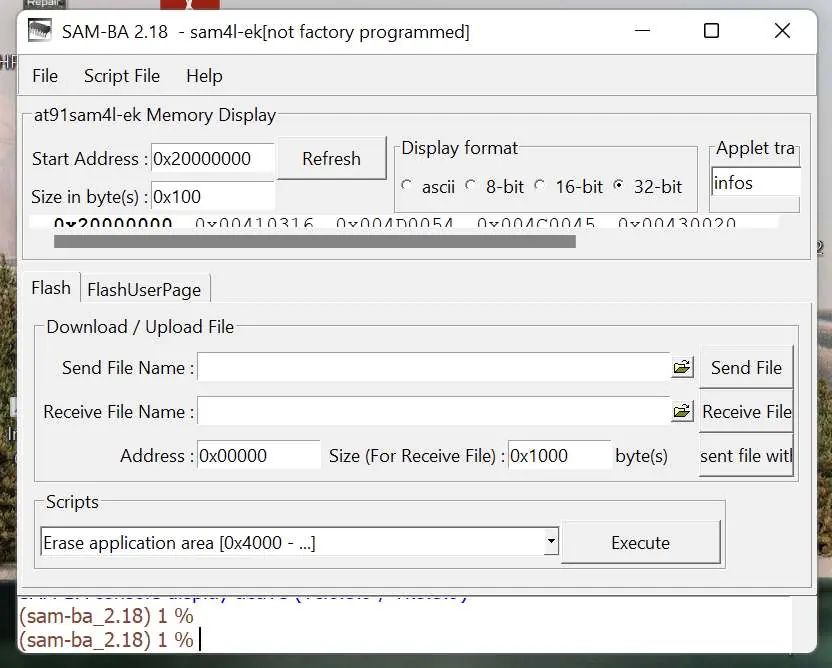
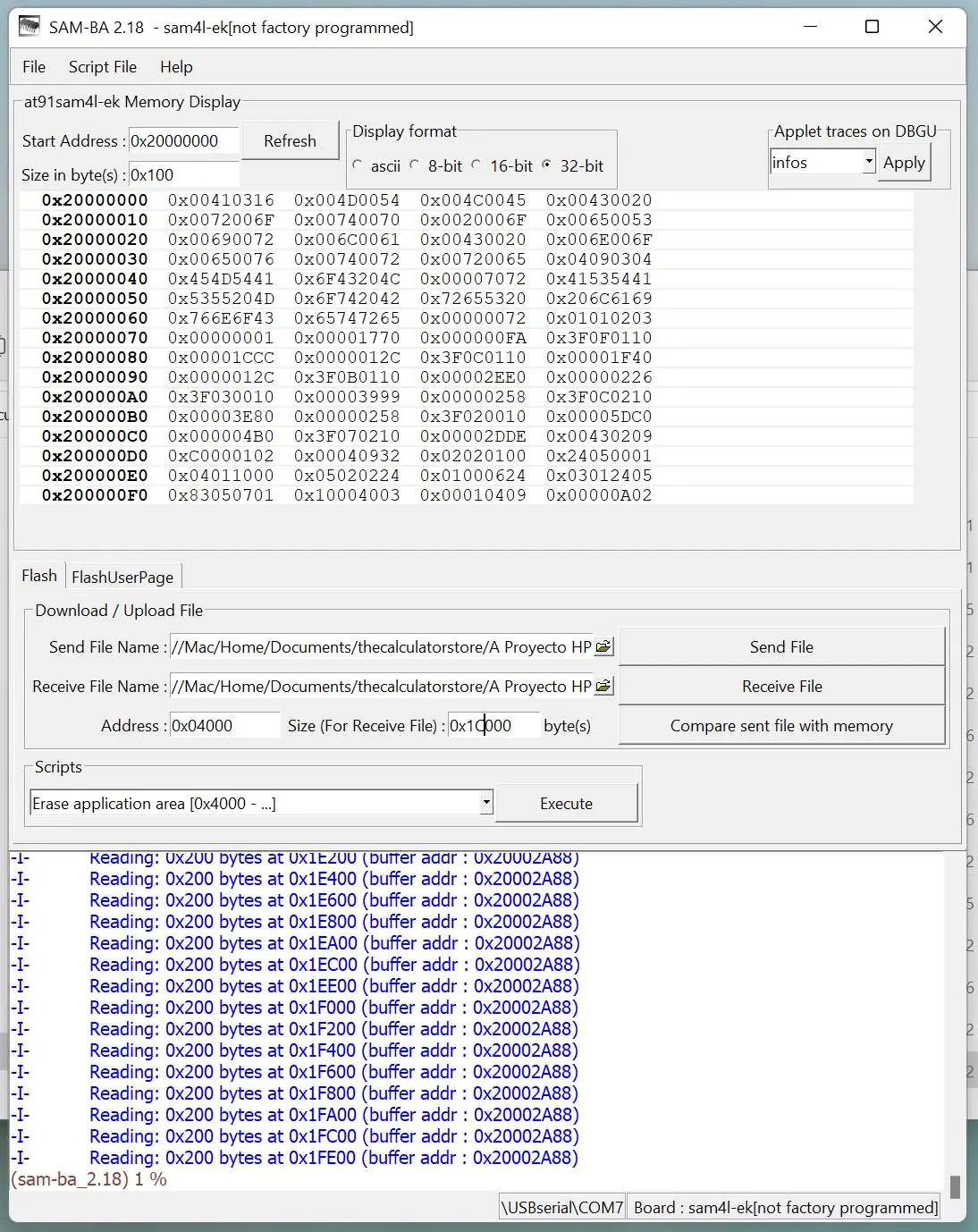
- Once connected, enlarge the window to view all fields.
- Click the folder icon next to the Send File Name field and browse to select your firmware file (usually ending in .bin).
- In the Address field, enter 0x04000. This is mandatory to avoid overwriting the bootloader firmware.
- Click the Send File button.
Verification and reset
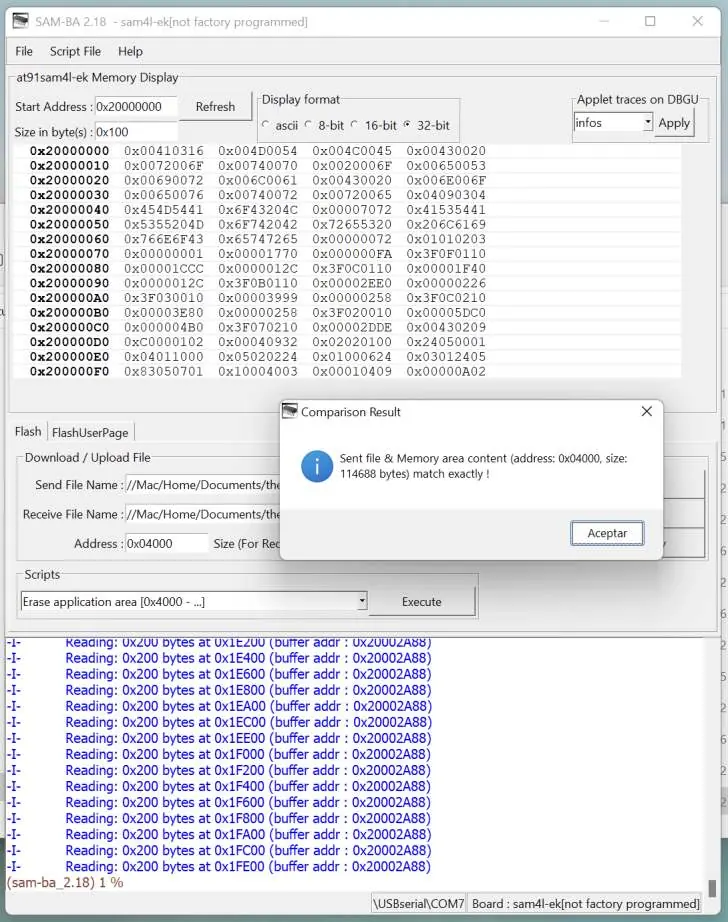
- After the file is sent, click Compare sent file with memory to ensure the content matches.
- Press the RESET button on the cable (or use a paperclip in the RESET hole on the back of the calculator).
- Press ON on the calculator.
- The screen will display pr error, indicating the user memory has been cleared.
- Press any key to start using the calculator; 0.0000 should appear on the screen.
Checking firmware checksum
To verify the update was successful:
- Switch the calculator off.
- Press and hold g + ENTER, then press ON.
- A menu will appear: 1.L 2.C 3.H.
- Press 2 to display the checksum.
- The new firmware should have a checksum of 0A0Ah (the original was 9090h).
Manufacturer information
HP Inc.
Practical help
Common problems
pr error appears on screen after reset
This is normal behavior indicating that the user memory has been cleared. Press any key to continue.
Checksum does not match 0A0Ah
Verify that you used the correct firmware file and that the address was set to 0x04000 during the upload process.
Before use
- Install SAM-BA 2.18 software on your PC
- Connect the programming cable to the calculator and PC
- Verify the calculator appears in the Windows Device Manager
- Ensure you have the firmware .bin file ready
Specs in practice
- Address 0x04000
- The memory location where user firmware must be placed to avoid overwriting the bootloader.
- Checksum 0A0Ah
- The hexadecimal value confirming the new firmware is correctly installed.
Images and diagrams
- The SAM-BA interface requires selecting the correct COM port and the sam4l-ek board.
- The Send File section allows browsing for the firmware file and setting the memory address.
- The Comparison Result window confirms that the file and memory content match exactly.
Model compatibility
- Requires SAM-BA 2.18 software.
- Requires Windows environment for the programming cable connection.

Manual page author
David Miller
Documentation analyst
Organizes user manual content into clear summaries, with attention to model details, product context, and everyday usability.