Computers / Laptops
Specifications Manual for HP ENVY Laptop 17m-ce1013dx
Official specifications and feature guide for the HP ENVY Laptop 17m-ce1013dx. Includes hardware configuration, performance features, connectivity options, and support information.
Table of contents
Quick guide from the manual
This document provides the technical specifications and feature overview for the HP ENVY Laptop 17m-ce1013dx. It outlines the hardware configuration, performance capabilities, and available support options for the device.
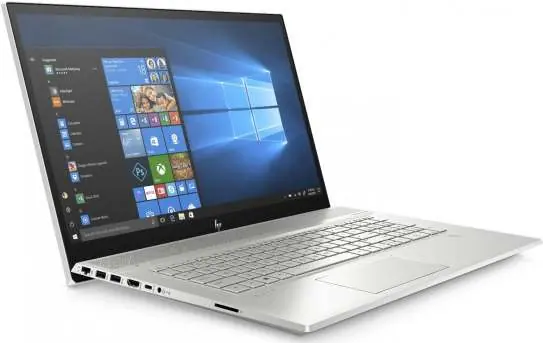
Key Hardware Specifications
- Processor: 10th Generation Intel Core i7-10510U (Quad-Core, 1.8 GHz base, up to 4.9 GHz with Turbo Boost).
- Memory: 12 GB DDR4-2400 SDRAM.
- Storage: 512 GB Intel SSD + 32 GB Intel Optane memory.
- Graphics: NVIDIA GeForce MX250 (2 GB GDDR5 dedicated).
Display and Multimedia
- Display: 17.3-inch diagonal FHD IPS WLED-backlit touch screen (1920x1080).
- Audio: Bang & Olufsen with dual speakers.
- Camera: HP Wide Vision HD Camera with integrated dual array digital microphone.
- Optical Drive: DVD-Writer.
Connectivity and Ports
- Wireless: Intel Wi-Fi 6 AX 200 (2x2) and Bluetooth 5 Combo.
- Ports: 1 USB 3.1 Gen 1 Type-C (Power Delivery 3.0, DisplayPort 1.2, HP Sleep and Charge), 1 USB 3.1 Gen 1 Type-A (HP Sleep and Charge), 2 USB 3.1 Gen 1 Type-A, 1 HDMI 2.0, 1 RJ-45, 1 AC Smart pin, 1 Headphone/microphone combo jack.
Security Features
- Webcam Kill Switch: Physical switch to disable the camera.
- Fingerprint Reader: Integrated for secure login.
- BIOS Protection: Automatically checks health and recovers itself.
Software and Support
- Operating System: Windows 10 Home.
- Included Software: HP Jumpstart, HP Support Assistant, McAfee LiveSafe (30-day trial), Dropbox (25GB for 1 year).
- Support: HP Hardware Limited Warranty and 90 days limited technical support for software and initial setup.
Manufacturer information
HP Inc.
Practical help
Common problems
Wi-Fi performance issues
Ensure you are using a router that supports 160MHz channels and Wi-Fi 6 (802.11ax) for optimal gigabit speeds.
Camera not working
Check if the physical Webcam Kill Switch is engaged, which disables the camera for privacy.
Before use
- Charge the battery fully before first use.
- Use HP Jumpstart during initial setup for a walkthrough of features.
- Register your product for support.
- Ensure you have an internet connection for initial setup and updates.
Specs in practice
- Intel Optane Memory
- Accelerates system performance by caching frequently used apps and data.
- Webcam Kill Switch
- A physical switch that electronically disconnects the camera for privacy.
- HP Fast Charge
- Charges the battery from 0 to 50% in approximately 45 minutes when the system is off.
Model compatibility
- Windows 10 Home features may vary by edition.
- Wi-Fi 6 (802.11ax) requires a compatible router.
- HP Support Assistant is only available on Windows-based PCs.

Manual page author
Emily Carter
User documentation editor
Prepares concise manual descriptions and highlights the most useful setup, operation, and maintenance information for readers.