Automotive / Transmission Systems
Hyundai BTS 40 B Portable Bluetooth Speaker User Manual
Quick guide for the Hyundai BTS 40 B portable Bluetooth speaker. Learn how to pair via Bluetooth, use TWS mode, play music from USB/Micro SD, use FM radio, and charge the device.
Quick answers from the manual
Quick answer
- The Hyundai BTS 40 B is a portable Bluetooth speaker. To pair, turn it on, wait for the 'ready to pair' tone, and select 'HYU BTS40B' on your phone. p. 5, 9
Key actions
- Pairing via Bluetooth p. 5, 9
- Charging the battery p. 6, 10
First start
- Turn on the device using the ON button, wait for the pairing tone, and connect via your phone's Bluetooth settings. p. 5, 9
Show 4 more answers Show less
Problems and fixes
Battery is low
Connect to a 5V/1-2A charger.
p. 6, 10Maintenance and reset
- To disconnect a paired device, long press the TWS button. p. 6, 10
Technical specifications
| Parameter | Value | Meaning | Pages |
|---|---|---|---|
| Battery | 7.4V / 3000 mAh | Rechargeable lithium battery | p. 4, 8 |
| Bluetooth Version | 5.0 | Wireless connectivity standard | p. 4, 8 |
| Charging Input | 5V / 1-2A | Recommended charger specification | p. 6, 10 |
Where to find it in the PDF
- Product Overview p. 3
- Specifications p. 4, 8
- Charging Instructions p. 6, 10
Table of contents
Manual images
Click an image to enlargeQuick guide from the manual
The Hyundai BTS 40 B is a portable, waterproof (IPX5) Bluetooth speaker. This manual provides instructions for pairing, playback modes, and maintenance. Key operations include Bluetooth connectivity, TWS (True Wireless Stereo) pairing for dual-speaker sound, and playback from USB or Micro SD cards.
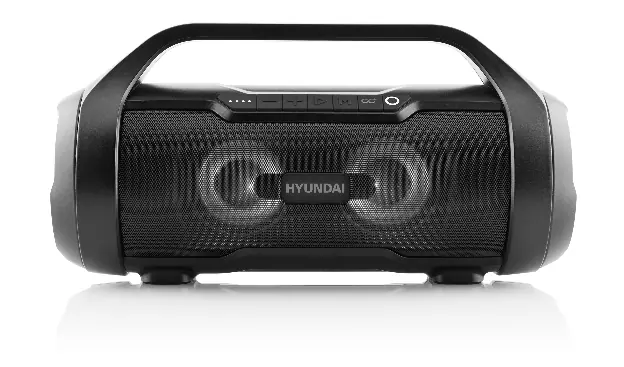
Product Overview
The speaker features a control panel with the following buttons and ports:
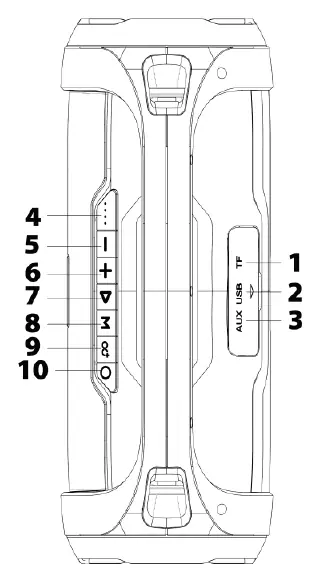
- 1. Micro SD slot
- 2. USB Port
- 3. AUX Input
- 4. Battery Indicator
- 5. Backward/Volume down
- 6. Forward/Volume Up
- 7. Play/Pause
- 8. Mode (Bluetooth, USB, Micro SD, FM, AUX-IN)
- 9. TWS Button
- 10. Power On/Off
Bluetooth Pairing
To connect your mobile device:
- Turn the power button to ON. The button will blink blue.
- Enable Bluetooth on your phone and search for HYU BTS40B.
- Select the device to connect. The speaker will emit a tone confirming the connection.
- Use the playback buttons on the speaker or your phone to control music.
Music Playback (USB & Micro SD)
Insert a USB flash drive or Micro SD card into the respective slot. The speaker will automatically switch to Music Play Mode and begin playback. Use the Forward/Backward buttons to skip tracks and hold them to adjust volume.
FM Radio
To use the FM radio:
- Connect the provided audio cable to the AUX port; it acts as an antenna.
- Press the MODE button until the speaker prompts The Radio Mode.
- Press the Play/Pause button to auto-search and save FM channels.
- Use the Forward/Backward buttons to switch between saved channels.
TWS Function
TWS allows you to pair two identical speakers for stereo sound:
- Turn on both speakers and ensure they are in Bluetooth mode.
- Press the TWS button on one speaker. It will emit a tone and begin pairing.
- Once paired, the TWS button will light up.
- Connect your phone to the speakers via Bluetooth to play music through both.
Charging
The speaker requires a 5V / 1-2A charger (not included). Connect the provided cable to the speaker and a power source. Charging takes 4-6 hours. A red light indicates charging, which turns off when the battery is full. Avoid using the speaker at maximum volume while charging if the power source cannot provide sufficient current.
Safety and Maintenance
While the speaker is IPX5 water-resistant, do not submerge it. Keep the device away from fire and moisture. Do not attempt to repair the device yourself; contact an authorized service center. The battery capacity will naturally decrease over time with normal use.
Manufacturer information
Hyundai
Practical help
Common problems
Speaker will not pair via Bluetooth
Ensure the speaker is in pairing mode (blinking blue light) and your phone is within 10 meters.
Bluetooth disconnects or won't connect to a new device
Long press the TWS button to disconnect the current device, then pair the new one.
Low battery warning
Connect the speaker to a 5V/1-2A charger immediately.
Before use
- Charge the speaker fully (4-6 hours) before first use.
- Ensure you have a 5V/1-2A USB charger (not included).
- Connect the audio cable if you intend to use FM radio mode.
- Ensure your Bluetooth device is within 10 meters of the speaker.
Show more Show less
Images and diagrams
- The control panel is located on the top of the speaker, housing volume, playback, and mode buttons.
- The input ports (USB, Micro SD, AUX) are located on the side panel.
Model compatibility
- Compatible with Bluetooth-enabled devices (phones, tablets, laptops).
- Supports USB flash drives and Micro SD cards for music playback.
- AUX-IN supports MP3/MP4 players and other audio devices.

Manual page author
Michael Turner
Technical manual editor