HVAC / Heat Pumps
User Guide for Ideal Logic Max System S Boiler
Quick guide for the Ideal Logic Max System S boiler. Learn how to operate, adjust temperature, re-pressurize the system, clear condensate blockages, and understand display and fault codes.
Table of contents
Manual images
Click an image to enlargeQuick guide from the manual
This guide provides essential operating instructions for the Ideal Logic Max System S boiler. This appliance is designed for central heating and hot water (when a separate cylinder is installed). It must be installed and serviced by a Gas Safe Registered Engineer (UK) or a Registered Gas Installer (RGII in Ireland). Always ensure the casing is correctly fitted and the appliance is earthed.
Boiler operation
The boiler features a control panel with a mode knob, temperature control, and status display. To start the boiler:
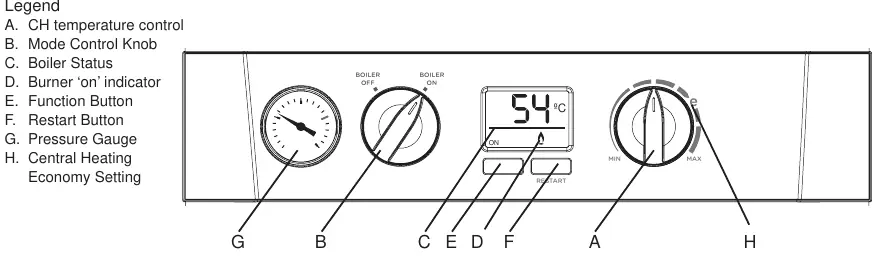
- Ensure the electricity supply is off.
- Set the mode knob to BOILER OFF.
- Set the central heating temperature knob to MAX.
- Switch on the electricity supply.
- Set the mode knob to BOILER ON.
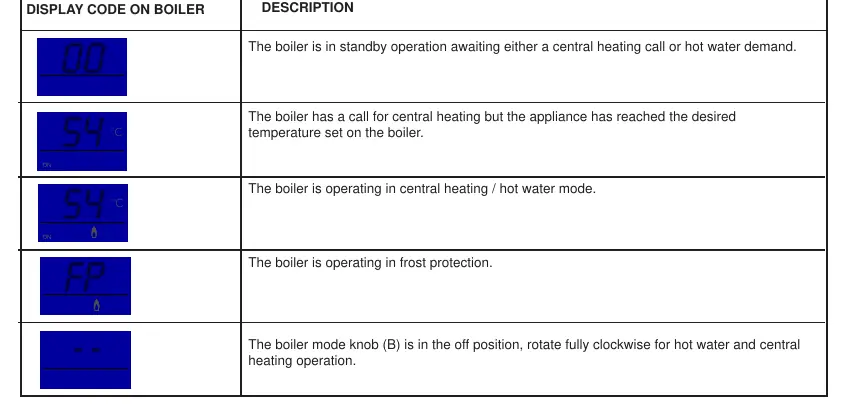
The boiler will automatically ignite. During normal operation, the status display will show codes like 00 (standby) or the current temperature. To turn off, simply set the mode knob to BOILER OFF.
Temperature control
The central heating radiator temperature can be adjusted using the central heating temperature knob. The range is approximately 30°C (Minimum) to 80°C (Maximum). For efficient operation, use the economy setting (marked with an 'e' symbol) or lower.
System maintenance
Condensate drain
If the condensate pipe freezes, the boiler may make a gurgling noise and lock out with an L2 fault code. To unblock: locate the frozen section (usually external), apply a warm water bottle, microwaveable heat pack, or warm damp cloth. Do not use boiling water. Once thawed, restart the boiler.
System water pressure
The pressure gauge indicates the central heating system pressure. If it falls below 1-2 bar, the system may need re-pressurizing. Use the filling loop to bring the pressure back to 1 bar, then restart the boiler. The boiler will not operate if the pressure is below 0.3 bar.
Troubleshooting and fault codes
If the boiler fails to operate, check the following before calling an engineer:
- No Central Heating/Hot Water: Check mains power, ensure the mode knob is in the ON position, verify the programmer is set to ON, and check that the room/cylinder thermostat is turned up.
- Fault Codes: The boiler displays specific fault codes (e.g., L2, F1, F2). Many faults require a restart (press the RESTART button). If the fault persists, contact a qualified engineer.
For any queries, contact the Ideal Consumer Helpline at 00353 (0)1 961 7700.
Practical help
Common problems
No central heating or hot water
Check mains power, ensure mode knob is in ON position, verify programmer is ON, and check room/cylinder thermostat settings.
Condensate pipe frozen (gurgling noise, L2 code)
Locate frozen section, apply warm cloth or heat pack (no boiling water), and restart boiler.
Low system pressure (below 0.3 bar)
Use the filling loop to re-pressurize the system to 1 bar and press the RESTART button.
Boiler fails to ignite
Check gas supply, condensate pipe for blockages, or contact a Gas Safe Registered Engineer.
Before use
- Ensure electricity supply is connected and switched on.
- Verify the mode knob is set to BOILER ON.
- Check that the programmer is set to ON.
- Ensure room and hot water cylinder thermostats are turned up.
- Check that the system pressure gauge is between 1 and 2 bar.
Specs in practice
- Central Heating Temperature
- Adjustable from 30°C (Min) to 80°C (Max).
- System Pressure
- Normal operating range is 1-2 bar. Boiler will not operate below 0.3 bar.
- Electrical Supply
- 230 V ~ 50 Hz, requires 3A fusing.
Images and diagrams
- Controls Diagram: Identifies the CH temperature knob, Mode knob, Status display, Burner indicator, Restart button, and Pressure gauge.
Model compatibility
- Requires a separate hot water cylinder for hot water supply.
- Must be installed and serviced by a Gas Safe Registered Engineer (UK) or RGII (IE).

Manual page author
Michael Turner
Technical manual editor
Reviews PDF manuals for structure, safety notes, and practical product details so readers can find the right information quickly.