Tools / Measuring Tools
User Manual for IDEAL 61-657 and 61-647 Non-Contact Voltage Testers
Quick guide for the IDEAL 61-657 and 61-647 Non-Contact Voltage Testers. Learn how to operate, change voltage ranges, use the flashlight, and understand safety indicators.
Table of contents
Manual images
Click an image to enlargeQuick guide from the manual
The IDEAL 61-657 and 61-647 are non-contact voltage testers designed to detect AC voltage. The 61-657 features dual-range sensing (12-1000V AC and 50-1000V AC), while the 61-647 is a single-range model (50-1000V AC). Both units include an integrated LED flashlight.
Safety Information
Warning: Arc Flash and Shock Hazard. Proper PPE is required. Follow all safety procedures in accordance with NFPA 70E.
- Use the tester only as specified in this manual.
- Visually inspect the case and tip for cracks before use.
- Keep fingers behind the tactile barrier at the base of the tester.
- Do not use the tester if it appears damaged or if the battery cap is not secure.
- Do not use in wet environments or around explosive gases.
- These testers are IP67 dust and water-resistant. If exposed to water, dry thoroughly before use.
Operating Controls
The tester features the following controls:
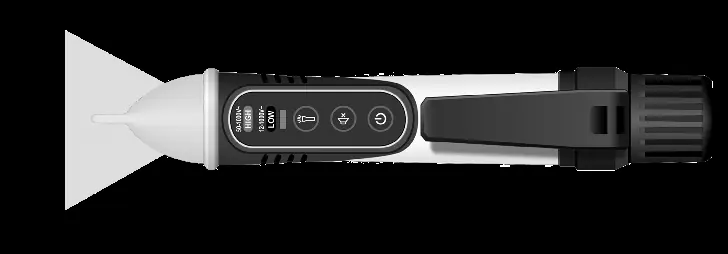
- Power On/Off Button: Used to turn the unit on/off and toggle voltage ranges (61-657 only).
- Audible Notification Button: Mutes or enables the beeping sound.
- Flashlight Button: Turns the LED flashlight on/off.
- Sensing Tip: The antenna used to detect voltage.
Tester Operation
Turning the Tester On/Off
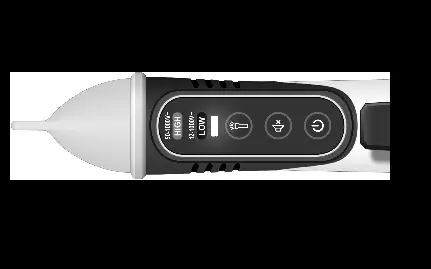
Press the Power button for less than 1s to turn the tester on. The unit will beep twice and the green LED will light up. To turn off, press the Power button for more than 1s (more than 2s for the 61-657). The unit will emit a long beep and all lights will turn off.
Voltage Range Selection (61-657 Only)
The tester defaults to High Voltage Sensing Mode (50-1000V AC), indicated by a steady red light. Press the Power button for less than 1s to switch to Low Voltage Sensing Mode (12-1000V AC), indicated by a steady blue light.
Checking for AC Voltage
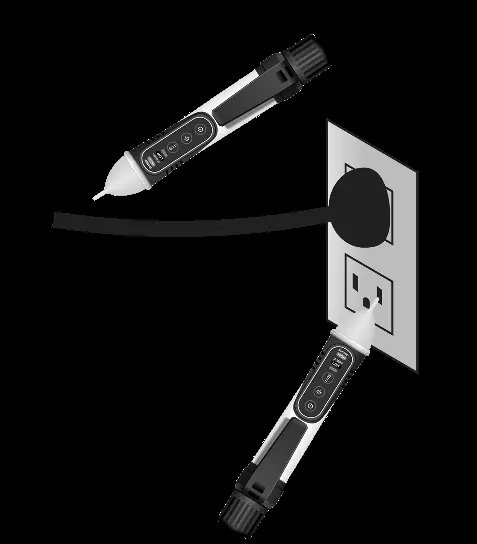
Prior to use, test the device on a known live circuit. Place the tip of the tester near an AC voltage source. A flashing red LED and intermittent beeping indicate the presence of voltage.
Features
- Audible Notification Disable: Press the speaker button for less than 1s to mute. One beep indicates muted, two beeps indicate active.
- Flashlight: Operates independently. It will auto-power off after 5 minutes of no voltage detection.
- Auto Power Off: The tester shuts down after 10 minutes of inactivity.
- Low Battery Indication: If battery voltage drops below ~2.4V, the green LED will flash 3 times and the buzzer will sound once before shutting down.
Maintenance
The unit has no user-serviceable parts. To replace batteries, unscrew the battery cap and insert two 1.5V AAA batteries. Clean the case with a damp cloth and mild detergent; do not use abrasives or solvents.
Practical help
Common problems
Tester does not turn on
Check that the two 1.5V AAA batteries are installed correctly and the battery cap is securely tightened.
False readings or erratic behavior
Replace the batteries immediately when the low battery indication appears.
Not detecting voltage in tamper-resistant outlets
If using the 61-657, ensure it is set to the low voltage detection mode (blue LED).
Before use
- Visually inspect the case and tip for cracks.
- Ensure the battery cap is securely in place.
- Test the device on a known live circuit to verify functionality.
- Wear proper PPE in accordance with NFPA 70E.
Specs in practice
- 61-657 Low Range
- 12V to 50V AC (suitable for thermostats, doorbells, and irrigation wiring).
- 61-657/61-647 High Range
- 50V to 1000V AC (standard voltage detection).
- Auto Power Off
- The device turns off automatically after 10 minutes of inactivity to save battery.
Images and diagrams
- The tip contains the non-contact voltage sensing antenna.
- The front panel features buttons for Power/Range, Audible Notification, and Flashlight.
- The LED indicators show the current voltage range (Red for High, Blue for Low).
Model compatibility
- 61-657 supports dual range (12-1000V AC).
- 61-647 supports single range (50-1000V AC).

Manual page author
David Miller
Documentation analyst
Organizes user manual content into clear summaries, with attention to model details, product context, and everyday usability.