Electronics / Monitors
AmpliTube Tonex Pedal
Quick guide for the AmpliTube Tonex Pedal. Learn how to navigate the interface, browse tone models, save presets, adjust advanced parameters, and configure global settings.
Table of contents
Manual images
Jump to the sectionQuick guide from the manual
The AmpliTube Tonex Pedal is a powerful tone modeling processor. To get started, connect your instrument and adjust the input level using the TRIM IN setting in the Global Setup. Use the Model Encoder to browse and select Tone Models, and the Parameter Encoder to access advanced settings. Presets can be saved by holding the Preset Encoder. Ensure you have the TONEX software installed on your Mac or PC to manage your library and firmware.
User Interface
The pedal features several encoders and footswitches for control:
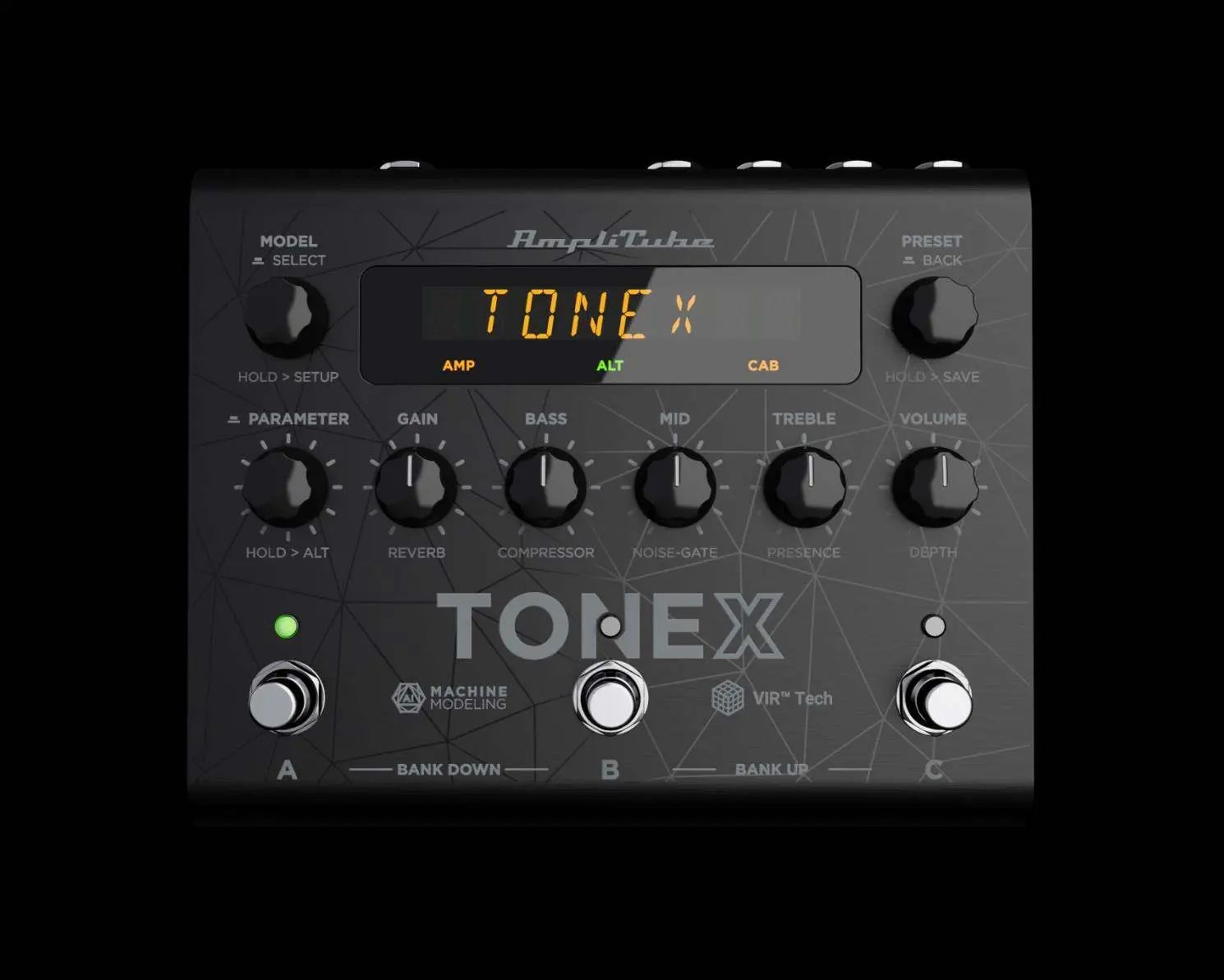
- Model Encoder: Press and rotate to change the Tone Model on the current preset. Hold to access BPM, Preset, and Global Setups.
- Parameter Encoder: Press to access the advanced parameters menu. Rotate to edit parameters. Hold to access alternative parameters on the main knobs.
- Preset Encoder: Rotate to browse presets. Hold to save the current preset. Press to go back while browsing menus.
- Main Knobs: Rotate to edit main parameters (Gain, Bass, Mid, Treble, Volume) and alternative parameters (Reverb, Compressor, Noise-Gate, Presence, Depth).
- Footswitches: Press to activate/bypass a preset. Hold to access tap tempo/tuner mode. Press A+B to move a bank down, or B+C to move a bank up.
Workflow and Preset Management
You can browse and save your sounds using the following methods:

- Browsing: Press the Model Encoder to open the Tone Model menu. You can browse Tone Models, Amp Models, or Cab Models by entering the respective sub-menus.
- Saving Presets: Hold the Preset Encoder to enter Save mode. Use the encoders to name the preset and select a location (bank and slot). Press the Preset Encoder to confirm.
- Color Coding: The display uses color coding to indicate the type of model active (e.g., Amp, Stomp+Amp, Cab, VIR, IR).
Parameters
Parameters are divided into three categories:
- Main Parameters: Gain, Bass, Mid, Treble, Volume.
- Alternative Parameters: Reverb, Compressor, Noise-Gate, Presence, Depth.
- Advanced Parameters: Includes detailed settings for Model, Gate, Comp, EQ, VIR (Cabinet resonance and mic positioning), Modulation (Chorus, Tremolo, Phaser, Flanger, Rotary), Delay, and Reverb. Underlined parameters are available in Advanced Usermode.
Setup and Configuration
The Setup menu allows for deep customization:
- BPM Setup: Set tempo from 40.0 to 240.0 BPM. Can be set to Global (affects all presets) or Preset (individual per preset).
- Preset Setup: Configure external control pedals, amp/cab bypass, and external learning.
- Global Setup: Manage volume (Trim In, Main Vol, Interface Vol), external control types (Expression pedals, switches), MIDI channels and clock, Tuner behavior, and general settings like naming format, footswitch behavior, and USB output modes.
Librarian Software
The Librarian tab in the TONEX app allows for computer-based management:
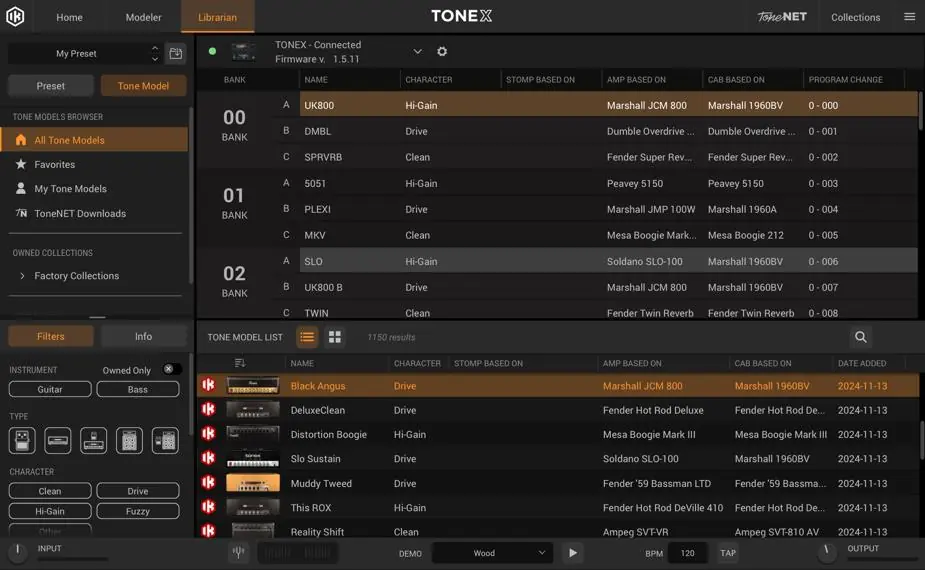
- Pedal Library: Shows presets currently on the pedal. Drag and drop from the Computer Library to transfer.
- Computer Library: Shows presets and Tone Models available on your computer.
- Monitoring: Selecting a preset in the Pedal Library automatically selects it on the physical pedal for real-time monitoring.
Practical help
Common problems
BPM editing is not working.
If the device is set to SLAVE mode, any BPM editing via tap tempo or encoder automatically changes the MIDI clock to OFF.
Preset changes are not saved.
If the LED is Amber, the preset is active but not saved. Hold the Preset Encoder to save your changes.
No sound from the cabinet.
Check if the CAB is globally bypassed in the Global Setup or if the CAB is empty.
Before use
- Connect your instrument to the input.
- Adjust the TRIM IN level in the Global Setup to match your instrument.
- Ensure the firmware is updated using the TONEX software.
- Configure your preferred footswitch behavior (Press vs Release) in Global Setup.
Images and diagrams
- Model Encoder: Primary control for selecting Tone Models and accessing setup menus.
- Parameter Encoder: Used for navigating advanced menus and switching between main/alternative knob functions.
- Footswitches A, B, C: Used for preset selection, bank navigation, and tap tempo/tuner access.
Model compatibility
- Requires TONEX software for Mac/PC for full librarian and preset management capabilities.
- Supports external expression pedals and single/dual switch pedals via the EXT.CTRL input.

Manual page author
Michael Turner
Technical manual editor
Reviews PDF manuals for structure, safety notes, and practical product details so readers can find the right information quickly.