Lighting / Fixtures
Immax 09114L DECENT LED Alarm Clock with Wireless Charging and White Noise
Comprehensive user manual for the Immax 09114L LED alarm clock, featuring wireless charging, white noise, night light, and dual alarm settings.
Table of contents
Product Overview
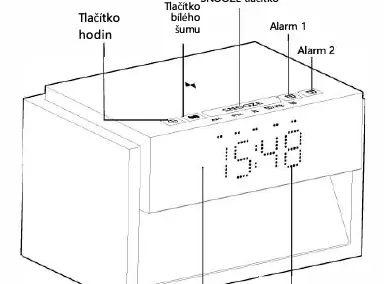
The Immax 09114L is a multifunctional LED alarm clock designed to enhance your bedside experience. It combines a digital clock with a 10W wireless charging pad, a built-in white noise machine for relaxation, and an adjustable night light. The device features a sleek design with intuitive touch controls and a rotary knob for easy adjustments.
Time and Alarm Settings
The clock supports both 12-hour and 24-hour formats. To set the time, long-press the clock button and use the rotary knob to adjust hours and minutes. The device allows for two independent alarms. Each alarm can be customized with a choice of 25 melodies and adjustable volume levels (0-12). The alarm includes a snooze function, providing 10-minute intervals for up to three cycles before switching to a mechanical bell sound at maximum volume.
Wireless Charging and Night Light
The top surface of the device serves as a wireless charging area, providing up to 10W of power (requires a 20W PD power adapter). A red indicator light confirms charging status. The integrated night light can be adjusted through three brightness levels (High, Medium, Low) or turned off completely using the touch-sensitive rotary knob on the side of the device.
White Noise and Timer
The device offers 20 natural sound tracks to help with sleep or relaxation. Users can cycle through these tracks in the white noise mode. Additionally, a countdown timer (30, 60, 90, or 120 minutes) is available, during which the volume gradually decreases in the final 5 minutes to ensure a peaceful transition to sleep.
Safety and Maintenance
For optimal performance, use only the original power cable and a compatible 20W PD power adapter. Do not disassemble the device, as internal components should only be serviced by qualified personnel. Keep the device on a stable surface, away from high temperatures or humidity. Clean the surface with a dry, soft cotton cloth. When disposing of the unit, please use designated electronic waste collection points.
Manufacturer information
Immax
Practical help
Common problems
Lights flash or device makes noise
Replace the power supply unit immediately with a compatible 20W PD adapter.
Alarms set to the same time
The system will automatically default Alarm 1 to 7:00 and Alarm 2 to 21:00.
Wireless charging not working
Ensure you are using a 20W PD power adapter; the indicator light should turn red when charging.
Before use
- Use only the original power cable provided.
- Ensure the power adapter supports 20W PD output.
- Place the device on a stable, flat surface (max 6-degree slope).
- Check that the device is not covered by cloth or paper.
- Verify the power source is 220-230V 50-60Hz.
Specs in practice
- Wireless Charging
- 10W maximum output for compatible devices.
- Color Temperature
- 3000K warm white light for the night lamp.
Images and diagrams
- The rotary knob on the right side controls both night light brightness and time/alarm value adjustments.
- The top panel contains touch buttons for SNOOZE, white noise, and alarm settings.
- The front display shows time and alarm status indicators (AM/PM).
- The wireless charging area is located on the top surface of the device.
Model compatibility
- Requires a 20W PD power adapter for full functionality including wireless charging.
- Not suitable for use on surfaces with a slope greater than 6 degrees.

Manual page author
David Miller
Documentation analyst
Organizes user manual content into clear summaries, with attention to model details, product context, and everyday usability.