Lighting / Fixtures
User Manual for Immax NEO LITE VARIABLE Smart LED Ceiling Fan
Quick guide for the Immax NEO LITE VARIABLE Smart LED ceiling fan. Includes installation steps, remote pairing, balancing instructions, and troubleshooting tips.
Table of contents
Manual images
Jump to the sectionQuick guide from the manual
This document provides essential instructions for the assembly, installation, and maintenance of the Immax NEO LITE VARIABLE Smart LED ceiling fan. It covers safety precautions, remote control pairing, and troubleshooting common issues like fan wobbling or noise.
Device Description
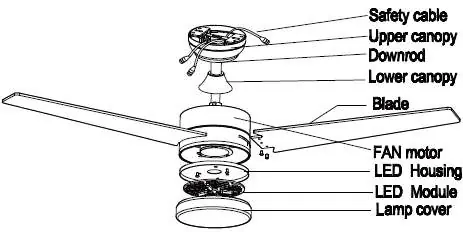
The fan consists of a motor housing, LED module, lamp cover, and blades. It is controlled via a remote and supports Tuya WiFi connectivity.
Assembly and Installation
The fan must be installed by a qualified person in accordance with local regulations. The ceiling or mounting point must support at least 45 kg. Ensure the fan is properly grounded. The minimum distance between blades and the floor is 2.3 m, and at least 150 cm from the wall.
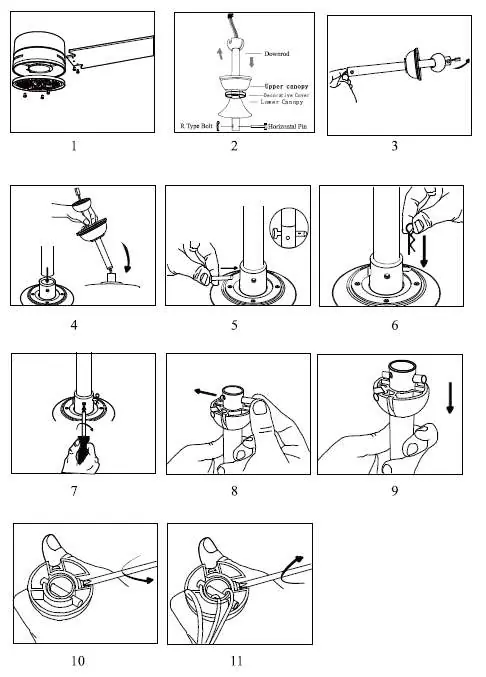
- Ensure all blades are securely screwed to the flywheel.
- Check that the mounting bracket is firmly installed in the junction box.
- Use the provided safety cable during installation.
- Do not connect the fan to a dimmer switch.
Remote Control Pairing
To pair the remote: turn the fan off and on. Within 30 seconds of turning it on, press and hold the Fan/on off button on the remote for 5 seconds. A long beep confirms successful pairing.
Fan Balancing
If the fan wobbles, perform dynamic balancing:
- Turn on the fan to the speed causing the most oscillation.
- Turn off the fan and attach a balancing clip to one blade.
- Turn the fan on and observe. Repeat for all blades to identify the one that improves stability the most.
- Move the clip along that blade to find the optimal position, then replace the clip with the provided balancing weight.
Cleaning and Maintenance
- Always disconnect power before cleaning.
- Clean the surface with a soft, damp cloth.
- Do not allow internal parts (especially the circuit board) to get wet.
- Do not use abrasive or chemical cleaners.
- Tighten all screws at least once a year to prevent clicking sounds.
Safety Warnings
- Not intended for children under 8 years of age.
- Do not use in rooms with explosive or toxic fumes.
- Never install in damp or wet rooms.
- Do not insert objects into the blades during operation.
- If the fan malfunctions, do not attempt to repair it yourself; contact support at [email protected].
Manufacturer information
Immax
Practical help
Common problems
Fan wobbling
Check blade tightness, ensure the fan is firmly installed, or perform dynamic balancing using the provided kit.
Fan makes noise
Allow a few days for the fan to 'break-in'. Check that all bolts are tight and the canopy does not touch the ceiling.
Fan not starting
Check fuses/circuit breakers and verify all wire connections.
Fan not heating air
The fan may be running in reverse; check the direction. Ensure no objects obstruct airflow.
Before use
- Ensure the ceiling can support 45 kg.
- Verify the fan is properly grounded.
- Check that the mounting bracket is secure.
- Ensure a minimum distance of 2.3 m from the floor.
- Confirm the fan is not connected to a dimmer switch.
Specs in practice
- Input voltage
- AC 220-240V; 50Hz.
- Lamp wattage
- 24W LED power.
Images and diagrams
- Steps 1-11: Detailed assembly of the downrod, canopy, and motor housing.
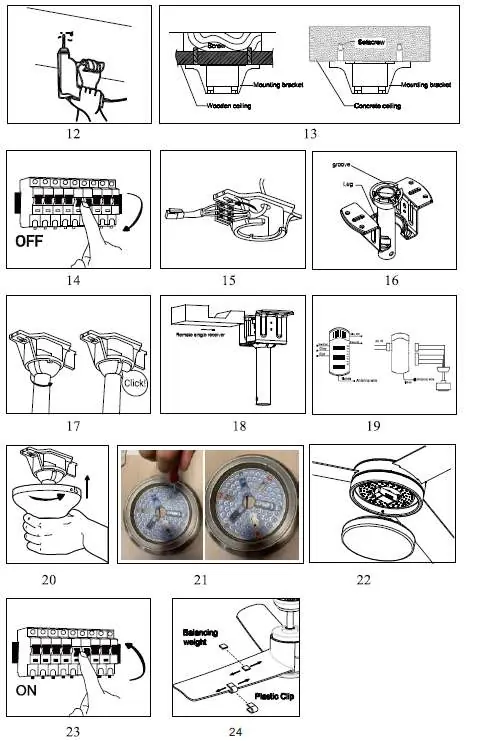
- Steps 12-13: Mounting bracket installation on wooden or concrete ceilings.
- Steps 14-15: Electrical wiring connections.
- Steps 21-22: LED module and lamp cover installation.
- Step 24: Balancing procedure using the clip and weight.
Model compatibility
- Requires Tuya WiFi protocol.
- Not compatible with dimmer switches.
- Suitable for 6-10 hours of daily operation; 24-hour usage voids warranty.

Manual page author
Emily Carter
User documentation editor
Prepares concise manual descriptions and highlights the most useful setup, operation, and maintenance information for readers.