Lighting / Fixtures
Immax NEO PASTEL SLIM Smart Ceiling Lamp Installation Manual
Quick installation guide and technical specifications for the Immax NEO PASTEL SLIM smart ceiling lamp. Learn how to mount the light, connect it, and understand its key features.
Table of contents
Important information from the manual
This document provides installation instructions and technical specifications for the Immax NEO PASTEL SLIM smart ceiling lamp. Before beginning installation, ensure that the main power supply is switched off. The device operates on the Zigbee 3.0 protocol and is designed for indoor use.
Package contents
- Light fixture
- Remote control
- Mounting kit
- Installation manual
Installation
Follow these steps to install the ceiling lamp:
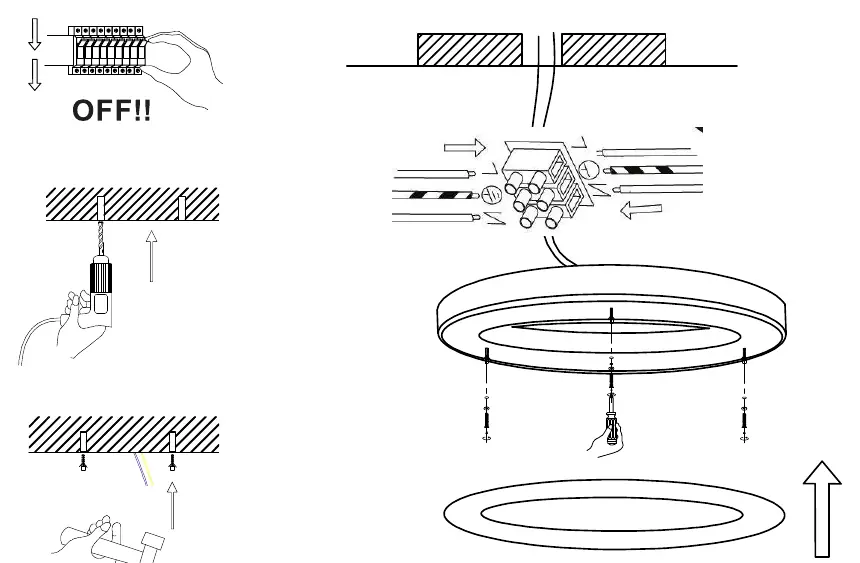
- Power off: Ensure the electrical power is disconnected at the main circuit breaker before starting.
- Preparation: Mark the mounting points on the ceiling based on the fixture's bracket.
- Mounting: Drill holes and secure the mounting bracket to the ceiling.
- Connection: Connect the electrical wires to the terminal block on the fixture.
- Final assembly: Attach the light fixture to the mounted bracket and secure it in place.
Technical parameters
- Dimensions: 600mm diameter, 70mm height
- Light color: 2700-6500K (adjustable)
- Power consumption: 53W
- Luminous flux: 3640lm
- Input voltage: AC 100-240V, 50-60Hz
- Protocol: Zigbee 3.0
- CRI(Ra): >86
- Warranty: 3 years
Maintenance and disposal
The surface of the luminaire does not require special maintenance. Wipe the surface with a soft cloth or duster. Do not dispose of the product with municipal waste; take it to a designated collection point for electronic waste.
Support
If you have any questions or need advice, please contact the manufacturer at [email protected].
Manufacturer information
Immax
Practical help
Common problems
Light does not turn on
Verify that the power supply is connected correctly and the circuit breaker is switched on.
Smart features not working
Ensure your Zigbee 3.0 gateway is properly configured and within range of the light.
Before use
- Ensure the power supply is switched off at the main breaker.
- Verify the mounting surface can support the weight of the fixture.
- Check that the voltage matches the AC 100-240V requirement.
- Ensure you have the remote control and mounting kit ready.
Images and diagrams
- The diagrams illustrate the step-by-step mounting process: turning off the power, drilling holes, mounting the bracket, connecting the electrical wires, and securing the light fixture.
Model compatibility
- Requires a Zigbee 3.0 compatible gateway for smart functionality.

Manual page author
Michael Turner
Technical manual editor
Reviews PDF manuals for structure, safety notes, and practical product details so readers can find the right information quickly.