Industrial / Electrical
User Manual for Immax NEO Smart Electronic Circuit Breaker 07573L
Quick guide for the Immax NEO 07573L smart circuit breaker. Learn how to install, pair with the Immax NEO PRO app, monitor energy consumption, and understand LED status indicators.
Table of contents
Quick guide from the manual
The Immax NEO 07573L is a single-phase smart electronic circuit breaker with energy monitoring capabilities, utilizing the Zigbee 3.0 protocol. To operate the device, ensure you have a compatible Zigbee gateway (Immax NEO PRO) and the Immax NEO PRO app installed on your smartphone. The device requires a stable power supply and must be installed on a DIN rail.
Installation
The circuit breaker is designed for installation on a standard DIN rail. Follow these steps for electrical connection:
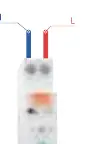
- Ensure the power is disconnected before starting installation.
- Connect the power line wires from above to the electronic circuit breaker.
- Connect the live wire (L) to the socket marked L.
- Connect the neutral wire to the socket marked N.
- Verify that all cables are securely and correctly connected before restoring power.
Pairing with the Immax NEO PRO app
To integrate the device into your smart home system, follow these steps:
- Ensure WiFi and Bluetooth are enabled on your mobile phone.
- On the electronic circuit breaker, press and hold the button until the LED indicator starts flashing.
- Open the Immax NEO PRO app and tap the + icon to add a new device.
- Select the Immax NEO category in the left column.
- Choose Other zigbee devices from the list.
- Select the smart gateway you wish to pair with.
- Confirm that the LED indicator on the device is blinking rapidly.
- Follow the on-screen prompts to complete the pairing, name the device, and assign it to a room.
LED indicator status
The LED indicator provides visual feedback on the device's status:
- Solid blue: Successful network connection.
- Blinking blue (slowly): Pairing mode active.
- Not lit: Device is not connected to the network (OFF GRID).
- ON LED lit: Switch is in the ON position.
- ON LED unlit: Switch is in the OFF position.
Real-time consumption monitoring
The device allows you to monitor current, voltage, and power in real-time via the application. You can track energy consumption by day, month, or year, which helps in managing the power usage of devices connected behind the circuit breaker.
Technical specifications
- Protocol: ZigBee 3.0
- Input power: AC 100 - 260V, 50/60 Hz
- Current protection: 1-63A (adjustable in app)
- Overvoltage protection: 220-265V (adjustable in app)
- Undervoltage protection: 76-240V (adjustable in app)
- Wireless range: 30m (line of sight), 10m (built-up area)
- Operating temperature: -25°C to 70°C
- Degree of protection: IP20
Manufacturer information
Immax
Practical help
Common problems
Device not pairing with the app.
Ensure WiFi and Bluetooth are enabled on your phone. Verify the device is in pairing mode (LED blinking slowly). Ensure the correct Zigbee gateway is selected in the app.
LED indicator is not lit.
This indicates the device is not connected to the network (OFF GRID). Check your network connection and gateway status.
Before use
- Ensure you have a Zigbee gateway (Immax NEO PRO).
- Check that the power supply is within 100-260V AC.
- Verify DIN rail availability for installation.
- Install the Immax NEO PRO app on your smartphone.
- Ensure you have an active email account for app registration.
Images and diagrams
- The wiring diagram illustrates the connection of the live (L) and neutral (N) wires to the top terminals of the circuit breaker.
Model compatibility
- Requires a Zigbee gateway for operation.
- Compatible with the Immax NEO PRO application.
- Supports Tuya protocol.

Manual page author
Emily Carter
User documentation editor
Prepares concise manual descriptions and highlights the most useful setup, operation, and maintenance information for readers.