Home / Security
User Manual for Immax NEO LITE Smart Weather Station 07528L
Quick guide for the Immax NEO LITE Smart professional weather station (07528L). Learn how to set up the 7-in-1 sensor, connect to Wi-Fi, configure alarms, and maintain your device.
Table of contents
Manual images
Jump to the sectionQuick guide from the manual
The Immax NEO LITE Smart weather station (07528L) is a professional 7-in-1 monitoring system. To get started, insert 3 AA batteries into the multisensor and plug the power cable into the main weather station. Download the Immax NEO PRO app, register an account, and pair the station via Wi-Fi (2.4GHz network required). Place the multisensor in an open area, at least 1.5 meters above the ground, ensuring the solar panel faces south.
Device Overview
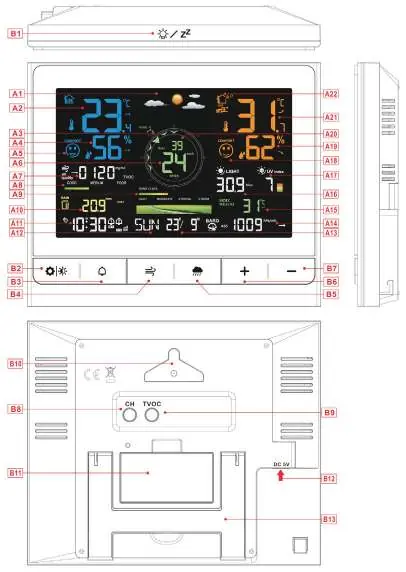
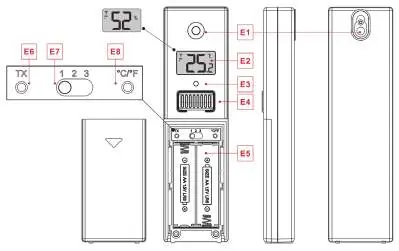
The system consists of a main console with an LCD display and a wireless 7-in-1 multisensor. The console features touch buttons for settings, alarm control, and history viewing. The multisensor includes a solar panel, rain funnel, anemometer vanes, and temperature/humidity sensors.
Installation
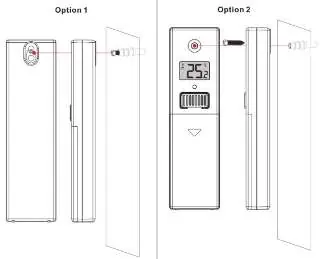
For accurate readings, the multisensor must be installed in an open area, at least 15 meters away from other objects. Use the bubble level on the sensor to ensure it is perfectly horizontal. Secure the sensor base to a stable platform or bracket. Ensure the 'N' mark on the sensor points North. The main console should be placed indoors, within 50 meters of the sensor.
Operation
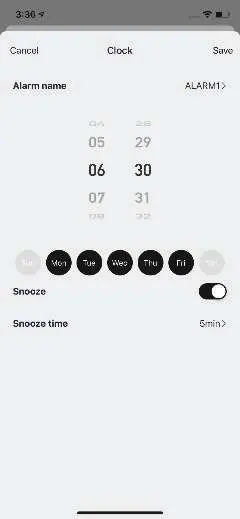
The weather station provides real-time data on temperature, humidity, wind speed, rainfall, light intensity, UV index, and TVOC levels. You can view historical data, set two daily alarms with snooze functions, and customize backlight settings. The station automatically calibrates time via Wi-Fi. Use the 'CH' button to cycle through connected sensors and the 'TVOC' button to manage air quality monitoring.
Maintenance
Regular maintenance is required for the multisensor, particularly the rain funnel. Clean the funnel every 1-3 months to remove debris, insects, or dirt. Do not apply oil to the rain sensor. If the battery icon appears on the console, replace the batteries in the corresponding sensor or the main unit immediately. Protect the device from harsh chemicals and clean only with a soft cloth.
Manufacturer information
Immax
Practical help
Common problems
Sensor signal loss
Ensure the sensor is within 50 meters of the station and there are no major obstructions. Check the batteries in the sensor.
Wi-Fi pairing failure
Ensure your network is 2.4GHz. If the station does not enter pairing mode automatically, hold the '-' button for more than 3 seconds.
Incorrect wind direction
Ensure the solar panel on the multisensor faces South during installation.
TVOC readings inaccurate
Perform a manual calibration by holding the 'TVOC' button for 3 seconds, then follow the calibration procedure in an air-flow environment.
Before use
- Insert 3 AA batteries into the multisensor.
- Plug the power cable into the weather station.
- Download the Immax NEO PRO app.
- Register an account in the app.
- Pair the station with the app via Wi-Fi.
- Place the multisensor in an open area 1.5m above ground.
Specs in practice
- Beaufort scale
- A 12-level scale used to describe wind speed.
Images and diagrams
- Sensor installation: Mount on a stable platform 1.5m above ground with the solar panel facing South.
- Rain funnel cleaning: Rotate the funnel to remove it, then clear debris from the drain and sensor.
Model compatibility
- Wi-Fi network must be 2.4GHz.
- Supports 1 multisensor and 3 additional temperature/humidity sensors.

Manual page author
Emily Carter
User documentation editor
Prepares concise manual descriptions and highlights the most useful setup, operation, and maintenance information for readers.