Hvac / Heat Pumps
User Manual for Immax NEO LITE Smart Thermostat 07535L
Quick guide for the Immax NEO LITE Smart Thermostat 07535L. Includes installation steps, wiring instructions, app pairing, and technical specifications for electric underfloor heating.
Table of contents
Quick guide from the manual
The Immax NEO LITE Smart Thermostat (07535L) is designed for electric underfloor heating. It features WiFi connectivity for remote control via the Immax NEO PRO app. Installation requires a standard 86mm or 60mm installation box. Ensure the power is turned off before starting any installation work.
Safety Warnings
- Installation must be performed by a person with appropriate electrical certification.
- Always disconnect the power supply (or turn off the circuit breaker) before installation or when a defect is detected.
- Do not disassemble the product due to the risk of electric shock.
- Avoid high humidity, extreme temperatures, and direct sunlight.
- Keep out of reach of children; contains small parts.
- Do not use rechargeable or reusable batteries.
Technical Specifications
- Protocol: Wi-Fi IEEE 802.11b/g/n (2.4GHz)
- Operating Voltage: AC 100-230V
- Operating Load: 16A (Electric underfloor heating)
- Temperature Setting Range: 5°C - 45°C (in 0.5°C steps)
- Protection Level: IP20
- Dimensions: 8x8x6 cm
Installation
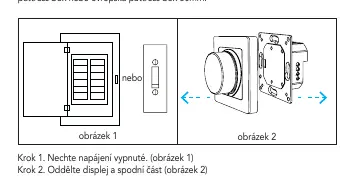
- Turn off the main power supply.
- Disconnect the display from the thermostat base.
- Connect the cables according to the wiring diagram.
- Attach the thermostat base to the installation box using screws.
- Connect the front cover to the back cover.
- Installation is complete.
LCD Description and Controls
The LCD displays current temperature, time, date, weather, humidity, and WiFi status. To operate:
- Wake up: Press the button to wake the device.
- Select function: Turn the button to select a function and press to confirm.
- Return: Long press the button in the function interface to return to the home screen.
- Pairing mode: Long press the button (more than 5 seconds) on the home screen until the WiFi icon flashes.
App Pairing
- Download the Immax NEO PRO app from the App Store or Google Play.
- Register and create an account using your email.
- Ensure WiFi and Bluetooth are enabled on your phone.
- Put the thermostat into pairing mode (WiFi icon flashing).
- In the app, click '+' to add a new device. Select 'Other WiFi devices' if it does not appear automatically.
- Enter your 2.4GHz WiFi network name and password.
Maintenance
Protect the device from contamination and dirt. Wipe with a soft cloth. Do not use rough materials, solvents, or aggressive chemicals.
Manufacturer information
Immax
Practical help
Common problems
Device not pairing with the app
Ensure your phone is connected to a 2.4GHz WiFi network (5GHz is not supported). Make sure Bluetooth is enabled. Ensure the WiFi icon on the thermostat is flashing before starting the pairing process in the app.
Screen is off
Press the button to wake the device. If the screen remains off, check if the screen brightness is set to 0% in the settings.
Before use
- Turn off the main power supply before starting installation.
- Verify that your installation box is a standard 86mm or 60mm type.
- Ensure you have a 2.4GHz WiFi network available.
- Have a qualified electrician perform the installation.
- Download the Immax NEO PRO app.
Specs in practice
- Operating Load: 16A
- The thermostat can handle a maximum load of 16 Amps, suitable for electric underfloor heating systems.
- Temperature Setting Range: 5°C - 45°C
- The range of temperatures you can set the thermostat to maintain.
- Protection Level: IP20
- The device is protected against solid objects over 12mm but is not waterproof; for indoor use only.
Images and diagrams
- The wiring diagram shows the connection points for Live (L) and Neutral (N) power supply, and the heating element connections.
Model compatibility
- Requires 2.4GHz WiFi network.
- Compatible with Immax NEO PRO app.
- Suitable for standard 86mm or 60mm installation boxes.

Manual page author
David Miller
Documentation analyst
Organizes user manual content into clear summaries, with attention to model details, product context, and everyday usability.