Automotive / Car Audio
Installation Guide for InCarTec 23-005 2-Channel Line Output Converter
A comprehensive installation guide for the InCarTec 23-005 2-Channel Line Output Converter. This guide details wiring color codes, connection points, and essential tips for ensuring correct audio phase and quality.
Quick answers from the manual
Quick answer
- The InCarTec 23-005 is a 2-channel line output converter used to connect an amplifier to a head unit's speaker outputs. It supports up to 80 watts per channel. p. 1
Key actions
- Connect the Input Harness wires to the corresponding speaker outputs of the head unit or amplifier. p. 1
- Connect the Power Harness wires to the vehicle's battery, ground, and remote turn-on. p. 1
Problems and fixes
Poor bass response or low-quality audio
Check that all audio input connections are polarized and in phase.
p. 1Technical specifications
| Parameter | Value | Meaning | Pages |
|---|---|---|---|
| Max Power | 80W per channel | Maximum amplifier output supported | p. 1 |
Where to find it in the PDF
- Installation and Wiring Guide p. 1
Table of contents
Quick Guide
The InCarTec 23-005 is a 2-channel line output converter (LOC) designed to convert speaker-level signals into RCA outputs for use with external amplifiers. It is compatible with car stereo speaker outputs or amplifier outputs up to 80 watts per channel.
Installation Instructions
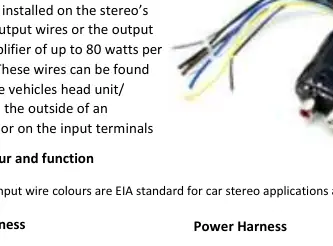
The LOC should be installed on the stereo's speaker output wires or the output of an amplifier. These wires are typically located behind the vehicle's head unit, on the outside of an amplifier, or on the input terminals.
Wiring Connections
The device features two harnesses: an Input Harness for audio signals and a Power Harness for electrical connections. The audio input wire colors follow the EIA standard for car stereo applications.
Input Harness
- White: Left Front (+) input
- White/Black: Left Front (-) input
- Grey: Right Front (+) input
- Grey/Black: Right Front (-) input
- Green: Rear Left (+) input
- Green/Black: Rear Left (-) input
Power Harness
- Yellow: Battery +12v input
- Black: Power (-) ground input
- Blue: Remote +12v output
- Brown: Reference Ground (-)
Important Notes
Ensure that all audio input connections are polarized or in phase with each other. Positive wires from the audio source must be connected to the corresponding positive input wires of the LOC, and negative wires must be connected to the corresponding negative input wires. Failure to maintain correct polarity will result in poor bass response and low-quality audio.
Practical help
Common problems
Poor bass response or low-quality audio
Ensure all audio input connections are polarized and in phase. Verify that positive wires from the source are connected to the corresponding positive input wires of the LOC.
Before use
- Verify that the amplifier output is 80 watts or less per channel.
- Locate the speaker output wires behind the head unit or amplifier.
- Identify the correct polarity for all speaker wires.
- Ensure the power source is stable for the +12v input.
Specs in practice
- Wiring Standard
- Uses EIA standard color coding for car stereo applications.
Images and diagrams
- The wiring harness is divided into two distinct sections: Input Harness for audio signals and Power Harness for power and ground.
- The color-coded wires allow for direct matching with standard car audio wiring.
Model compatibility
- Compatible with stereo speaker outputs or amplifier outputs up to 80 watts per channel.

Manual page author
David Miller
Documentation analyst
Organizes user manual content into clear summaries, with attention to model details, product context, and everyday usability.