Lighting / Smart Lighting
User Guide for Innr OFL 22x C Smart Outdoor Flex Light
Quick guide for the Innr OFL 22x C Smart Outdoor Flex Light. Includes installation steps, safety warnings, connection instructions, and factory reset procedures.
Quick answers from the manual
Quick answer
- The Innr OFL 22x C is a smart outdoor flex light. Installation involves securing the strip with clips, connecting the cable, and pairing via the mobile app. It is suitable for outdoor use but must not be cut or submerged in water. p. 1
Key actions
- Install the light strip using the provided clips. p. 1
- Connect to the bridge using the mobile app. p. 1
First start
- Connect the light strip to the power adapter and plug it into an outlet, then follow app instructions. p. 1
Show 4 more answers Show less
Problems and fixes
Factory Reset
Plug and unplug the power adapter 6 times, waiting 1 second between each cycle.
p. 1Maintenance and reset
- Factory reset: Plug and unplug 6 times with 1s interval. p. 1
Technical specifications
| Parameter | Value | Meaning | Pages |
|---|---|---|---|
| Frequency | 2.4 GHz | Operating frequency range | p. 2 |
| RF Power | 10 dBm | Maximum transmit power | p. 2 |
Where to find it in the PDF
- Installation and Setup p. 1
- Safety and Regulatory p. 2
Table of contents
Manual images
Click an image to enlargeQuick guide from the manual
The Innr OFL 22x C is a smart outdoor flex light designed for outdoor use. This guide covers the essential installation steps, safety precautions, and how to reset the device to factory settings. Always ensure the device is connected to a compatible bridge via the mobile app for full functionality.
Safety instructions
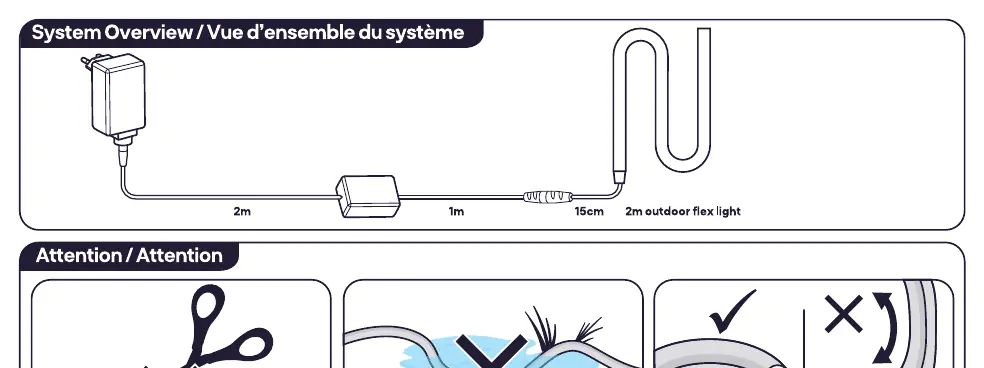
- Outdoor use: The product is suitable for outdoor use.
- Do not cut: Do not cut the light strip.
- Do not submerge: Do not immerse the product in water.
- Handling: Do not disassemble the product. If any part is damaged, do not use it.
- Cleaning: Use a damp cloth for cleaning; do not use strong cleaning agents.
Installation
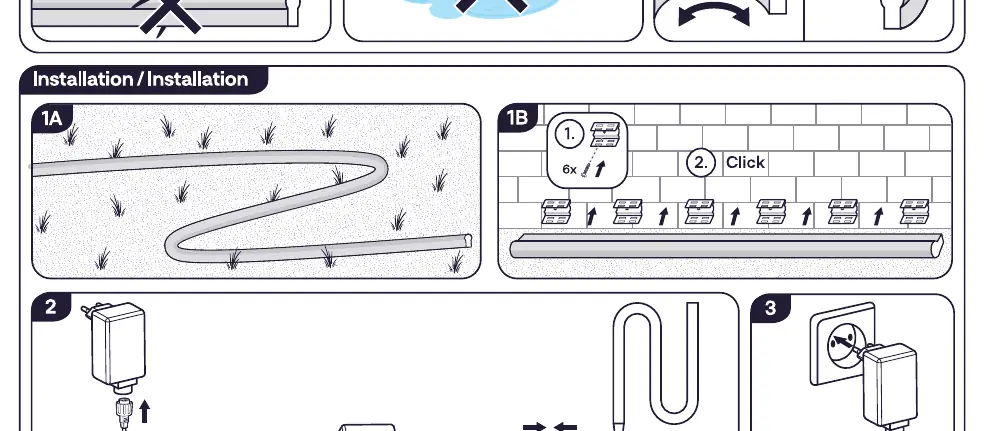
- Placement: Position the light strip in the desired outdoor location.
- Mounting: Use the provided clips to secure the light strip to the surface. Ensure the clips are clicked into place.
- Connection: Connect the light strip cable to the power adapter.
- Power: Plug the power adapter into an electrical outlet.
Connection
To connect the lamp to the bridge, follow the instructions provided in the mobile app. Ensure your bridge is powered on and within range during the pairing process.
Factory reset
If you need to reset the device to factory settings:
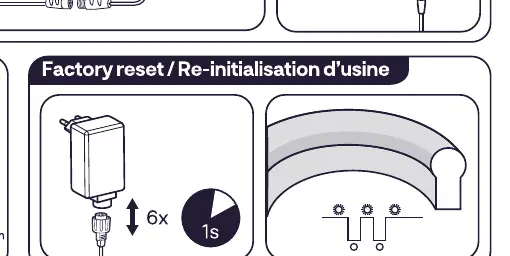
- Plug and unplug the power adapter 6 times.
- Wait approximately 1 second between each cycle.
Technical specifications
- Frequency: 2.4 GHz (2400 - 2483.5 MHz)
- RF Power: Max 10 dBm
- Energy Efficiency: Class G
Manufacturer information
Innr Lighting
Practical help
Common problems
Device not connecting to the bridge
Ensure the bridge is active and follow the pairing instructions within the mobile app.
Need to reset the device
Perform a factory reset by plugging and unplugging the power adapter 6 times, with 1-second intervals.
Before use
- Verify the location is suitable for outdoor use
- Do not cut the light strip
- Do not submerge the product in water
- Ensure the power adapter is accessible
- Have the mobile app ready for bridge connection
Show more Show less
Images and diagrams
- The system overview shows the power adapter, cable, and the 2m outdoor flex light.
- Installation steps illustrate placing the strip, mounting with clips, and connecting the power cable.
- The factory reset diagram shows the power cycling sequence.
Model compatibility
- Requires a bridge for smart functionality.
- Compatible with mobile app control.

Manual page author
Emily Carter
User documentation editor